Subclassing

Building Programs by Subclassing
In Lesson 1a, you learned to build programs using the Functional API. Now, let's explore a more advanced approach: subclassing the Program class.
When to Use Subclassing
Subclassing is useful when you need:
- Custom logic in your program's execution flow
- Stateful behavior that persists across calls
- Reusable components that can be shared across projects
- Full control over serialization and deserialization
Think of it like the difference between using a pre-built function vs writing your own class in object-oriented programming.
The Subclassing Pattern
When you subclass synalinks.Program, you must implement:
__init__(): Define your modules and initialize statecall(): Define how data flows through your modulesget_config(): Define how to save your program (serialization)from_config(): Define how to load your program (deserialization)
classDiagram
    class Program {
        +__init__()
        +call(inputs)
        +get_config()
        +from_config(config)
    }
    class MyProgram {
        +generator
        +__init__(language_model)
        +call(inputs)
        +get_config()
        +from_config(config)
    }
    Program <|-- MyProgram
class MyProgram(synalinks.Program):
def __init__(self, language_model=None):
super().__init__() # Always call super().__init__()!
self.generator = synalinks.Generator(
data_model=OutputModel,
language_model=language_model,
)
async def call(self, inputs, training=False):
# Define the forward pass
return await self.generator(inputs)
def get_config(self):
# Return a dict with everything needed to recreate this program
return {"language_model": serialize(self.language_model)}
@classmethod
def from_config(cls, config):
# Recreate the program from the config dict
return cls(language_model=deserialize(config["language_model"]))
Important: The build() Method
Unlike the Functional API, subclassed programs need to be built before first use. This tells Synalinks what input type to expect:
program = MyProgram(language_model=lm)
await program.build(InputDataModel)  # <-- Required before first call!
If you used a subclassed module inside a functional API program, your module is built automatically!
Complete Example
import asyncio
from dotenv import load_dotenv
import synalinks

class Query(synalinks.DataModel):
    query: str = synalinks.Field(description="The user query")

class AnswerWithThinking(synalinks.DataModel):
    thinking: str = synalinks.Field(description="Your step by step thinking")
    answer: str = synalinks.Field(description="The correct answer")

class ChainOfThought(synalinks.Program):
    def __init__(self, language_model=None):
        super().__init__()
        self.answer_generator = synalinks.Generator(
            data_model=AnswerWithThinking,
            language_model=language_model,
        )

    async def call(self, inputs, training=False):
        return await self.answer_generator(inputs)

    def get_config(self):
        return {
            "language_model": synalinks.saving.serialize_synalinks_object(
                self.language_model
            )
        }

    @classmethod
    def from_config(cls, config):
        language_model = synalinks.saving.deserialize_synalinks_object(
            config.pop("language_model")
        )
        return cls(language_model=language_model)

async def main():
    load_dotenv()
    language_model = synalinks.LanguageModel(model="ollama/mistral:latest")

    program = ChainOfThought(language_model=language_model)
    await program.build(Query)  # Required before first call!

    result = await program(Query(query="What is 15% of 80?"))
    print(f"Answer: {result['answer']}")

asyncio.run(main())
Key Takeaways
- Subclassing: Inherit from
synalinks.Programfor full control over program behavior and custom logic. - Four Methods: Implement
__init__(),call(),get_config(), andfrom_config()for a complete subclassed program. - Build Required: Call
await program.build(InputDataModel)before first use when using standalone subclassed programs. - Serialization:
get_config()andfrom_config()enable saving and loading your custom programs.
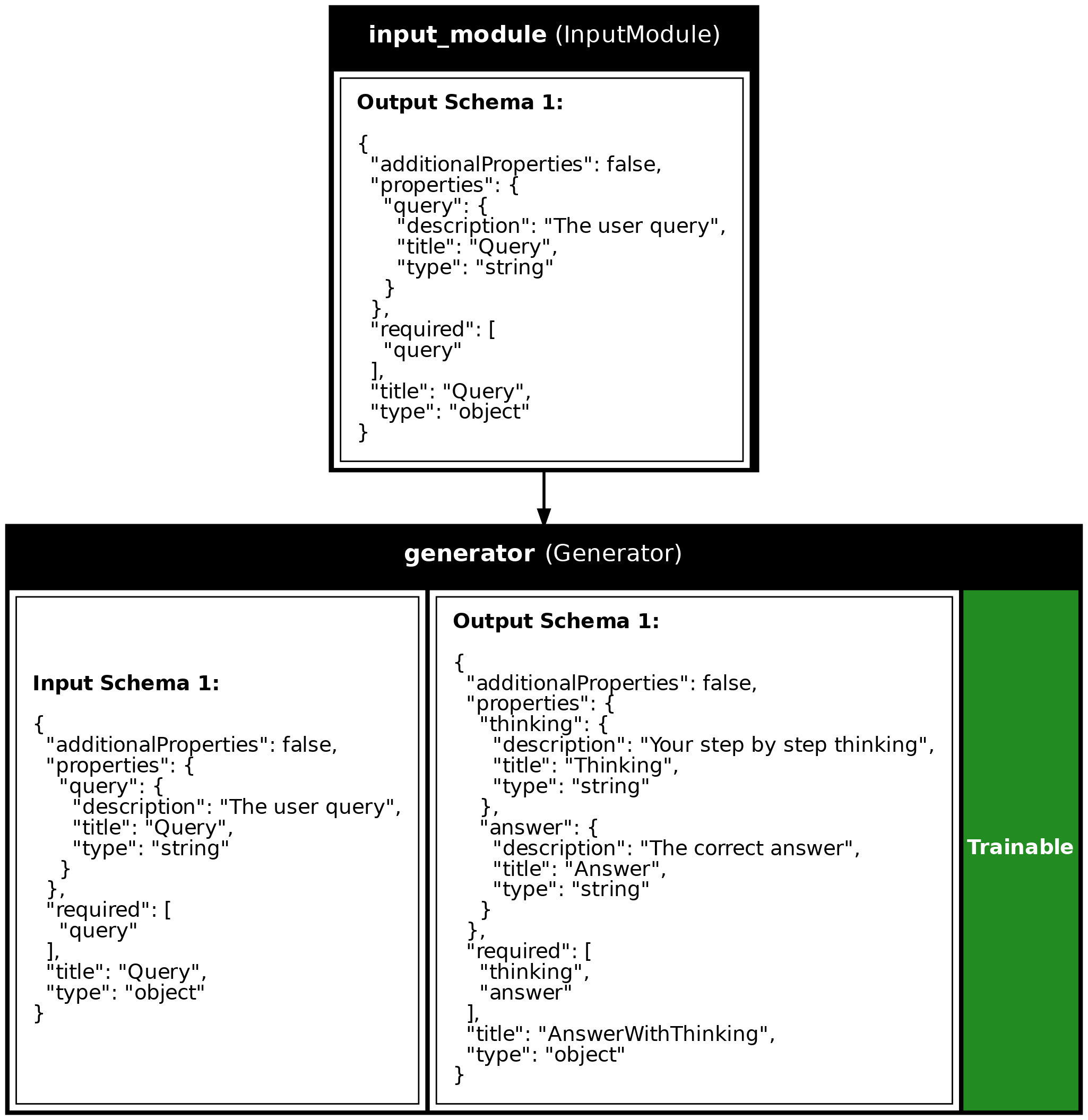
Program Visualization
API References
AnswerWithThinking
Bases: DataModel
The output from our program - reasoning + final answer.
Source code in examples/1b_subclassing.py
ChainOfThought
Bases: Program
A program that answers questions with step-by-step reasoning.
Note: The first line of the docstring becomes the program's description if not explicitly provided in super().init().
Source code in examples/1b_subclassing.py
call(inputs, training=False)
async
Define how data flows through your program.
This method is called when you do await program(input_data).
Parameters:
| Name | Type | Description | Default |
|---|---|---|---|
inputs
|
JsonDataModel
|
The input data (will be a Query instance) |
required |
training
|
bool
|
Whether we're in training mode (for optimization) |
False
|
Returns:
| Name | Type | Description |
|---|---|---|
JsonDataModel |
JsonDataModel
|
The output data (will be an AnswerWithThinking instance) |
Source code in examples/1b_subclassing.py
from_config(config)
classmethod
Recreate the program from a configuration dict.
This is called when loading the program from disk.
Source code in examples/1b_subclassing.py
get_config()
Return configuration needed to recreate this program.
This is called when saving the program to disk.
Source code in examples/1b_subclassing.py
Source
import asyncio
from dotenv import load_dotenv
import synalinks
# =============================================================================
# STEP 1: Define Your Data Models
# =============================================================================
# Same as in Lesson 1a - these define the structure of inputs and outputs
class Query(synalinks.DataModel):
"""The input to our program - a user's question."""
query: str = synalinks.Field(
description="The user query",
)
class AnswerWithThinking(synalinks.DataModel):
    """The output from our program - reasoning + final answer."""

    thinking: str = synalinks.Field(
        description="Your step by step thinking",
    )
    answer: str = synalinks.Field(
        description="The correct answer",
    )
# =============================================================================
# STEP 2: Define Your Custom Program Class
# =============================================================================
# This is where subclassing shines - you have full control over your program!
class ChainOfThought(synalinks.Program):
    """A program that answers questions with step-by-step reasoning.

    Note: The first line of the docstring becomes the program's description
    if not explicitly provided in super().__init__().
    """

    def __init__(self, language_model=None):
        # Always call super().__init__() first!
        super().__init__()

        # Define the modules your program will use
        # These are like instance variables in regular Python classes
        self.answer_generator = synalinks.Generator(
            data_model=AnswerWithThinking,
            language_model=language_model,
        )

    async def call(
        self, inputs: synalinks.JsonDataModel, training: bool = False
    ) -> synalinks.JsonDataModel:
        """Define how data flows through your program.

        This method is called when you do `await program(input_data)`.

        Args:
            inputs (JsonDataModel): The input data (will be a Query instance)
            training (bool): Whether we're in training mode (for optimization)

        Returns:
            JsonDataModel: The output data (will be an AnswerWithThinking instance)
        """
        # In this simple case, we just pass inputs through one module
        # More complex programs might have multiple steps, conditionals, etc.
        result = await self.answer_generator(inputs)
        return result

    def get_config(self):
        """Return configuration needed to recreate this program.

        This is called when saving the program to disk.
        """
        config = {
            "name": self.name,
            "description": self.description,
            "trainable": self.trainable,
        }
        # Serialize the language model so it can be saved
        language_model_config = {
            "language_model": synalinks.saving.serialize_synalinks_object(
                self.language_model
            )
        }
        return {**config, **language_model_config}

    @classmethod
    def from_config(cls, config):
        """Recreate the program from a configuration dict.

        This is called when loading the program from disk.
        """
        # Deserialize the language model first
        language_model = synalinks.saving.deserialize_synalinks_object(
            config.pop("language_model")
        )
        return cls(language_model=language_model, **config)
# =============================================================================
# STEP 3: Build and Run the Program
# =============================================================================
async def main():
load_dotenv()
# Enable observability for tracing (view traces at http://localhost:5000)
# synalinks.enable_observability(
# tracking_uri="http://localhost:5000",
# experiment_name="lesson_1b_subclassing",
# )
# Initialize the language model
language_model = synalinks.LanguageModel(
model="ollama/mistral:latest",
)
# -------------------------------------------------------------------------
# 3.1: Create and Build the Program
# -------------------------------------------------------------------------
print("=" * 60)
print("Building a Chain-of-Thought Program (Subclassing)")
print("=" * 60)
# Create an instance of our custom program
program = ChainOfThought(language_model=language_model)
# IMPORTANT: Build the program before first use!
# This tells Synalinks what input type to expect
await program.build(Query)
# Generate a visualization
synalinks.utils.plot_program(
program,
to_folder="examples",
show_module_names=True,
show_trainable=True,
show_schemas=True,
)
# -------------------------------------------------------------------------
# 3.2: Run the Program
# -------------------------------------------------------------------------
print("\nRunning the program...")
print("-" * 60)
result = await program(
Query(query="What are the key aspects of human cognition?"),
)
print("\nResult:")
print(result.prettify_json())
# Access individual fields directly
print("\n" + "=" * 60)
print("Accessing individual fields:")
print("=" * 60)
print(f"\nThinking: {result['thinking'][:100]}...")
print(f"\nAnswer: {result['answer'][:100]}...")
if __name__ == "__main__":
asyncio.run(main())
Run log
The log below is the unedited combined output of running the example above with local models (ollama).
Full run log: examples/1b_subclassing.log
============================================================
Building a Chain-of-Thought Program (Subclassing)
============================================================

Running the program...
------------------------------------------------------------

Result:
{
  "thinking": "The key aspects of human cognition include perception, attention, memory, learning, reasoning, problem-solving, decision making, and language.",
  "answer": "Perception, attention, memory, learning, reasoning, problem-solving, decision making, and language are the key aspects of human cognition."
}

============================================================
Accessing individual fields:
============================================================

Thinking: The key aspects of human cognition include perception, attention, memory, learning, reasoning, probl...

Answer: Perception, attention, memory, learning, reasoning, problem-solving, decision making, and language a...