Sequential API

The Sequential API
You've learned two ways to build programs: the Functional API (Lesson 1a) and Subclassing (Lesson 1b). Now, let's explore the simplest approach: the Sequential API.
When to Use Sequential
The Sequential API is perfect when your program is a simple pipeline - data flows through modules one after another, like water through pipes:
graph LR
    Input --> A[Module A] --> B[Module B] --> C[Module C] --> Output
No branching, no conditionals, just a straight line of transformations.
Comparison: Three Ways to Build Programs
| API | Use Case | Complexity |
|---|---|---|
| Sequential | Simple linear pipelines | Easiest |
| Functional | Graphs with branches/merges | Medium |
| Subclassing | Custom logic, full control | Advanced |
The Sequential Pattern
Building with Sequential is as simple as making a list:
program = synalinks.Sequential(
    [
        synalinks.Input(data_model=InputType),     # First: where data enters
        synalinks.SomeModule(...),                  # Middle: transformations
        synalinks.Generator(data_model=OutputType), # Last: final output
    ],
    name="my_program",
)
Think of it like a recipe:
- Start with ingredients (Input)
- Apply steps in order (Modules)
- Get the final dish (Output)
Complete Example
import asyncio
from dotenv import load_dotenv
import synalinks

class Query(synalinks.DataModel):
    query: str = synalinks.Field(description="The user query")

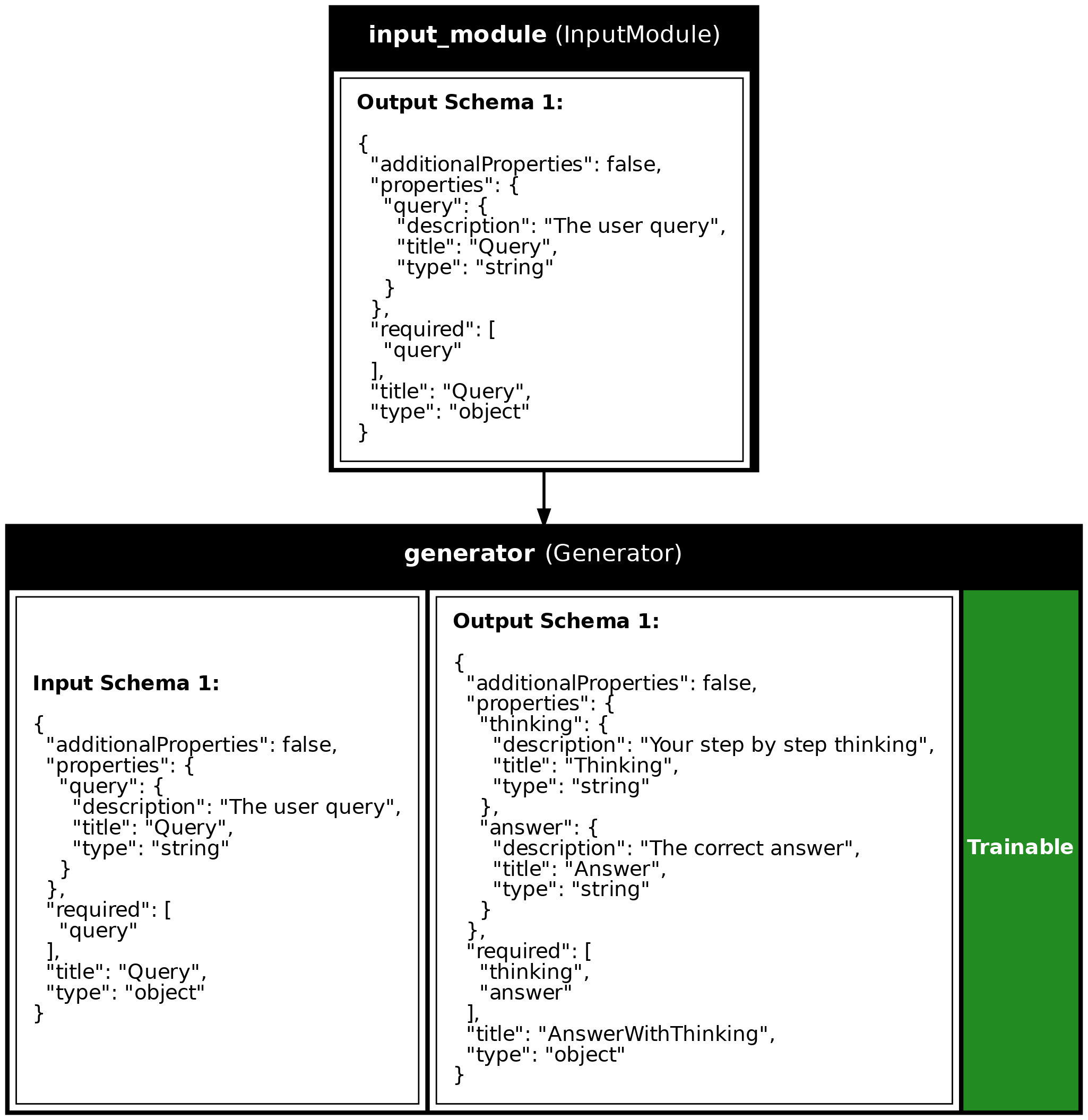
class AnswerWithThinking(synalinks.DataModel):
    thinking: str = synalinks.Field(description="Your step by step thinking")
    answer: str = synalinks.Field(description="The correct answer")

async def main():
    load_dotenv()
    language_model = synalinks.LanguageModel(model="ollama/mistral:latest")

    # Create a sequential program - just a list of modules!
    program = synalinks.Sequential(
        [
            synalinks.Input(data_model=Query),
            synalinks.Generator(
                data_model=AnswerWithThinking,
                language_model=language_model,
            ),
        ],
        name="chain_of_thought",
    )

    result = await program(Query(query="What is the capital of France?"))
    print(f"Answer: {result['answer']}")

asyncio.run(main())
Key Takeaways
- Sequential API: The simplest way to build programs - just provide a list of modules that execute in order.
- Linear Pipelines: Best for simple data flows with no branching or conditional logic.
- Minimal Boilerplate: No need to manually connect inputs/outputs - Sequential handles the wiring automatically.
- Quick Prototyping: Great for testing ideas quickly before moving to more complex architectures.
Program Visualization
API References
AnswerWithThinking
Bases: DataModel
The output from our program - reasoning + final answer.
Source code in examples/1c_sequential.py
Source
import asyncio
from dotenv import load_dotenv
import synalinks
# =============================================================================
# STEP 1: Define Your Data Models
# =============================================================================
# Same as previous lessons - structure of inputs and outputs
class Query(synalinks.DataModel):
"""The input to our program - a user's question."""
query: str = synalinks.Field(
description="The user query",
)
class AnswerWithThinking(synalinks.DataModel):
    """The output from our program - reasoning + final answer."""

    thinking: str = synalinks.Field(
        description="Your step by step thinking",
    )
    answer: str = synalinks.Field(
        description="The correct answer",
    )
# =============================================================================
# STEP 2: Build and Run the Program
# =============================================================================
async def main():
load_dotenv()
# Enable observability for tracing (view traces at http://localhost:5000)
# synalinks.enable_observability(
# tracking_uri="http://localhost:5000",
# experiment_name="lesson_1c_sequential",
# )
# Initialize the language model
language_model = synalinks.LanguageModel(
model="ollama/mistral:latest",
)
# -------------------------------------------------------------------------
# 2.1: Build the Program with Sequential API
# -------------------------------------------------------------------------
print("=" * 60)
print("Building a Chain-of-Thought Program (Sequential API)")
print("=" * 60)
# Create a sequential program - just a list of modules!
# Data flows through each module in order.
program = synalinks.Sequential(
[
# First module: defines the input type
synalinks.Input(data_model=Query),
# Second module: transforms Query into AnswerWithThinking
synalinks.Generator(
data_model=AnswerWithThinking,
language_model=language_model,
),
],
name="chain_of_thought",
description="Useful to answer in a step by step manner.",
)
# Generate a visualization
synalinks.utils.plot_program(
program,
to_folder="examples",
show_module_names=True,
show_trainable=True,
show_schemas=True,
)
# -------------------------------------------------------------------------
# 2.2: Run the Program
# -------------------------------------------------------------------------
print("\nRunning the program...")
print("-" * 60)
result = await program(
Query(query="What are the key aspects of human cognition?"),
)
print("\nResult:")
print(result.prettify_json())
# Access individual fields directly
print("\n" + "=" * 60)
print("Accessing individual fields:")
print("=" * 60)
print(f"\nThinking: {result['thinking'][:100]}...")
print(f"\nAnswer: {result['answer'][:100]}...")
if __name__ == "__main__":
asyncio.run(main())
Run log
The log below is the unedited combined output of running the example above with local models (ollama).
Full run log: examples/1c_sequential.log
============================================================
Building a Chain-of-Thought Program (Sequential API)
============================================================

Running the program...
------------------------------------------------------------

Result:
{
  "thinking": "The key aspects of human cognition include perception, attention, memory, learning, reasoning, problem-solving, decision making, and language.",
  "answer": "Perception, attention, memory, learning, reasoning, problem-solving, decision making, and language are the key aspects of human cognition."
}

============================================================
Accessing individual fields:
============================================================

Thinking: The key aspects of human cognition include perception, attention, memory, learning, reasoning, probl...

Answer: Perception, attention, memory, learning, reasoning, problem-solving, decision making, and language a...