Knowledge Extraction and Storage

Knowledge Extraction and Storage
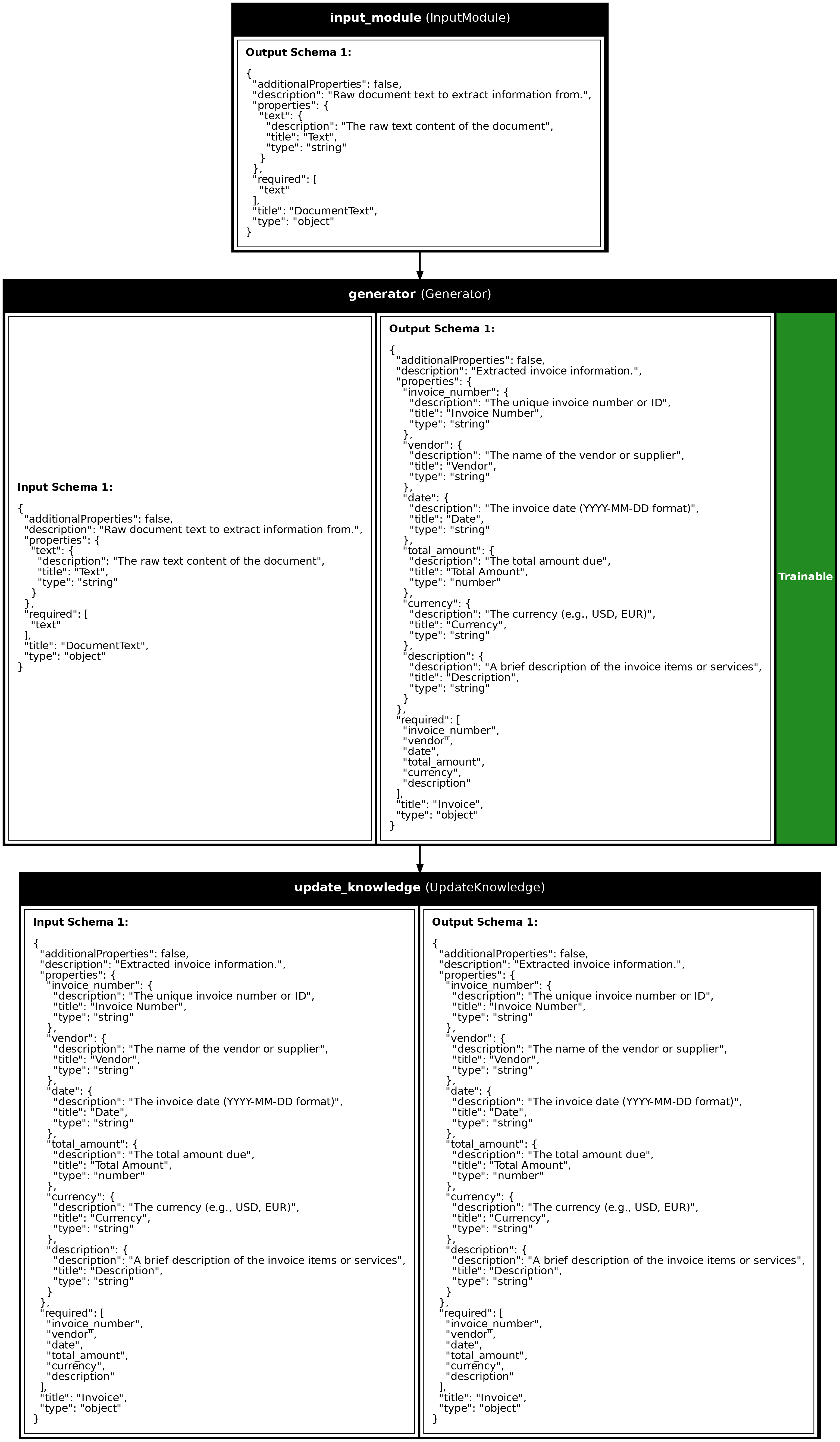
Synalinks provides a powerful knowledge base system for extracting, storing, and retrieving structured knowledge. This example demonstrates extracting structured information from invoices and documents, storing them, and querying them later.
graph LR
    subgraph Extraction
        A[Document] --> B[Generator]
        B --> C[Structured Data]
    end
    subgraph Storage
        C --> D[UpdateKnowledge]
        D --> E[(KnowledgeBase)]
    end
    subgraph Retrieval
        F[Query] --> G[RetrieveKnowledge]
        E --> G
        G --> H[Results]
    end
Creating a Knowledge Base
The KnowledgeBase uses DuckDB as the underlying storage engine, providing
full-text search and optional vector similarity search:
# Define your data model
class Invoice(synalinks.DataModel):
    invoice_number: str = synalinks.Field(description="Invoice number")
    vendor: str = synalinks.Field(description="Vendor name")
    total: float = synalinks.Field(description="Total amount")
    description: str = synalinks.Field(description="Description of items")

# Create a knowledge base
knowledge_base = synalinks.KnowledgeBase(
    uri="duckdb://./invoices.db",
    data_models=[Invoice],
    embedding_model=embedding_model,  # Optional, for similarity search
)
Extracting Information with Generator
Use a Generator to extract structured information from unstructured text:
inputs = synalinks.Input(data_model=DocumentText)
extracted = await synalinks.Generator(
    data_model=Invoice,
    language_model=language_model,
)(inputs)
Storing Data with UpdateKnowledge
The UpdateKnowledge module stores data models in the knowledge base:
Retrieving Data with RetrieveKnowledge
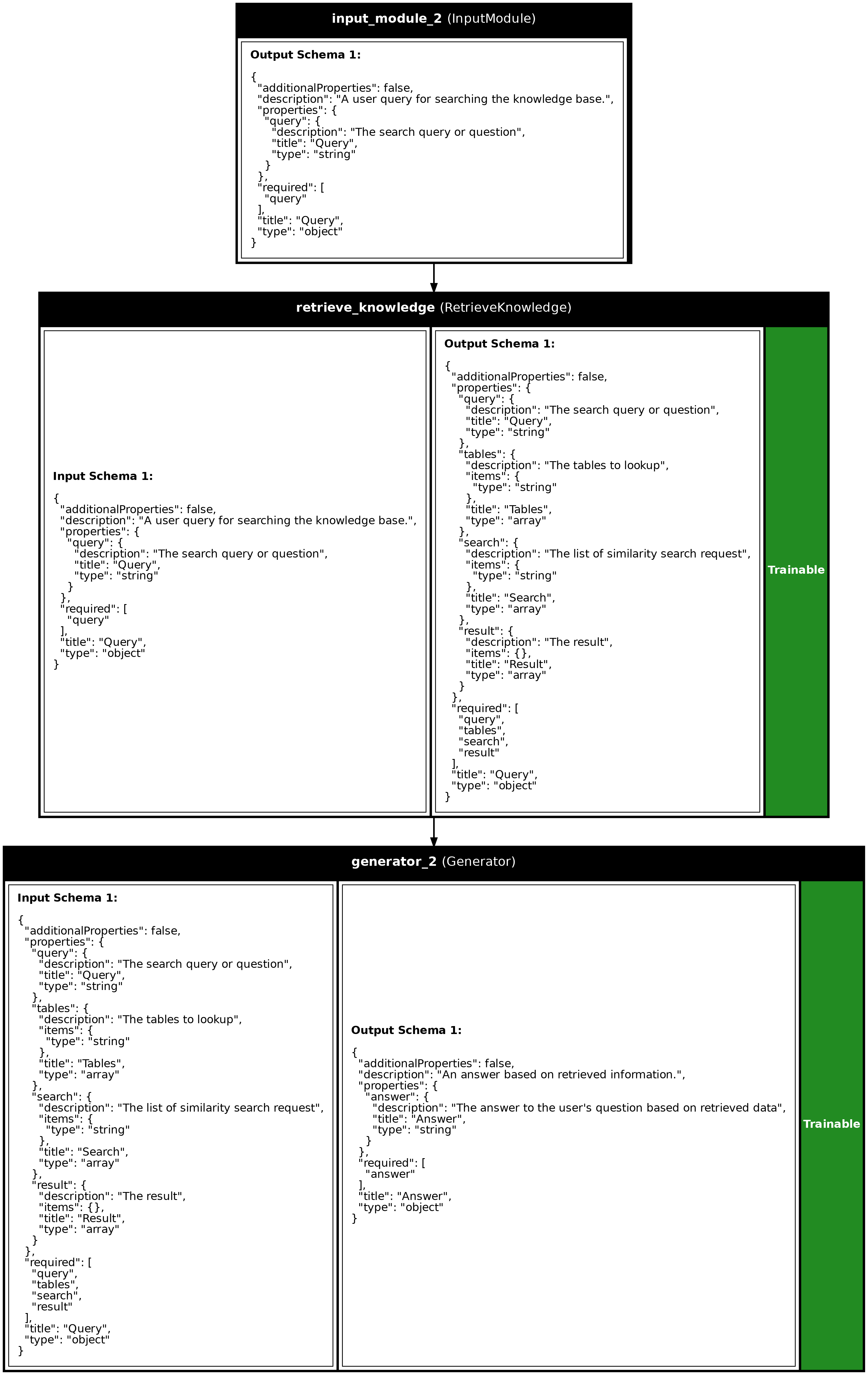
The RetrieveKnowledge module uses hybrid search to find relevant records:
results = await synalinks.RetrieveKnowledge(
    knowledge_base=knowledge_base,
    language_model=language_model,
    search_type="hybrid",
    k=5,
)(query)
Key Takeaways
- KnowledgeBase: Unified interface for storing and searching structured data using DuckDB with full-text and vector search capabilities.
- UpdateKnowledge: Module for inserting/upserting data models into the knowledge base using the first field as primary key.
- RetrieveKnowledge: Module for intelligent retrieval using LM-generated search queries with hybrid search (full-text + vector).
- Structured Extraction: Use Generators to extract typed data from unstructured text like invoices, receipts, or documents.
Program Visualizations
Invoice Extraction Pipeline
Business Q&A System
API References
Answer
Bases: DataModel
An answer based on retrieved information.
Source code in examples/12_knowledge_extraction_and_storage.py
Customer
Bases: DataModel
Extracted customer information.
Source code in examples/12_knowledge_extraction_and_storage.py
DocumentText
Bases: DataModel
Raw document text to extract information from.
Source code in examples/12_knowledge_extraction_and_storage.py
Invoice
Bases: DataModel
Extracted invoice information.
Source code in examples/12_knowledge_extraction_and_storage.py
Query
Bases: DataModel
A user query for searching the knowledge base.
Source code in examples/12_knowledge_extraction_and_storage.py
Source
import asyncio
import os
from dotenv import load_dotenv
import synalinks
# =============================================================================
# Define the data models for invoice extraction
# =============================================================================
class DocumentText(synalinks.DataModel):
"""Raw document text to extract information from."""
text: str = synalinks.Field(
description="The raw text content of the document",
)
class Invoice(synalinks.DataModel):
"""Extracted invoice information."""
invoice_number: str = synalinks.Field(
description="The unique invoice number or ID",
)
vendor: str = synalinks.Field(
description="The name of the vendor or supplier",
)
date: str = synalinks.Field(
description="The invoice date (YYYY-MM-DD format)",
)
total_amount: float = synalinks.Field(
description="The total amount due",
)
currency: str = synalinks.Field(
description="The currency (e.g., USD, EUR)",
)
description: str = synalinks.Field(
description="A brief description of the invoice items or services",
)
class Customer(synalinks.DataModel):
"""Extracted customer information."""
customer_id: str = synalinks.Field(
description="Unique customer identifier",
)
name: str = synalinks.Field(
description="Customer name (person or company)",
)
email: str = synalinks.Field(
description="Customer email address",
)
description: str = synalinks.Field(
description="Additional notes about the customer",
)
class Query(synalinks.DataModel):
"""A user query for searching the knowledge base."""
query: str = synalinks.Field(
description="The search query or question",
)
class Answer(synalinks.DataModel):
    """An answer based on retrieved information."""

    answer: str = synalinks.Field(
        description="The answer to the user's question based on retrieved data",
    )
async def main():
load_dotenv()
# Enable observability for tracing
# synalinks.enable_observability(
# tracking_uri="http://localhost:5000",
# experiment_name="knowledge_extraction",
# )
# Initialize models
language_model = synalinks.LanguageModel(
model="ollama/mistral:latest",
)
embedding_model = synalinks.EmbeddingModel(
model="ollama/mxbai-embed-large",
)
# Clean up any existing database
db_path = "./examples/business_data.db"
if os.path.exists(db_path):
os.remove(db_path)
# ==========================================================================
# Example 1: Create a Knowledge Base for Business Data
# ==========================================================================
print("Example 1: Creating a Knowledge Base")
print("=" * 50)
knowledge_base = synalinks.KnowledgeBase(
uri=f"duckdb://{db_path}",
data_models=[Invoice, Customer],
embedding_model=embedding_model,
metric="cosine",
)
print(f"Knowledge base created at: {db_path}")
tables = [m.get_schema()["title"] for m in knowledge_base.get_symbolic_data_models()]
print(f"Tables: {tables}")
# ==========================================================================
# Example 2: Extract and Store Invoices
# ==========================================================================
print("\nExample 2: Extracting and Storing Invoices")
print("=" * 50)
# Sample invoice texts (simulating OCR output or email content)
invoice_texts = [
"""
INVOICE #INV-2024-001
From: TechSupply Co.
Date: 2024-01-15
Items:
- 10x USB-C Cables @ $12.99 each
- 5x Wireless Mouse @ $29.99 each
Subtotal: $279.85
Tax: $27.99
Total Due: $307.84 USD
Payment due within 30 days.
""",
"""
Invoice Number: INV-2024-002
Vendor: Cloud Services Inc.
Invoice Date: January 20, 2024
Monthly subscription for cloud hosting services
- Basic Plan (January 2024)
- Storage: 500GB
- Bandwidth: Unlimited
Amount: EUR 149.00
""",
"""
BILL
Invoice: INV-2024-003
Office Furniture Ltd.
02/01/2024
Standing Desk - Adjustable Height: $599.00
Ergonomic Chair - Premium: $449.00
Desk Lamp - LED: $79.00
Total: $1,127.00 USD
""",
]
# Create extraction and storage program
inputs = synalinks.Input(data_model=DocumentText)
extracted_invoice = await synalinks.Generator(
data_model=Invoice,
language_model=language_model,
instructions="Extract invoice information from the document text. Use YYYY-MM-DD format for dates.",
)(inputs)
stored_invoice = await synalinks.UpdateKnowledge(
knowledge_base=knowledge_base,
)(extracted_invoice)
invoice_program = synalinks.Program(
inputs=inputs,
outputs=stored_invoice,
name="invoice_extraction",
description="Extract and store invoice data",
)
synalinks.utils.plot_program(
invoice_program,
to_folder="examples",
show_module_names=True,
show_schemas=True,
show_trainable=True,
)
# Process invoices
print("\nExtracting invoices...")
for text in invoice_texts:
result = await invoice_program(DocumentText(text=text))
print(
f" - {result.get('invoice_number')}: {result.get('vendor')} - {result.get('total_amount')} {result.get('currency')}"
)
# ==========================================================================
# Example 3: Extract and Store Customers
# ==========================================================================
print("\nExample 3: Extracting and Storing Customers")
print("=" * 50)
customer_texts = [
"""
New Customer Registration:
ID: CUST-001
Company: Acme Corporation
Contact: john.doe@acme.com
Notes: Enterprise client, interested in bulk orders
""",
"""
Customer Profile Update
Customer Number: CUST-002
Name: Jane Smith
Email Address: jane.smith@startup.io
Remarks: Small business owner, prefers monthly billing
""",
]
inputs = synalinks.Input(data_model=DocumentText)
extracted_customer = await synalinks.Generator(
data_model=Customer,
language_model=language_model,
instructions="Extract customer information from the document text.",
)(inputs)
stored_customer = await synalinks.UpdateKnowledge(
knowledge_base=knowledge_base,
)(extracted_customer)
customer_program = synalinks.Program(
inputs=inputs,
outputs=stored_customer,
name="customer_extraction",
description="Extract and store customer data",
)
print("\nExtracting customers...")
for text in customer_texts:
result = await customer_program(DocumentText(text=text))
print(
f" - {result.get('customer_id')}: {result.get('name')} ({result.get('email')})"
)
# ==========================================================================
# Example 4: Search the Knowledge Base
# ==========================================================================
print("\nExample 4: Searching the Knowledge Base")
print("=" * 50)
# Full-text search for invoices
print("\nSearch for 'cloud' in invoices:")
results = await knowledge_base.fulltext_search("cloud", table_name="Invoice", k=5)
for r in results:
print(f" Found: {r}")
# Hybrid search (vector + BM25 fulltext, fused with RRF)
print("\nSearch for 'office equipment purchase':")
results = await knowledge_base.hybrid_fts_search(
"office equipment purchase", table_name="Invoice", k=5
)
for r in results:
print(f" Found: {r}")
# ==========================================================================
# Example 5: Build a Q&A System with RetrieveKnowledge
# ==========================================================================
print("\nExample 5: Q&A System with RetrieveKnowledge")
print("=" * 50)
inputs = synalinks.Input(data_model=Query)
retrieved = await synalinks.RetrieveKnowledge(
knowledge_base=knowledge_base,
language_model=language_model,
search_type="hybrid",
k=5,
return_inputs=True,
return_query=True,
)(inputs)
answer = await synalinks.Generator(
data_model=Answer,
language_model=language_model,
instructions="Answer the question based on the retrieved business data. Be specific with numbers and dates.",
)(retrieved)
qa_program = synalinks.Program(
inputs=inputs,
outputs=answer,
name="business_qa",
description="Answer questions about business data",
)
synalinks.utils.plot_program(
qa_program,
to_folder="examples",
show_module_names=True,
show_schemas=True,
show_trainable=True,
)
# Test questions
questions = [
"What is the total amount of the invoice from TechSupply?",
"Which invoice is for cloud services?",
"What is Jane Smith's email?",
"How much was the standing desk invoice?",
]
print("\nAsking questions:")
for question in questions:
print(f"\nQ: {question}")
result = await qa_program(Query(query=question))
print(f"A: {result.get('answer')}")
# ==========================================================================
# Example 6: List All Stored Records
# ==========================================================================
print("\n\nExample 6: Listing All Stored Records")
print("=" * 50)
# Get data models from knowledge base
data_models = knowledge_base.get_symbolic_data_models()
for dm in data_models:
table_name = dm.get_schema()["title"]
records = await knowledge_base.getall(table_name=table_name, limit=10)
print(f"\n{table_name} ({len(records)} records):")
for record in records:
json_data = record.get_json()
# Print a summary of each record
if table_name == "Invoice":
print(
f" - {json_data['invoice_number']}: {json_data['vendor']} - {json_data['total_amount']} {json_data['currency']}"
)
elif table_name == "Customer":
print(f" - {json_data['customer_id']}: {json_data['name']}")
print("\nDone!")
if __name__ == "__main__":
asyncio.run(main())
Run log
The log below is the unedited combined output of running the example above with local models (ollama).
Full run log: examples/12_knowledge_extraction_and_storage.log
Example 1: Creating a Knowledge Base
==================================================
Knowledge base created at: ./examples/business_data.db
Tables: []

Example 2: Extracting and Storing Invoices
==================================================

Extracting invoices...
  - INV-2024-001: TechSupply Co. - 307.84 USD
  - INV-2024-002: Cloud Services Inc. - 149.0 EUR
  - INV-2024-003: Office Furniture Ltd. - 1127.0 USD

Example 3: Extracting and Storing Customers
==================================================

Extracting customers...
  - CUST-001: Acme Corporation (john.doe@acme.com)
  - CUST-002: Jane Smith (jane.smith@startup.io)

Example 4: Searching the Knowledge Base
==================================================

Search for 'cloud' in invoices:
  Found: {'invoice_number': 'INV-2024-002', 'vendor': 'Cloud Services Inc.', 'date': '2024-01-20', 'total_amount': 149.0, 'currency': 'EUR', 'description': 'Monthly subscription for cloud hosting services\n        - Basic Plan (January 2024)\n        - Storage: 500GB\n        - Bandwidth: Unlimited', 'embedding': None, 'score': 1.0}

Search for 'office equipment purchase':
  Found: {'invoice_number': 'INV-2024-003', 'vendor': 'Office Furniture Ltd.', 'date': '2024-01-02', 'total_amount': 1127.0, 'currency': 'USD', 'description': "{ \n    'Standing Desk - Adjustable Height': 599.0,\n    'Ergonomic Chair - Premium': 449.0,\n    'Desk Lamp - LED': 79.0\n}", 'embedding': None, 'score': 0.032266458495966696}
  Found: {'invoice_number': 'INV-2024-001', 'vendor': 'TechSupply Co.', 'date': '2024-01-15', 'total_amount': 307.84, 'currency': 'USD', 'description': '10x USB-C Cables @ $12.99 each\n- 5x Wireless Mouse @ $29.99 each', 'embedding': None, 'score': 0.01639344262295082}
  Found: {'invoice_number': 'INV-2024-002', 'vendor': 'Cloud Services Inc.', 'date': '2024-01-20', 'total_amount': 149.0, 'currency': 'EUR', 'description': 'Monthly subscription for cloud hosting services\n        - Basic Plan (January 2024)\n        - Storage: 500GB\n        - Bandwidth: Unlimited', 'embedding': None, 'score': 0.016129032258064516}

Example 5: Q&A System with RetrieveKnowledge
==================================================

Asking questions:

Q: What is the total amount of the invoice from TechSupply?
A: The total amount of the invoice from TechSupply is $307.84.

Q: Which invoice is for cloud services?
A: The invoice for cloud services is INV-2024-002.

Q: What is Jane Smith's email?
A: Jane Smith's email is jane.smith@startup.io.

Q: How much was the standing desk invoice?
A: The standing desk invoice was $1127.0 (USD). The invoice number is INV-2024-003.


Example 6: Listing All Stored Records
==================================================

Customer (2 records):
  - CUST-001: Acme Corporation
  - CUST-002: Jane Smith

Invoice (3 records):
  - INV-2024-001: TechSupply Co. - 307.84 USD
  - INV-2024-002: Cloud Services Inc. - 149.0 EUR
  - INV-2024-003: Office Furniture Ltd. - 1127.0 USD

Done!