Document RAG

Document RAG (Retrieval-Augmented Generation)
This example demonstrates how to build a classic RAG system using Synalinks. RAG combines document retrieval with language model generation to answer questions based on your own documents.
How RAG Works
graph LR
    subgraph Indexing
        A[Documents] --> B[Embeddings]
        B --> C[(KnowledgeBase)]
    end
    subgraph Query Time
        D[Question] --> E[RetrieveKnowledge]
        C --> E
        E --> F[Relevant Docs]
        F --> G[Generator]
        G --> H[Answer]
end- Index: Store documents in a knowledge base with embeddings
- Retrieve: When a question is asked, find relevant documents
- Generate: Use the retrieved context to generate an accurate answer
Creating a Document Store
class Document(synalinks.DataModel):
    id: str = synalinks.Field(description="Document ID")
    title: str = synalinks.Field(description="Document title")
    content: str = synalinks.Field(description="Document content")

knowledge_base = synalinks.KnowledgeBase(
    uri="duckdb://./documents.db",
    data_models=[Document],
    embedding_model=embedding_model,  # For semantic search
)
Building the RAG Pipeline
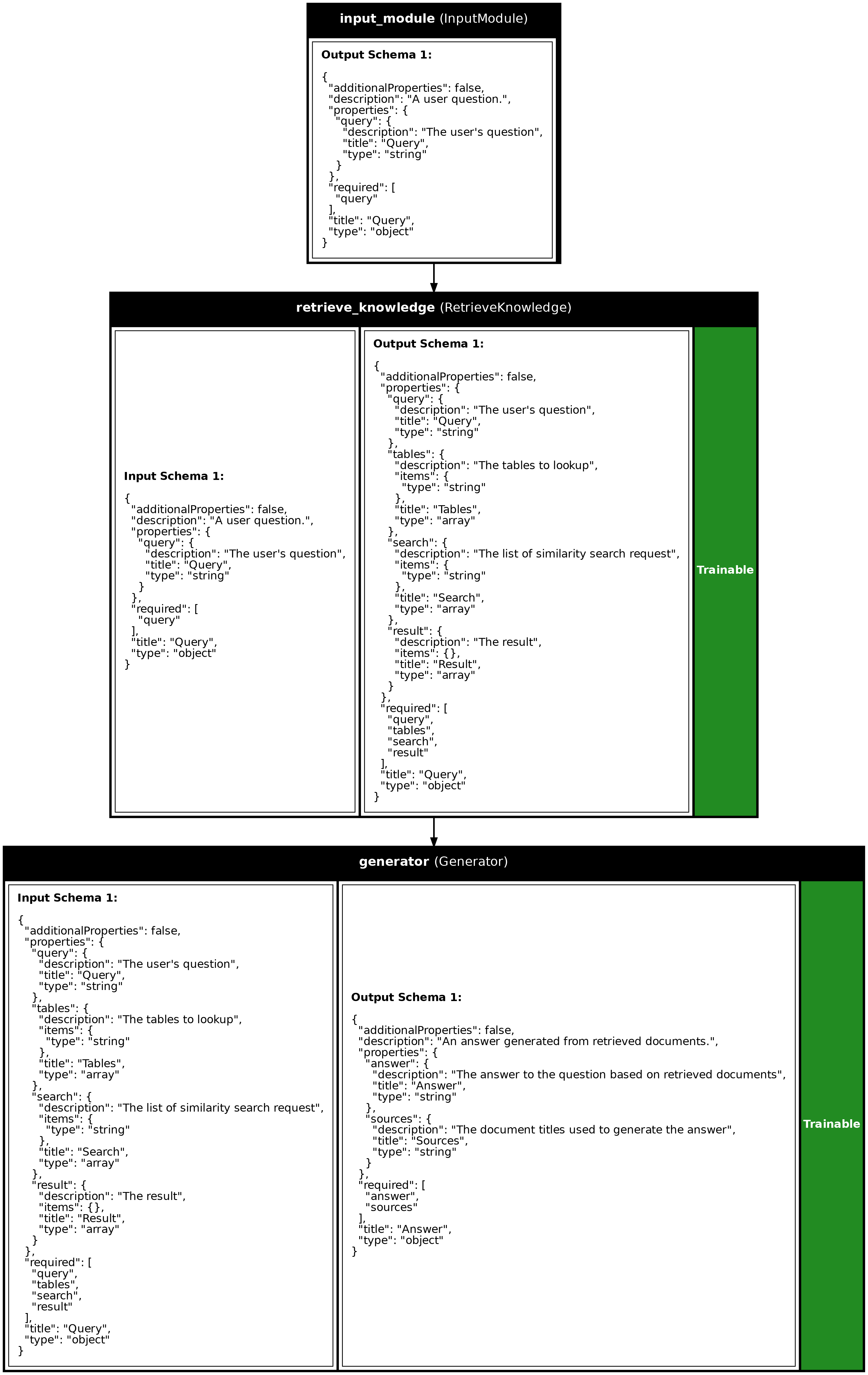
inputs = synalinks.Input(data_model=Query)

# Retrieve relevant documents
retrieved = await synalinks.RetrieveKnowledge(
    knowledge_base=knowledge_base,
    language_model=language_model,
    search_type="hybrid",
    k=3,
)(inputs)

# Generate answer from retrieved context
answer = await synalinks.Generator(
    data_model=Answer,
    language_model=language_model,
    instructions="Answer based on the retrieved documents.",
)(retrieved)
Key Takeaways
- Hybrid Search: Combines keyword (BM25) and semantic (vector) search for better retrieval accuracy.
- Chunking: For large documents, split into smaller chunks for better retrieval granularity.
- Context Window: Retrieved documents are passed as context to the LM for grounded generation.
- Trainable: The retrieval and generation modules can be optimized using Synalinks training.
Program Visualization
API References
Answer
Bases: DataModel
An answer generated from retrieved documents.
Source code in examples/13_document_rag.py
Document
Bases: DataModel
A document stored in the knowledge base.
Source code in examples/13_document_rag.py
Source
import asyncio
import os
from dotenv import load_dotenv
import synalinks
# =============================================================================
# Define the data models
# =============================================================================
class Document(synalinks.DataModel):
"""A document stored in the knowledge base."""
id: str = synalinks.Field(
description="Unique document identifier",
)
title: str = synalinks.Field(
description="Document title",
)
content: str = synalinks.Field(
description="The main text content of the document",
)
source: str = synalinks.Field(
description="Source or category of the document",
)
class Query(synalinks.DataModel):
"""A user question."""
query: str = synalinks.Field(
description="The user's question",
)
class Answer(synalinks.DataModel):
    """An answer generated from retrieved documents."""

    answer: str = synalinks.Field(
        description="The answer to the question based on retrieved documents",
    )
    sources: str = synalinks.Field(
        description="The document titles used to generate the answer",
    )
async def main():
load_dotenv()
# Enable observability for tracing
# synalinks.enable_observability(
# tracking_uri="http://localhost:5000",
# experiment_name="document_rag_pipeline",
# )
# Initialize models
language_model = synalinks.LanguageModel(
model="ollama/mistral:latest",
)
embedding_model = synalinks.EmbeddingModel(
model="ollama/all-minilm",
)
# Clean up any existing database
db_path = "./examples/documents.db"
if os.path.exists(db_path):
os.remove(db_path)
# ==========================================================================
# Step 1: Create the Document Knowledge Base
# ==========================================================================
print("Step 1: Creating Document Knowledge Base")
print("=" * 60)
knowledge_base = synalinks.KnowledgeBase(
uri=f"duckdb://{db_path}",
data_models=[Document],
embedding_model=embedding_model,
metric="cosine",
)
print(f"Knowledge base created: {db_path}")
# ==========================================================================
# Step 2: Add Documents to the Knowledge Base
# ==========================================================================
print("\nStep 2: Adding Documents to Knowledge Base")
print("=" * 60)
# Sample documents (in a real scenario, these would come from files, APIs, etc.)
documents = [
Document(
id="doc-001",
title="Introduction to Machine Learning",
content="""
Machine learning is a subset of artificial intelligence that enables
systems to learn and improve from experience without being explicitly
programmed. It focuses on developing algorithms that can access data
and use it to learn for themselves. The process begins with
observations or data, such as examples, direct experience, or
instruction, to look for patterns in data and make better decisions
in the future. The primary aim is to allow computers to learn
automatically without human intervention.
""",
source="AI Fundamentals",
),
Document(
id="doc-002",
title="Types of Machine Learning",
content="""
There are three main types of machine learning: supervised learning,
unsupervised learning, and reinforcement learning. In supervised
learning, the algorithm learns from labeled training data and makes
predictions. Unsupervised learning works with unlabeled data to find
hidden patterns. Reinforcement learning involves an agent learning
to make decisions by performing actions and receiving rewards or
penalties. Each type has specific use cases and applications in
real-world scenarios.
""",
source="AI Fundamentals",
),
Document(
id="doc-003",
title="Neural Networks Explained",
content="""
Neural networks are computing systems inspired by biological neural
networks in the human brain. They consist of interconnected nodes
(neurons) organized in layers: an input layer, one or more hidden
layers, and an output layer. Each connection has a weight that
adjusts as learning proceeds. Deep learning uses neural networks
with many hidden layers, enabling the model to learn complex
patterns. Popular architectures include CNNs for images and RNNs
for sequential data.
""",
source="Deep Learning",
),
Document(
id="doc-004",
title="Natural Language Processing Overview",
content="""
Natural Language Processing (NLP) is a field of AI that focuses on
the interaction between computers and human language. Key tasks
include text classification, named entity recognition, sentiment
analysis, machine translation, and question answering. Modern NLP
relies heavily on transformer models like BERT and GPT. These models
use attention mechanisms to understand context and relationships
between words in a sentence.
""",
source="NLP Guide",
),
Document(
id="doc-005",
title="Large Language Models",
content="""
Large Language Models (LLMs) are neural networks trained on massive
amounts of text data. They can generate human-like text, answer
questions, summarize documents, and perform various language tasks.
Examples include GPT-4, Claude, and Llama. LLMs use the transformer
architecture and are trained using self-supervised learning on
internet-scale datasets. They demonstrate emergent capabilities as
they scale in size and training data.
""",
source="NLP Guide",
),
Document(
id="doc-006",
title="RAG: Retrieval-Augmented Generation",
content="""
Retrieval-Augmented Generation (RAG) is a technique that combines
information retrieval with text generation. Instead of relying
solely on the knowledge embedded in model weights, RAG retrieves
relevant documents from a knowledge base and uses them as context
for generation. This approach reduces hallucinations, allows for
up-to-date information, and enables domain-specific applications.
RAG systems typically use vector databases for efficient similarity
search.
""",
source="Advanced AI",
),
Document(
id="doc-007",
title="Vector Databases and Embeddings",
content="""
Vector databases store and index high-dimensional vectors (embeddings)
for efficient similarity search. Embeddings are numerical
representations of text, images, or other data that capture semantic
meaning. Similar items have vectors that are close together in the
embedding space. Popular vector databases include Pinecone, Weaviate,
and Chroma. They use algorithms like HNSW or IVF for approximate
nearest neighbor search, enabling fast retrieval at scale.
""",
source="Advanced AI",
),
]
# Store documents
print("\nStoring documents...")
for doc in documents:
await knowledge_base.update(doc.to_json_data_model())
print(f" - Stored: {doc.title}")
print(f"\nTotal documents stored: {len(documents)}")
# ==========================================================================
# Step 3: Build the RAG Pipeline
# ==========================================================================
print("\nStep 3: Building RAG Pipeline")
print("=" * 60)
inputs = synalinks.Input(data_model=Query)
# Retrieve relevant documents using hybrid search
retrieved = await synalinks.RetrieveKnowledge(
knowledge_base=knowledge_base,
language_model=language_model,
search_type="hybrid",
k=3, # Retrieve top 3 documents
return_inputs=True,
return_query=True,
)(inputs)
# Generate answer based on retrieved context
answer = await synalinks.Generator(
data_model=Answer,
language_model=language_model,
instructions="""
Answer the user's question based ONLY on the retrieved documents.
If the information is not in the documents, say "I don't have information about that."
Include the titles of the documents you used in the 'sources' field.
""",
)(retrieved)
# Create the RAG program
rag_program = synalinks.Program(
inputs=inputs,
outputs=answer,
name="document_rag",
description="Answer questions using retrieved documents",
)
# Plot the program
synalinks.utils.plot_program(
rag_program,
to_folder="examples",
show_module_names=True,
show_schemas=True,
show_trainable=True,
)
print("RAG pipeline created successfully!")
# ==========================================================================
# Step 4: Test the RAG System
# ==========================================================================
print("\nStep 4: Testing RAG System")
print("=" * 60)
test_questions = [
"What is machine learning?",
"What are the three types of machine learning?",
"How do neural networks work?",
"What is RAG and why is it useful?",
"What are vector databases used for?",
"What is the capital of France?", # Not in documents
]
for question in test_questions:
print(f"\n{'─' * 60}")
print(f"Q: {question}")
print(f"{'─' * 60}")
result = await rag_program(Query(query=question))
print(f"\nA: {result.get('answer')}")
print(f"\nSources: {result.get('sources')}")
# ==========================================================================
# Step 5: Direct Search Examples
# ==========================================================================
print("\n\nStep 5: Direct Search Examples")
print("=" * 60)
# Full-text search
print("\nFull-text search for 'transformer':")
results = await knowledge_base.fulltext_search(
"transformer", table_name="Document", k=3
)
for r in results:
print(f" - Document ID: {r.get('id')}, Score: {r.get('score', 'N/A'):.4f}")
# Hybrid search: vector + BM25 fulltext, fused with RRF.
print("\nHybrid search for 'how computers learn from data':")
results = await knowledge_base.hybrid_fts_search(
"how computers learn from data", table_name="Document", k=3
)
for r in results:
print(f" - Document ID: {r.get('id')}, Score: {r.get('score', 'N/A'):.4f}")
# ==========================================================================
# Step 6: List All Documents
# ==========================================================================
print("\n\nStep 6: All Documents in Knowledge Base")
print("=" * 60)
all_docs = await knowledge_base.getall(table_name="Document", limit=20)
for doc in all_docs:
data = doc.get_json()
print(f"\n[{data['id']}] {data['title']}")
print(f" Source: {data['source']}")
# Print first 100 chars of content
content_preview = data["content"].strip()[:100].replace("\n", " ")
print(f" Content: {content_preview}...")
print("\n\nDone!")
if __name__ == "__main__":
asyncio.run(main())
Run log
The log below is the unedited combined output of running the example above with local models (ollama).
Full run log: examples/13_document_rag.log
Step 1: Creating Document Knowledge Base
============================================================
Knowledge base created: ./examples/documents.db

Step 2: Adding Documents to Knowledge Base
============================================================

Storing documents...
  - Stored: Introduction to Machine Learning
  - Stored: Types of Machine Learning
  - Stored: Neural Networks Explained
  - Stored: Natural Language Processing Overview
  - Stored: Large Language Models
  - Stored: RAG: Retrieval-Augmented Generation
  - Stored: Vector Databases and Embeddings

Total documents stored: 7

Step 3: Building RAG Pipeline
============================================================
RAG pipeline created successfully!

Step 4: Testing RAG System
============================================================

────────────────────────────────────────────────────────────
Q: What is machine learning?
────────────────────────────────────────────────────────────

A: Machine learning is a subset of artificial intelligence that enables systems to learn and improve from experience without being explicitly programmed. It focuses on developing algorithms that can access data and use it to learn for themselves. The process begins with observations or data, such as examples, direct experience, or instruction, to look for patterns in data and make better decisions in the future.

Sources: AI Fundamentals

────────────────────────────────────────────────────────────
Q: What are the three types of machine learning?
────────────────────────────────────────────────────────────

A: The three main types of machine learning are supervised learning, unsupervised learning, and reinforcement learning.

Sources: ][

────────────────────────────────────────────────────────────
Q: How do neural networks work?
────────────────────────────────────────────────────────────

A: Neural networks are computing systems inspired by the human brain and consist of interconnected nodes (neurons) organized in layers: an input layer, one or more hidden layers, and an output layer. Each connection has a weight that adjusts as learning proceeds. Deep learning uses neural networks with many hidden layers to learn complex patterns. Popular architectures include CNNs for images and RNNs for sequential data.

Sources: ['Neural Networks Explained', 'Deep Learning']

────────────────────────────────────────────────────────────
Q: What is RAG and why is it useful?
────────────────────────────────────────────────────────────

A: RAG stands for Retrieval-Augmented Generation. It is a technique that combines information retrieval with text generation, reducing hallucinations and allowing for up-to-date information and domain-specific applications. This approach is useful as it enables systems to learn and improve from both the knowledge embedded in model weights and relevant documents from a knowledge base.

Sources: ['Advanced AI']

────────────────────────────────────────────────────────────
Q: What are vector databases used for?
────────────────────────────────────────────────────────────

A: Vector databases are used for storing and indexing high-dimensional vectors (embeddings) for efficient similarity search. Embeddings are numerical representations of text, images, or other data that capture semantic meaning. Similar items have vectors that are close together in the embedding space.

Sources: ['Document with title: Vector Databases and Embeddings', 'Document with title: RAG: Retrieval-Augmented Generation']

────────────────────────────────────────────────────────────
Q: What is the capital of France?
────────────────────────────────────────────────────────────

A: I don't have information about that.

Sources: ][


Step 5: Direct Search Examples
============================================================

Full-text search for 'transformer':
  - Document ID: doc-004, Score: 1.0000
  - Document ID: doc-005, Score: 1.0000

Hybrid search for 'how computers learn from data':
  - Document ID: doc-001, Score: 0.0328
  - Document ID: doc-002, Score: 0.0320
  - Document ID: doc-003, Score: 0.0320


Step 6: All Documents in Knowledge Base
============================================================

[doc-001] Introduction to Machine Learning
   Source: AI Fundamentals
   Content: Machine learning is a subset of artificial intelligence that enables             systems to learn an...

[doc-002] Types of Machine Learning
   Source: AI Fundamentals
   Content: There are three main types of machine learning: supervised learning,             unsupervised learni...

[doc-003] Neural Networks Explained
   Source: Deep Learning
   Content: Neural networks are computing systems inspired by biological neural             networks in the huma...

[doc-004] Natural Language Processing Overview
   Source: NLP Guide
   Content: Natural Language Processing (NLP) is a field of AI that focuses on             the interaction betwe...

[doc-005] Large Language Models
   Source: NLP Guide
   Content: Large Language Models (LLMs) are neural networks trained on massive             amounts of text data...

[doc-006] RAG: Retrieval-Augmented Generation
   Source: Advanced AI
   Content: Retrieval-Augmented Generation (RAG) is a technique that combines             information retrieval ...

[doc-007] Vector Databases and Embeddings
   Source: Advanced AI
   Content: Vector databases store and index high-dimensional vectors (embeddings)             for efficient sim...


Done!