MCP Agent

MCP Agent
This example demonstrates how to build an autonomous agent that uses tools from an MCP (Model Context Protocol) server. MCP is a standard protocol for connecting AI models to external tools and data sources.
Understanding MCP Integration
graph LR
    subgraph Synalinks
        A[Agent] --> B[MultiServerMCPClient]
    end
    subgraph MCP Servers
        B --> C[Math Server]
        B --> D[Search Server]
        B --> E[...]
    end
    C --> F[add, subtract, ...]
    D --> G[search, fetch, ...]
MCP enables seamless integration between language models and external tools
through a standardized protocol. Synalinks provides the MultiServerMCPClient
class to connect to one or more MCP servers and load their tools as native
Synalinks Tool modules.
Key benefits of using MCP:
- Standardized Protocol: Use tools from any MCP-compatible server
- Multiple Servers: Connect to multiple MCP servers simultaneously
- Namespace Support: Avoid tool name collisions with namespacing
- Transport Flexibility: Support for stdio, HTTP, SSE, and WebSocket
Setting Up the MCP Server
First, you need an MCP server. This example uses a simple math server
(mcp_math_server.py) that provides basic arithmetic operations.
To run the server standalone (for testing):
Creating an MCP Agent
Connect to MCP servers using MultiServerMCPClient:
client = synalinks.MultiServerMCPClient(
    {
        "math": {
            "command": "python",
            "args": ["examples/mcp_math_server.py"],
            "transport": "stdio",
        },
    }
)

# Load all tools from connected servers
tools = await client.get_tools()
Then use the tools with a FunctionCallingAgent:
inputs = synalinks.Input(data_model=Query)
outputs = await synalinks.FunctionCallingAgent(
    data_model=NumericalFinalAnswer,
    tools=tools,
    language_model=language_model,
    autonomous=True,
)(inputs)
Key Takeaways
- MCP Protocol: Synalinks supports the Model Context Protocol for standardized tool integration.
- MultiServerMCPClient: Connect to multiple MCP servers and load tools with automatic namespacing.
- Transport Options: Support for stdio (subprocess), HTTP, SSE, and WebSocket transports.
- Seamless Integration: MCP tools work identically to native Synalinks tools with full observability support.
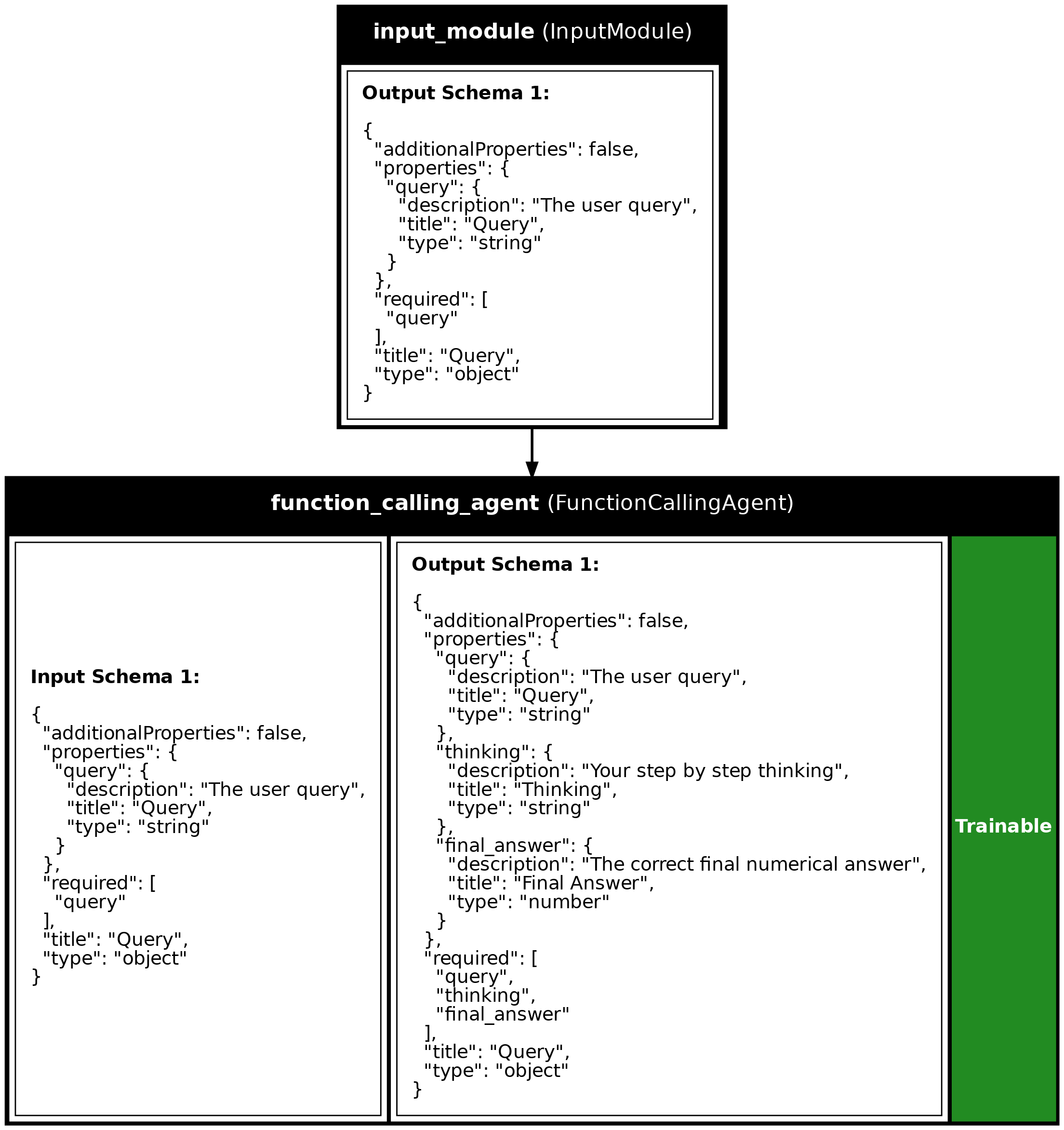
Program Visualization
API References
Source
import asyncio
import os

from dotenv import load_dotenv

import synalinks

synalinks.enable_logging()


# Define the data models
class Query(synalinks.DataModel):
    query: str = synalinks.Field(
        description="The user query",
    )


class NumericalFinalAnswer(synalinks.DataModel):
    final_answer: float = synalinks.Field(
        description="The correct final numerical answer",
    )


async def main():
    load_dotenv()

    # Enable observability for tracing
#     synalinks.enable_observability(
#         tracking_uri="http://localhost:5000",
#         experiment_name="mcp_math_agent",
#     )

    # Initialize the language model
    language_model = synalinks.LanguageModel(
        model="ollama/qwen3:8b",
    )

    # ==========================================================================
    # Connect to MCP server and load tools
    # ==========================================================================
    print("Connecting to MCP server...")

    # Get the absolute path to the MCP server script
    script_dir = os.path.dirname(os.path.abspath(__file__))
    server_path = os.path.join(script_dir, "mcp_math_server.py")

    # Create the MCP client with stdio transport
    # The server will be started as a subprocess
    client = synalinks.MultiServerMCPClient(
        {
            "math": {
                "command": "python",
                "args": [server_path],
                "transport": "stdio",
            },
        }
    )

    # Load all tools from the MCP server
    # Each tool call will start a new session with the server
    tools = await client.get_tools()

    print(f"Loaded {len(tools)} tools from MCP server:")
    for tool in tools:
        print(f"  - {tool.name}: {tool.description}")

    # ==========================================================================
    # Create the autonomous agent with MCP tools
    # ==========================================================================
    print("\nCreating the MCP agent...")

    inputs = synalinks.Input(data_model=Query)
    outputs = await synalinks.FunctionCallingAgent(
        data_model=NumericalFinalAnswer,
        tools=tools,
        language_model=language_model,
        max_iterations=10,
        return_inputs_with_trajectory=True,
        autonomous=True,
    )(inputs)

    agent = synalinks.Program(
        inputs=inputs,
        outputs=outputs,
        name="mcp_agent",
        description="An agent using MCP tools for math operations",
    )

    synalinks.utils.plot_program(
        agent,
        to_folder="examples",
        show_module_names=True,
        show_trainable=True,
        show_schemas=True,
    )

    # ==========================================================================
    # Run the agent
    # ==========================================================================
    print("\nRunning the agent...")

    # Test with a simple calculation
    input_query = Query(query="What is (15 + 25) * 3 - 10?")
    response = await agent(input_query)

    print("\nAgent response:")
    print(response.prettify_json())

    # ==========================================================================
    # Run another query to demonstrate multiple tool calls
    # ==========================================================================
    print("\n" + "=" * 60)
    print("Running another query...")

    input_query = Query(query="Calculate 100 divided by 4, then multiply by 7")
    response = await agent(input_query)

    print("\nAgent response:")
    print(response.prettify_json())


if __name__ == "__main__":
    asyncio.run(main())
Run log
The log below is the unedited combined output of running the example above with local models (ollama).
Full run log: examples/15_mcp_agent.log
(DEBUG) [Synalinks]
Call ID: fc124ce3-76d2-411d-a6a1-6493bdc46c9d
Parent call ID: None
Module: FunctionCallingAgent
Module Name: function_calling_agent
Module Description: A trainable parallel function calling agent.
Data Model JSON Schema:
[
{
"additionalProperties": false,
"properties": {
"query": {
"description": "The user query",
"title": "Query",
"type": "string"
}
},
"required": [
"query"
],
"title": "Query",
"type": "object"
}
]
(DEBUG) [Synalinks]
Call ID: ac0ce18d-17f9-4709-82be-13be1d2191a9
Parent call ID: fc124ce3-76d2-411d-a6a1-6493bdc46c9d
Module: Generator
Module Name: tool_calls_generator_function_calling_agent
Module Description: Use a `LanguageModel` to generate a data model from an arbitrary input data model.
Data Model JSON Schema:
[
{
"additionalProperties": false,
"properties": {
"query": {
"description": "The user query",
"title": "Query",
"type": "string"
}
},
"required": [
"query"
],
"title": "Query",
"type": "object"
}
]
(DEBUG) [Synalinks]
Call ID: ac0ce18d-17f9-4709-82be-13be1d2191a9
Parent call ID: fc124ce3-76d2-411d-a6a1-6493bdc46c9d
Module: Generator
Module Name: tool_calls_generator_function_calling_agent
Module Description: Use a `LanguageModel` to generate a data model from an arbitrary input data model.
Data Model JSON Schema:
[
{
"$defs": {
"ChatRole": {
"description": "The chat message roles",
"enum": [
"system",
"developer",
"user",
"assistant",
"tool",
"function"
],
"title": "ChatRole",
"type": "string"
},
"ToolCall": {
"additionalProperties": false,
"description": "A tool call, shaped like an OpenAI Chat Completions tool call.\n\nMirrors the wire envelope (`{id, type, function: {name, arguments}}`)\nexcept that `arguments` stays a parsed dict rather than a JSON-encoded\nstring, so modules and agents can read it directly. The string encoding\nis applied only at the wire edge (see `backend.pydantic.chat_completions`).",
"properties": {
"id": {
"description": "The id of the tool call",
"title": "Id",
"type": "string"
},
"type": {
"const": "function",
"default": "function",
"description": "The tool call type (always `function` today)",
"title": "Type",
"type": "string"
},
"function": {
"$ref": "#/$defs/ToolCallFunction",
"description": "The function invocation (name + arguments)"
}
},
"required": [
"id",
"function"
],
"title": "ToolCall",
"type": "object"
},
"ToolCallFunction": {
"additionalProperties": false,
"description": "The `function` payload of a tool call (name + parsed arguments).",
"properties": {
"name": {
"description": "The name of the function called",
"title": "Name",
"type": "string"
},
"arguments": {
"additionalProperties": true,
"description": "The arguments of the tool call",
"title": "Arguments",
"type": "object"
}
},
"required": [
"name",
"arguments"
],
"title": "ToolCallFunction",
"type": "object"
}
},
"additionalProperties": false,
"description": "A chat message",
"properties": {
"role": {
"$ref": "#/$defs/ChatRole",
"description": "The chat message role"
},
"reasoning_content": {
"anyOf": [
{
"type": "string"
},
{
"type": "null"
}
],
"default": null,
"description": "The reasoning/thinking content of the message. Keyed to match the litellm/DeepSeek `reasoning_content` chat-completion field (a provider extension, not part of the base OpenAI spec), so the message API stays a subset of the litellm-extended chat-completion message.",
"title": "Reasoning Content"
},
"thinking_blocks": {
"anyOf": [
{
"items": {
"additionalProperties": true,
"type": "object"
},
"type": "array"
},
{
"type": "null"
}
],
"default": null,
"description": "Opaque provider-native thinking blocks (e.g. Anthropic's signed `thinking_blocks`; a litellm extension, not part of the base OpenAI spec). Carried through verbatim on assistant-message re-injection so multi-turn tool-use round-trips preserve signatures. None for providers that emit reasoning only as text.",
"title": "Thinking Blocks"
},
"content": {
"anyOf": [
{
"type": "string"
},
{
"items": {
"additionalProperties": true,
"type": "object"
},
"type": "array"
},
{
"additionalProperties": true,
"type": "object"
},
{
"type": "null"
}
],
"default": null,
"description": "The content of the message",
"title": "Content"
},
"tool_call_id": {
"anyOf": [
{
"type": "string"
},
{
"type": "null"
}
],
"default": null,
"description": "The id of the tool call if role is `tool`",
"title": "Tool Call Id"
},
"tool_calls": {
"anyOf": [
{
"items": {
"$ref": "#/$defs/ToolCall"
},
"type": "array"
},
{
"type": "null"
}
],
"default": null,
"description": "The tool calls of the agent",
"title": "Tool Calls"
}
},
"required": [
"role"
],
"title": "ChatMessage",
"type": "object"
}
]
(DEBUG) [Synalinks]
Call ID: 2530d9d3-04b3-451e-bdd7-11e43f8b64dd
Parent call ID: ac0ce18d-17f9-4709-82be-13be1d2191a9
Module: Generator
Module Name: tool_calls_generator_function_calling_agent
Module Description: Use a `LanguageModel` to generate a data model from an arbitrary input data model.
Data Model JSON Schema:
[
{
"additionalProperties": false,
"properties": {
"query": {
"description": "The user query",
"title": "Query",
"type": "string"
}
},
"required": [
"query"
],
"title": "Query",
"type": "object"
}
]
(DEBUG) [Synalinks]
Call ID: 2530d9d3-04b3-451e-bdd7-11e43f8b64dd
Parent call ID: ac0ce18d-17f9-4709-82be-13be1d2191a9
Module: Generator
Module Name: tool_calls_generator_function_calling_agent
Module Description: Use a `LanguageModel` to generate a data model from an arbitrary input data model.
Data Model JSON Schema:
[
{
"$defs": {
"ChatRole": {
"description": "The chat message roles",
"enum": [
"system",
"developer",
"user",
"assistant",
"tool",
"function"
],
"title": "ChatRole",
"type": "string"
},
"ToolCall": {
"additionalProperties": false,
"description": "A tool call, shaped like an OpenAI Chat Completions tool call.\n\nMirrors the wire envelope (`{id, type, function: {name, arguments}}`)\nexcept that `arguments` stays a parsed dict rather than a JSON-encoded\nstring, so modules and agents can read it directly. The string encoding\nis applied only at the wire edge (see `backend.pydantic.chat_completions`).",
"properties": {
"id": {
"description": "The id of the tool call",
"title": "Id",
"type": "string"
},
"type": {
"const": "function",
"default": "function",
"description": "The tool call type (always `function` today)",
"title": "Type",
"type": "string"
},
"function": {
"$ref": "#/$defs/ToolCallFunction",
"description": "The function invocation (name + arguments)"
}
},
"required": [
"id",
"function"
],
"title": "ToolCall",
"type": "object"
},
"ToolCallFunction": {
"additionalProperties": false,
"description": "The `function` payload of a tool call (name + parsed arguments).",
"properties": {
"name": {
"description": "The name of the function called",
"title": "Name",
"type": "string"
},
"arguments": {
"additionalProperties": true,
"description": "The arguments of the tool call",
"title": "Arguments",
"type": "object"
}
},
"required": [
"name",
"arguments"
],
"title": "ToolCallFunction",
"type": "object"
}
},
"additionalProperties": false,
"description": "A chat message",
"properties": {
"role": {
"$ref": "#/$defs/ChatRole",
"description": "The chat message role"
},
"reasoning_content": {
"anyOf": [
{
"type": "string"
},
{
"type": "null"
}
],
"default": null,
"description": "The reasoning/thinking content of the message. Keyed to match the litellm/DeepSeek `reasoning_content` chat-completion field (a provider extension, not part of the base OpenAI spec), so the message API stays a subset of the litellm-extended chat-completion message.",
"title": "Reasoning Content"
},
"thinking_blocks": {
"anyOf": [
{
"items": {
"additionalProperties": true,
"type": "object"
},
"type": "array"
},
{
"type": "null"
}
],
"default": null,
"description": "Opaque provider-native thinking blocks (e.g. Anthropic's signed `thinking_blocks`; a litellm extension, not part of the base OpenAI spec). Carried through verbatim on assistant-message re-injection so multi-turn tool-use round-trips preserve signatures. None for providers that emit reasoning only as text.",
"title": "Thinking Blocks"
},
"content": {
"anyOf": [
{
"type": "string"
},
{
"items": {
"additionalProperties": true,
"type": "object"
},
"type": "array"
},
{
"additionalProperties": true,
"type": "object"
},
{
"type": "null"
}
],
"default": null,
"description": "The content of the message",
"title": "Content"
},
"tool_call_id": {
"anyOf": [
{
"type": "string"
},
{
"type": "null"
}
],
"default": null,
"description": "The id of the tool call if role is `tool`",
"title": "Tool Call Id"
},
"tool_calls": {
"anyOf": [
{
"items": {
"$ref": "#/$defs/ToolCall"
},
"type": "array"
},
{
"type": "null"
}
],
"default": null,
"description": "The tool calls of the agent",
"title": "Tool Calls"
}
},
"required": [
"role"
],
"title": "ChatMessage",
"type": "object"
}
]
(DEBUG) [Synalinks]
Call ID: fc124ce3-76d2-411d-a6a1-6493bdc46c9d
Parent call ID: None
Module: FunctionCallingAgent
Module Name: function_calling_agent
Module Description: A trainable parallel function calling agent.
Data Model JSON Schema:
[
{
"additionalProperties": false,
"$defs": {
"ChatMessage": {
"additionalProperties": false,
"description": "A chat message",
"properties": {
"role": {
"$ref": "#/$defs/ChatRole",
"description": "The chat message role"
},
"reasoning_content": {
"anyOf": [
{
"type": "string"
},
{
"type": "null"
}
],
"default": null,
"description": "The reasoning/thinking content of the message. Keyed to match the litellm/DeepSeek `reasoning_content` chat-completion field (a provider extension, not part of the base OpenAI spec), so the message API stays a subset of the litellm-extended chat-completion message.",
"title": "Reasoning Content"
},
"thinking_blocks": {
"anyOf": [
{
"items": {
"additionalProperties": true,
"type": "object"
},
"type": "array"
},
{
"type": "null"
}
],
"default": null,
"description": "Opaque provider-native thinking blocks (e.g. Anthropic's signed `thinking_blocks`; a litellm extension, not part of the base OpenAI spec). Carried through verbatim on assistant-message re-injection so multi-turn tool-use round-trips preserve signatures. None for providers that emit reasoning only as text.",
"title": "Thinking Blocks"
},
"content": {
"anyOf": [
{
"type": "string"
},
{
"items": {
"additionalProperties": true,
"type": "object"
},
"type": "array"
},
{
"additionalProperties": true,
"type": "object"
},
{
"type": "null"
}
],
"default": null,
"description": "The content of the message",
"title": "Content"
},
"tool_call_id": {
"anyOf": [
{
"type": "string"
},
{
"type": "null"
}
],
"default": null,
"description": "The id of the tool call if role is `tool`",
"title": "Tool Call Id"
},
"tool_calls": {
"anyOf": [
{
"items": {
"$ref": "#/$defs/ToolCall"
},
"type": "array"
},
{
"type": "null"
}
],
"default": null,
"description": "The tool calls of the agent",
"title": "Tool Calls"
}
},
"required": [
"role"
],
"title": "ChatMessage",
"type": "object"
},
"ChatRole": {
"description": "The chat message roles",
"enum": [
"system",
"developer",
"user",
"assistant",
"tool",
"function"
],
"title": "ChatRole",
"type": "string"
},
"ToolCall": {
"additionalProperties": false,
"description": "A tool call, shaped like an OpenAI Chat Completions tool call.\n\nMirrors the wire envelope (`{id, type, function: {name, arguments}}`)\nexcept that `arguments` stays a parsed dict rather than a JSON-encoded\nstring, so modules and agents can read it directly. The string encoding\nis applied only at the wire edge (see `backend.pydantic.chat_completions`).",
"properties": {
"id": {
"description": "The id of the tool call",
"title": "Id",
"type": "string"
},
"type": {
"const": "function",
"default": "function",
"description": "The tool call type (always `function` today)",
"title": "Type",
"type": "string"
},
"function": {
"$ref": "#/$defs/ToolCallFunction",
"description": "The function invocation (name + arguments)"
}
},
"required": [
"id",
"function"
],
"title": "ToolCall",
"type": "object"
},
"ToolCallFunction": {
"additionalProperties": false,
"description": "The `function` payload of a tool call (name + parsed arguments).",
"properties": {
"name": {
"description": "The name of the function called",
"title": "Name",
"type": "string"
},
"arguments": {
"additionalProperties": true,
"description": "The arguments of the tool call",
"title": "Arguments",
"type": "object"
}
},
"required": [
"name",
"arguments"
],
"title": "ToolCallFunction",
"type": "object"
}
},
"properties": {
"messages": {
"default": [],
"description": "The list of chat messages",
"items": {
"$ref": "#/$defs/ChatMessage"
},
"title": "Messages",
"type": "array"
},
"final_answer": {
"description": "The correct final numerical answer",
"title": "Final Answer",
"type": "number"
}
},
"required": [
"final_answer"
],
"title": "ChatMessages",
"type": "object"
}
]
[Synalinks]
Call ID: a59e252b-08f3-4b71-a1ff-ee8400b4057f
Parent call ID: None
Module: Functional
Module Name: mcp_agent
Module Description: An agent using MCP tools for math operations
Data Model JSON:
[
{
"query": "What is (15 + 25) * 3 - 10?"
}
]
[Synalinks]
Call ID: 3c23fd0b-0a6a-45b7-9649-3ef02851a001
Parent call ID: a59e252b-08f3-4b71-a1ff-ee8400b4057f
Module: FunctionCallingAgent
Module Name: function_calling_agent
Module Description: A trainable parallel function calling agent.
Data Model JSON:
[
{
"query": "What is (15 + 25) * 3 - 10?"
}
]
[Synalinks]
Call ID: fbaf5681-5d19-4a08-9401-b5bbc9d7d950
Parent call ID: 3c23fd0b-0a6a-45b7-9649-3ef02851a001
Module: Generator
Module Name: tool_calls_generator_function_calling_agent
Module Description: Use a `LanguageModel` to generate a data model from an arbitrary input data model.
Data Model JSON:
[
{
"query": "What is (15 + 25) * 3 - 10?",
"messages": []
}
]
[Synalinks]
Call ID: bf9ed64d-e88c-4297-b575-c536aff3f85e
Parent call ID: fbaf5681-5d19-4a08-9401-b5bbc9d7d950
Module: LanguageModel
Module Name: language_model
Module Description: A language model API wrapper.
Data Model JSON:
[
{
"messages": [
{
"role": "system",
"content": "<instructions>\nThink step by step: Use the thinking field to elaborate what you observe and\nwhat do you need to accomplish next.\nReflect on prior steps: Review your previous actions and their outcomes to\navoid unnecessary repetition.\nAvoid unnecessary actions: If you already have enough information to complete\nthe user task, return an empty tool calls array.\n</instructions>\n"
},
{
"role": "user",
"content": "<input>\n{'query': 'What is (15 + 25) * 3 - 10?'}\n</input>\n<output>\n"
}
]
}
]
[Synalinks]
Call ID: bf9ed64d-e88c-4297-b575-c536aff3f85e
Parent call ID: fbaf5681-5d19-4a08-9401-b5bbc9d7d950
Module: LanguageModel
Module Name: language_model
Module Description: A language model API wrapper.
Data Model JSON:
[
{
"role": "assistant",
"content": "",
"reasoning_content": "Okay, let's tackle this problem step by step. The user is asking for the result of (15 + 25) * 3 - 10. First, I need to break down the calculation into manageable parts.\n\nStarting with the parentheses: 15 + 25. Using the math_add function, I can add these two numbers. That should give me 40. Next, I need to multiply that result by 3. So, I'll use the math_multiply function with 40 and 3, which should equal 120. \n\nNow, the last part is subtracting 10 from 120. Here, the math_subtract function comes into play. Subtracting 10 from 120 gives 110. I should make sure each step is correct and that I'm using the right functions for each operation. Let me double-check each calculation to avoid any mistakes. Once all steps are verified, the final answer should be 110.\n",
"tool_calls": [
{
"id": "call_ajww2d5k",
"type": "function",
"function": {
"name": "math_add",
"arguments": {
"b": 25,
"a": 15
}
}
},
{
"id": "call_kpqkqrcx",
"type": "function",
"function": {
"name": "math_multiply",
"arguments": {
"a": 40,
"b": 3
}
}
},
{
"id": "call_626qjy5y",
"type": "function",
"function": {
"name": "math_subtract",
"arguments": {
"a": 120,
"b": 10
}
}
}
]
}
]
[Synalinks]
Call ID: fbaf5681-5d19-4a08-9401-b5bbc9d7d950
Parent call ID: 3c23fd0b-0a6a-45b7-9649-3ef02851a001
Module: Generator
Module Name: tool_calls_generator_function_calling_agent
Module Description: Use a `LanguageModel` to generate a data model from an arbitrary input data model.
Data Model JSON:
[
{
"role": "assistant",
"content": "",
"reasoning_content": "Okay, let's tackle this problem step by step. The user is asking for the result of (15 + 25) * 3 - 10. First, I need to break down the calculation into manageable parts.\n\nStarting with the parentheses: 15 + 25. Using the math_add function, I can add these two numbers. That should give me 40. Next, I need to multiply that result by 3. So, I'll use the math_multiply function with 40 and 3, which should equal 120. \n\nNow, the last part is subtracting 10 from 120. Here, the math_subtract function comes into play. Subtracting 10 from 120 gives 110. I should make sure each step is correct and that I'm using the right functions for each operation. Let me double-check each calculation to avoid any mistakes. Once all steps are verified, the final answer should be 110.\n",
"tool_calls": [
{
"id": "call_ajww2d5k",
"type": "function",
"function": {
"name": "math_add",
"arguments": {
"b": 25,
"a": 15
}
}
},
{
"id": "call_kpqkqrcx",
"type": "function",
"function": {
"name": "math_multiply",
"arguments": {
"a": 40,
"b": 3
}
}
},
{
"id": "call_626qjy5y",
"type": "function",
"function": {
"name": "math_subtract",
"arguments": {
"a": 120,
"b": 10
}
}
}
]
}
]
[Synalinks]
Call ID: 68ddc2a7-0617-4299-9923-b64bb7360f0d
Parent call ID: bf9ed64d-e88c-4297-b575-c536aff3f85e
Module: Tool
Module Name: math_add
Module Description: Add two numbers together
Keyword Arguments:
{
"b": 25,
"a": 15
}
[Synalinks]
Call ID: 60c18676-8eff-4d46-b905-6a2f43d48a0f
Parent call ID: 68ddc2a7-0617-4299-9923-b64bb7360f0d
Module: Tool
Module Name: math_multiply
Module Description: Multiply two numbers together
Keyword Arguments:
{
"a": 40,
"b": 3
}
[Synalinks]
Call ID: 21e030b7-ef0d-4740-93d6-15a4398287b2
Parent call ID: 60c18676-8eff-4d46-b905-6a2f43d48a0f
Module: Tool
Module Name: math_subtract
Module Description: Subtract two numbers (a - b)
Keyword Arguments:
{
"a": 120,
"b": 10
}
[Synalinks]
Call ID: 60c18676-8eff-4d46-b905-6a2f43d48a0f
Parent call ID: 68ddc2a7-0617-4299-9923-b64bb7360f0d
Module: Tool
Module Name: math_multiply
Module Description: Multiply two numbers together
Data Model JSON:
[
{
"response": "120"
}
]
[Synalinks]
Call ID: 68ddc2a7-0617-4299-9923-b64bb7360f0d
Parent call ID: bf9ed64d-e88c-4297-b575-c536aff3f85e
Module: Tool
Module Name: math_add
Module Description: Add two numbers together
Data Model JSON:
[
{
"response": "40"
}
]
[Synalinks]
Call ID: 21e030b7-ef0d-4740-93d6-15a4398287b2
Parent call ID: 60c18676-8eff-4d46-b905-6a2f43d48a0f
Module: Tool
Module Name: math_subtract
Module Description: Subtract two numbers (a - b)
Data Model JSON:
[
{
"response": "110"
}
]
[Synalinks]
Call ID: 4e28705d-c386-4176-9479-d4d917e5096a
Parent call ID: 21e030b7-ef0d-4740-93d6-15a4398287b2
Module: Generator
Module Name: tool_calls_generator_function_calling_agent
Module Description: Use a `LanguageModel` to generate a data model from an arbitrary input data model.
Data Model JSON:
[
{
"query": "What is (15 + 25) * 3 - 10?",
"messages": [
{
"role": "assistant",
"content": "",
"reasoning_content": "Okay, let's tackle this problem step by step. The user is asking for the result of (15 + 25) * 3 - 10. First, I need to break down the calculation into manageable parts.\n\nStarting with the parentheses: 15 + 25. Using the math_add function, I can add these two numbers. That should give me 40. Next, I need to multiply that result by 3. So, I'll use the math_multiply function with 40 and 3, which should equal 120. \n\nNow, the last part is subtracting 10 from 120. Here, the math_subtract function comes into play. Subtracting 10 from 120 gives 110. I should make sure each step is correct and that I'm using the right functions for each operation. Let me double-check each calculation to avoid any mistakes. Once all steps are verified, the final answer should be 110.\n",
"tool_calls": [
{
"id": "call_ajww2d5k",
"type": "function",
"function": {
"name": "math_add",
"arguments": {
"b": 25,
"a": 15
}
}
},
{
"id": "call_kpqkqrcx",
"type": "function",
"function": {
"name": "math_multiply",
"arguments": {
"a": 40,
"b": 3
}
}
},
{
"id": "call_626qjy5y",
"type": "function",
"function": {
"name": "math_subtract",
"arguments": {
"a": 120,
"b": 10
}
}
}
]
},
{
"role": "tool",
"content": {
"response": "40"
},
"tool_call_id": "call_ajww2d5k"
},
{
"role": "tool",
"content": {
"response": "120"
},
"tool_call_id": "call_kpqkqrcx"
},
{
"role": "tool",
"content": {
"response": "110"
},
"tool_call_id": "call_626qjy5y"
}
]
}
]
[Synalinks]
Call ID: b65ec675-afb1-4383-908a-5bbeeb964110
Parent call ID: 4e28705d-c386-4176-9479-d4d917e5096a
Module: LanguageModel
Module Name: language_model
Module Description: A language model API wrapper.
Data Model JSON:
[
{
"messages": [
{
"role": "system",
"content": "<instructions>\nThink step by step: Use the thinking field to elaborate what you observe and\nwhat do you need to accomplish next.\nReflect on prior steps: Review your previous actions and their outcomes to\navoid unnecessary repetition.\nAvoid unnecessary actions: If you already have enough information to complete\nthe user task, return an empty tool calls array.\n</instructions>\n"
},
{
"role": "user",
"content": "<input>\n{'query': 'What is (15 + 25) * 3 - 10?'}\n</input>\n<output>\n"
},
{
"role": "assistant",
"reasoning_content": "Okay, let's tackle this problem step by step. The user is asking for the result of (15 + 25) * 3 - 10. First, I need to break down the calculation into manageable parts.\n\nStarting with the parentheses: 15 + 25. Using the math_add function, I can add these two numbers. That should give me 40. Next, I need to multiply that result by 3. So, I'll use the math_multiply function with 40 and 3, which should equal 120. \n\nNow, the last part is subtracting 10 from 120. Here, the math_subtract function comes into play. Subtracting 10 from 120 gives 110. I should make sure each step is correct and that I'm using the right functions for each operation. Let me double-check each calculation to avoid any mistakes. Once all steps are verified, the final answer should be 110.\n",
"content": "",
"tool_calls": [
{
"id": "call_ajww2d5k",
"type": "function",
"function": {
"name": "math_add",
"arguments": {
"b": 25,
"a": 15
}
}
},
{
"id": "call_kpqkqrcx",
"type": "function",
"function": {
"name": "math_multiply",
"arguments": {
"a": 40,
"b": 3
}
}
},
{
"id": "call_626qjy5y",
"type": "function",
"function": {
"name": "math_subtract",
"arguments": {
"a": 120,
"b": 10
}
}
}
]
},
{
"role": "tool",
"content": {
"response": "40"
},
"tool_call_id": "call_ajww2d5k"
},
{
"role": "tool",
"content": {
"response": "120"
},
"tool_call_id": "call_kpqkqrcx"
},
{
"role": "tool",
"content": {
"response": "110"
},
"tool_call_id": "call_626qjy5y"
}
]
}
]
[Synalinks]
Call ID: b65ec675-afb1-4383-908a-5bbeeb964110
Parent call ID: 4e28705d-c386-4176-9479-d4d917e5096a
Module: LanguageModel
Module Name: language_model
Module Description: A language model API wrapper.
Data Model JSON:
[
{
"role": "assistant",
"content": "The final answer is 110.",
"reasoning_content": "Okay, let me see. The user asked for the result of (15 + 25) * 3 - 10. I need to make sure each step is correct.\n\nFirst, I called the math_add function with 15 and 25. The response was 40, which makes sense because 15 + 25 is indeed 40. Then, I used math_multiply with 40 and 3, which gave 120. That's correct because 40 * 3 is 120. \n\nNext, I subtracted 10 from 120 using math_subtract, and the result was 110. All the steps check out. Each function was used appropriately for the operations. The final answer should be 110. I don't see any mistakes in the calculations or the order of operations. The parentheses were handled first, then multiplication, and finally subtraction. Everything looks good. The user should get the correct result of 110.\n"
}
]
[Synalinks]
Call ID: 4e28705d-c386-4176-9479-d4d917e5096a
Parent call ID: 21e030b7-ef0d-4740-93d6-15a4398287b2
Module: Generator
Module Name: tool_calls_generator_function_calling_agent
Module Description: Use a `LanguageModel` to generate a data model from an arbitrary input data model.
Data Model JSON:
[
{
"role": "assistant",
"content": "The final answer is 110.",
"reasoning_content": "Okay, let me see. The user asked for the result of (15 + 25) * 3 - 10. I need to make sure each step is correct.\n\nFirst, I called the math_add function with 15 and 25. The response was 40, which makes sense because 15 + 25 is indeed 40. Then, I used math_multiply with 40 and 3, which gave 120. That's correct because 40 * 3 is 120. \n\nNext, I subtracted 10 from 120 using math_subtract, and the result was 110. All the steps check out. Each function was used appropriately for the operations. The final answer should be 110. I don't see any mistakes in the calculations or the order of operations. The parentheses were handled first, then multiplication, and finally subtraction. Everything looks good. The user should get the correct result of 110.\n"
}
]
[Synalinks]
Call ID: ba612a1c-19b2-4e67-879c-bbedbfd0a9e3
Parent call ID: b65ec675-afb1-4383-908a-5bbeeb964110
Module: Generator
Module Name: final_generator_function_calling_agent
Module Description: Use a `LanguageModel` to generate a data model from an arbitrary input data model.
Data Model JSON:
[
{
"query": "What is (15 + 25) * 3 - 10?",
"messages": [
{
"role": "assistant",
"content": "",
"reasoning_content": "Okay, let's tackle this problem step by step. The user is asking for the result of (15 + 25) * 3 - 10. First, I need to break down the calculation into manageable parts.\n\nStarting with the parentheses: 15 + 25. Using the math_add function, I can add these two numbers. That should give me 40. Next, I need to multiply that result by 3. So, I'll use the math_multiply function with 40 and 3, which should equal 120. \n\nNow, the last part is subtracting 10 from 120. Here, the math_subtract function comes into play. Subtracting 10 from 120 gives 110. I should make sure each step is correct and that I'm using the right functions for each operation. Let me double-check each calculation to avoid any mistakes. Once all steps are verified, the final answer should be 110.\n",
"tool_calls": [
{
"id": "call_ajww2d5k",
"type": "function",
"function": {
"name": "math_add",
"arguments": {
"b": 25,
"a": 15
}
}
},
{
"id": "call_kpqkqrcx",
"type": "function",
"function": {
"name": "math_multiply",
"arguments": {
"a": 40,
"b": 3
}
}
},
{
"id": "call_626qjy5y",
"type": "function",
"function": {
"name": "math_subtract",
"arguments": {
"a": 120,
"b": 10
}
}
}
]
},
{
"role": "tool",
"content": {
"response": "40"
},
"tool_call_id": "call_ajww2d5k"
},
{
"role": "tool",
"content": {
"response": "120"
},
"tool_call_id": "call_kpqkqrcx"
},
{
"role": "tool",
"content": {
"response": "110"
},
"tool_call_id": "call_626qjy5y"
}
]
}
]
[Synalinks]
Call ID: ca3b1711-e54a-41ba-91cd-31aa0d8a6ef9
Parent call ID: ba612a1c-19b2-4e67-879c-bbedbfd0a9e3
Module: LanguageModel
Module Name: language_model
Module Description: A language model API wrapper.
Data Model JSON:
[
{
"messages": [
{
"role": "system",
"content": "<instructions>\nThink step by step: Use the thinking field to elaborate what you observe and\nwhat do you need to accomplish next.\nReflect on prior steps: Review your previous actions and their outcomes to\navoid unnecessary repetition.\nAvoid unnecessary actions: If you already have enough information to complete\nthe user task, return an empty tool calls array.\n</instructions>\n"
},
{
"role": "user",
"content": "<input>\n{'query': 'What is (15 + 25) * 3 - 10?'}\n</input>\n<output>\n"
},
{
"role": "assistant",
"reasoning_content": "Okay, let's tackle this problem step by step. The user is asking for the result of (15 + 25) * 3 - 10. First, I need to break down the calculation into manageable parts.\n\nStarting with the parentheses: 15 + 25. Using the math_add function, I can add these two numbers. That should give me 40. Next, I need to multiply that result by 3. So, I'll use the math_multiply function with 40 and 3, which should equal 120. \n\nNow, the last part is subtracting 10 from 120. Here, the math_subtract function comes into play. Subtracting 10 from 120 gives 110. I should make sure each step is correct and that I'm using the right functions for each operation. Let me double-check each calculation to avoid any mistakes. Once all steps are verified, the final answer should be 110.\n",
"content": "",
"tool_calls": [
{
"id": "call_ajww2d5k",
"type": "function",
"function": {
"name": "math_add",
"arguments": {
"b": 25,
"a": 15
}
}
},
{
"id": "call_kpqkqrcx",
"type": "function",
"function": {
"name": "math_multiply",
"arguments": {
"a": 40,
"b": 3
}
}
},
{
"id": "call_626qjy5y",
"type": "function",
"function": {
"name": "math_subtract",
"arguments": {
"a": 120,
"b": 10
}
}
}
]
},
{
"role": "tool",
"content": {
"response": "40"
},
"tool_call_id": "call_ajww2d5k"
},
{
"role": "tool",
"content": {
"response": "120"
},
"tool_call_id": "call_kpqkqrcx"
},
{
"role": "tool",
"content": {
"response": "110"
},
"tool_call_id": "call_626qjy5y"
}
]
}
]
[Synalinks]
Call ID: ca3b1711-e54a-41ba-91cd-31aa0d8a6ef9
Parent call ID: ba612a1c-19b2-4e67-879c-bbedbfd0a9e3
Module: LanguageModel
Module Name: language_model
Module Description: A language model API wrapper.
Data Model JSON:
[
{
"final_answer": 110
}
]
[Synalinks]
Call ID: ba612a1c-19b2-4e67-879c-bbedbfd0a9e3
Parent call ID: b65ec675-afb1-4383-908a-5bbeeb964110
Module: Generator
Module Name: final_generator_function_calling_agent
Module Description: Use a `LanguageModel` to generate a data model from an arbitrary input data model.
Data Model JSON:
[
{
"final_answer": 110
}
]
[Synalinks]
Call ID: 3c23fd0b-0a6a-45b7-9649-3ef02851a001
Parent call ID: a59e252b-08f3-4b71-a1ff-ee8400b4057f
Module: FunctionCallingAgent
Module Name: function_calling_agent
Module Description: A trainable parallel function calling agent.
Data Model JSON:
[
{
"messages": [
{
"role": "assistant",
"reasoning_content": "Okay, let's tackle this problem step by step. The user is asking for the result of (15 + 25) * 3 - 10. First, I need to break down the calculation into manageable parts.\n\nStarting with the parentheses: 15 + 25. Using the math_add function, I can add these two numbers. That should give me 40. Next, I need to multiply that result by 3. So, I'll use the math_multiply function with 40 and 3, which should equal 120. \n\nNow, the last part is subtracting 10 from 120. Here, the math_subtract function comes into play. Subtracting 10 from 120 gives 110. I should make sure each step is correct and that I'm using the right functions for each operation. Let me double-check each calculation to avoid any mistakes. Once all steps are verified, the final answer should be 110.\n",
"content": "",
"tool_calls": [
{
"id": "call_ajww2d5k",
"type": "function",
"function": {
"name": "math_add",
"arguments": {
"b": 25,
"a": 15
}
}
},
{
"id": "call_kpqkqrcx",
"type": "function",
"function": {
"name": "math_multiply",
"arguments": {
"a": 40,
"b": 3
}
}
},
{
"id": "call_626qjy5y",
"type": "function",
"function": {
"name": "math_subtract",
"arguments": {
"a": 120,
"b": 10
}
}
}
]
},
{
"role": "tool",
"content": {
"response": "40"
},
"tool_call_id": "call_ajww2d5k"
},
{
"role": "tool",
"content": {
"response": "120"
},
"tool_call_id": "call_kpqkqrcx"
},
{
"role": "tool",
"content": {
"response": "110"
},
"tool_call_id": "call_626qjy5y"
}
],
"final_answer": 110
}
]
[Synalinks]
Call ID: a59e252b-08f3-4b71-a1ff-ee8400b4057f
Parent call ID: None
Module: Functional
Module Name: mcp_agent
Module Description: An agent using MCP tools for math operations
Data Model JSON:
[
{
"messages": [
{
"role": "assistant",
"reasoning_content": "Okay, let's tackle this problem step by step. The user is asking for the result of (15 + 25) * 3 - 10. First, I need to break down the calculation into manageable parts.\n\nStarting with the parentheses: 15 + 25. Using the math_add function, I can add these two numbers. That should give me 40. Next, I need to multiply that result by 3. So, I'll use the math_multiply function with 40 and 3, which should equal 120. \n\nNow, the last part is subtracting 10 from 120. Here, the math_subtract function comes into play. Subtracting 10 from 120 gives 110. I should make sure each step is correct and that I'm using the right functions for each operation. Let me double-check each calculation to avoid any mistakes. Once all steps are verified, the final answer should be 110.\n",
"content": "",
"tool_calls": [
{
"id": "call_ajww2d5k",
"type": "function",
"function": {
"name": "math_add",
"arguments": {
"b": 25,
"a": 15
}
}
},
{
"id": "call_kpqkqrcx",
"type": "function",
"function": {
"name": "math_multiply",
"arguments": {
"a": 40,
"b": 3
}
}
},
{
"id": "call_626qjy5y",
"type": "function",
"function": {
"name": "math_subtract",
"arguments": {
"a": 120,
"b": 10
}
}
}
]
},
{
"role": "tool",
"content": {
"response": "40"
},
"tool_call_id": "call_ajww2d5k"
},
{
"role": "tool",
"content": {
"response": "120"
},
"tool_call_id": "call_kpqkqrcx"
},
{
"role": "tool",
"content": {
"response": "110"
},
"tool_call_id": "call_626qjy5y"
}
],
"final_answer": 110
}
]
[Synalinks]
Call ID: 518ed84d-69c3-4b68-9be9-8c1c342201bb
Parent call ID: None
Module: Functional
Module Name: mcp_agent
Module Description: An agent using MCP tools for math operations
Data Model JSON:
[
{
"query": "Calculate 100 divided by 4, then multiply by 7"
}
]
[Synalinks]
Call ID: ad5afd31-bd2a-42c3-91bc-a2c1f631ff06
Parent call ID: 518ed84d-69c3-4b68-9be9-8c1c342201bb
Module: FunctionCallingAgent
Module Name: function_calling_agent
Module Description: A trainable parallel function calling agent.
Data Model JSON:
[
{
"query": "Calculate 100 divided by 4, then multiply by 7"
}
]
[Synalinks]
Call ID: 55708872-fa43-4970-bcff-b24799cd648f
Parent call ID: ad5afd31-bd2a-42c3-91bc-a2c1f631ff06
Module: Generator
Module Name: tool_calls_generator_function_calling_agent
Module Description: Use a `LanguageModel` to generate a data model from an arbitrary input data model.
Data Model JSON:
[
{
"query": "Calculate 100 divided by 4, then multiply by 7",
"messages": []
}
]
[Synalinks]
Call ID: 93b3bf0a-03d9-49a0-8f35-815f9ce3b491
Parent call ID: 55708872-fa43-4970-bcff-b24799cd648f
Module: LanguageModel
Module Name: language_model
Module Description: A language model API wrapper.
Data Model JSON:
[
{
"messages": [
{
"role": "system",
"content": "<instructions>\nThink step by step: Use the thinking field to elaborate what you observe and\nwhat do you need to accomplish next.\nReflect on prior steps: Review your previous actions and their outcomes to\navoid unnecessary repetition.\nAvoid unnecessary actions: If you already have enough information to complete\nthe user task, return an empty tool calls array.\n</instructions>\n"
},
{
"role": "user",
"content": "<input>\n{'query': 'Calculate 100 divided by 4, then multiply by 7'}\n</input>\n<output>\n"
}
]
}
]
[Synalinks]
Call ID: 93b3bf0a-03d9-49a0-8f35-815f9ce3b491
Parent call ID: 55708872-fa43-4970-bcff-b24799cd648f
Module: LanguageModel
Module Name: language_model
Module Description: A language model API wrapper.
Data Model JSON:
[
{
"role": "assistant",
"content": "",
"reasoning_content": "Okay, let's see. The user wants to calculate 100 divided by 4, then multiply the result by 7. Hmm, so first, I need to handle the division part. The tools available include math_divide, which takes two numbers. So first step is to divide 100 by 4 using math_divide. Then, take that result and multiply by 7 using math_multiply. Wait, but do I need to store the intermediate result? Since the functions are called sequentially, the output of the first function will be the input for the second. Let me check the functions again. The math_divide function returns a value, which I can then use as the 'a' parameter in math_multiply with b being 7. So first call math_divide with a=100 and b=4. Then take that result and call math_multiply with a=result and b=7. But since I can't store variables, I need to chain the calls. Wait, but the user's query is a single calculation. Let me make sure I'm following the correct order. Yes, first division then multiplication. So the first tool call is math_divide with 100 and 4. Then use that output as the first argument for math_multiply with 7. But since each tool call is separate, I need to make two tool calls in sequence. So first, divide 100 by 4, then multiply the result by 7. That's it.\n",
"tool_calls": [
{
"id": "call_1rqykp6h",
"type": "function",
"function": {
"name": "math_divide",
"arguments": {
"a": 100,
"b": 4
}
}
},
{
"id": "call_7b78ghmx",
"type": "function",
"function": {
"name": "math_multiply",
"arguments": {
"a": 25,
"b": 7
}
}
}
]
}
]
[Synalinks]
Call ID: 55708872-fa43-4970-bcff-b24799cd648f
Parent call ID: ad5afd31-bd2a-42c3-91bc-a2c1f631ff06
Module: Generator
Module Name: tool_calls_generator_function_calling_agent
Module Description: Use a `LanguageModel` to generate a data model from an arbitrary input data model.
Data Model JSON:
[
{
"role": "assistant",
"content": "",
"reasoning_content": "Okay, let's see. The user wants to calculate 100 divided by 4, then multiply the result by 7. Hmm, so first, I need to handle the division part. The tools available include math_divide, which takes two numbers. So first step is to divide 100 by 4 using math_divide. Then, take that result and multiply by 7 using math_multiply. Wait, but do I need to store the intermediate result? Since the functions are called sequentially, the output of the first function will be the input for the second. Let me check the functions again. The math_divide function returns a value, which I can then use as the 'a' parameter in math_multiply with b being 7. So first call math_divide with a=100 and b=4. Then take that result and call math_multiply with a=result and b=7. But since I can't store variables, I need to chain the calls. Wait, but the user's query is a single calculation. Let me make sure I'm following the correct order. Yes, first division then multiplication. So the first tool call is math_divide with 100 and 4. Then use that output as the first argument for math_multiply with 7. But since each tool call is separate, I need to make two tool calls in sequence. So first, divide 100 by 4, then multiply the result by 7. That's it.\n",
"tool_calls": [
{
"id": "call_1rqykp6h",
"type": "function",
"function": {
"name": "math_divide",
"arguments": {
"a": 100,
"b": 4
}
}
},
{
"id": "call_7b78ghmx",
"type": "function",
"function": {
"name": "math_multiply",
"arguments": {
"a": 25,
"b": 7
}
}
}
]
}
]
[Synalinks]
Call ID: 361a4600-6af7-4e0a-8934-0f4332d1474f
Parent call ID: 93b3bf0a-03d9-49a0-8f35-815f9ce3b491
Module: Tool
Module Name: math_divide
Module Description: Divide two numbers (a / b)
Keyword Arguments:
{
"a": 100,
"b": 4
}
[Synalinks]
Call ID: 83fd6ecd-6c79-49ee-ab0f-096a44e47828
Parent call ID: 361a4600-6af7-4e0a-8934-0f4332d1474f
Module: Tool
Module Name: math_multiply
Module Description: Multiply two numbers together
Keyword Arguments:
{
"a": 25,
"b": 7
}
[Synalinks]
Call ID: 361a4600-6af7-4e0a-8934-0f4332d1474f
Parent call ID: 93b3bf0a-03d9-49a0-8f35-815f9ce3b491
Module: Tool
Module Name: math_divide
Module Description: Divide two numbers (a / b)
Data Model JSON:
[
{
"response": "25.0"
}
]
[Synalinks]
Call ID: 83fd6ecd-6c79-49ee-ab0f-096a44e47828
Parent call ID: 361a4600-6af7-4e0a-8934-0f4332d1474f
Module: Tool
Module Name: math_multiply
Module Description: Multiply two numbers together
Data Model JSON:
[
{
"response": "175"
}
]
[Synalinks]
Call ID: 5d7dafd5-4cd1-4abb-851b-c6a2cd2a8540
Parent call ID: 83fd6ecd-6c79-49ee-ab0f-096a44e47828
Module: Generator
Module Name: tool_calls_generator_function_calling_agent
Module Description: Use a `LanguageModel` to generate a data model from an arbitrary input data model.
Data Model JSON:
[
{
"query": "Calculate 100 divided by 4, then multiply by 7",
"messages": [
{
"role": "assistant",
"content": "",
"reasoning_content": "Okay, let's see. The user wants to calculate 100 divided by 4, then multiply the result by 7. Hmm, so first, I need to handle the division part. The tools available include math_divide, which takes two numbers. So first step is to divide 100 by 4 using math_divide. Then, take that result and multiply by 7 using math_multiply. Wait, but do I need to store the intermediate result? Since the functions are called sequentially, the output of the first function will be the input for the second. Let me check the functions again. The math_divide function returns a value, which I can then use as the 'a' parameter in math_multiply with b being 7. So first call math_divide with a=100 and b=4. Then take that result and call math_multiply with a=result and b=7. But since I can't store variables, I need to chain the calls. Wait, but the user's query is a single calculation. Let me make sure I'm following the correct order. Yes, first division then multiplication. So the first tool call is math_divide with 100 and 4. Then use that output as the first argument for math_multiply with 7. But since each tool call is separate, I need to make two tool calls in sequence. So first, divide 100 by 4, then multiply the result by 7. That's it.\n",
"tool_calls": [
{
"id": "call_1rqykp6h",
"type": "function",
"function": {
"name": "math_divide",
"arguments": {
"a": 100,
"b": 4
}
}
},
{
"id": "call_7b78ghmx",
"type": "function",
"function": {
"name": "math_multiply",
"arguments": {
"a": 25,
"b": 7
}
}
}
]
},
{
"role": "tool",
"content": {
"response": "25.0"
},
"tool_call_id": "call_1rqykp6h"
},
{
"role": "tool",
"content": {
"response": "175"
},
"tool_call_id": "call_7b78ghmx"
}
]
}
]
[Synalinks]
Call ID: cff910ef-3451-47a9-ba87-a02c5bdf1ad1
Parent call ID: 5d7dafd5-4cd1-4abb-851b-c6a2cd2a8540
Module: LanguageModel
Module Name: language_model
Module Description: A language model API wrapper.
Data Model JSON:
[
{
"messages": [
{
"role": "system",
"content": "<instructions>\nThink step by step: Use the thinking field to elaborate what you observe and\nwhat do you need to accomplish next.\nReflect on prior steps: Review your previous actions and their outcomes to\navoid unnecessary repetition.\nAvoid unnecessary actions: If you already have enough information to complete\nthe user task, return an empty tool calls array.\n</instructions>\n"
},
{
"role": "user",
"content": "<input>\n{'query': 'Calculate 100 divided by 4, then multiply by 7'}\n</input>\n<output>\n"
},
{
"role": "assistant",
"reasoning_content": "Okay, let's see. The user wants to calculate 100 divided by 4, then multiply the result by 7. Hmm, so first, I need to handle the division part. The tools available include math_divide, which takes two numbers. So first step is to divide 100 by 4 using math_divide. Then, take that result and multiply by 7 using math_multiply. Wait, but do I need to store the intermediate result? Since the functions are called sequentially, the output of the first function will be the input for the second. Let me check the functions again. The math_divide function returns a value, which I can then use as the 'a' parameter in math_multiply with b being 7. So first call math_divide with a=100 and b=4. Then take that result and call math_multiply with a=result and b=7. But since I can't store variables, I need to chain the calls. Wait, but the user's query is a single calculation. Let me make sure I'm following the correct order. Yes, first division then multiplication. So the first tool call is math_divide with 100 and 4. Then use that output as the first argument for math_multiply with 7. But since each tool call is separate, I need to make two tool calls in sequence. So first, divide 100 by 4, then multiply the result by 7. That's it.\n",
"content": "",
"tool_calls": [
{
"id": "call_1rqykp6h",
"type": "function",
"function": {
"name": "math_divide",
"arguments": {
"a": 100,
"b": 4
}
}
},
{
"id": "call_7b78ghmx",
"type": "function",
"function": {
"name": "math_multiply",
"arguments": {
"a": 25,
"b": 7
}
}
}
]
},
{
"role": "tool",
"content": {
"response": "25.0"
},
"tool_call_id": "call_1rqykp6h"
},
{
"role": "tool",
"content": {
"response": "175"
},
"tool_call_id": "call_7b78ghmx"
}
]
}
]
[Synalinks]
Call ID: cff910ef-3451-47a9-ba87-a02c5bdf1ad1
Parent call ID: 5d7dafd5-4cd1-4abb-851b-c6a2cd2a8540
Module: LanguageModel
Module Name: language_model
Module Description: A language model API wrapper.
Data Model JSON:
[
{
"role": "assistant",
"content": "The result of calculating 100 divided by 4 and then multiplying by 7 is **175**.",
"reasoning_content": "Okay, let me walk through this step by step. The user asked to calculate 100 divided by 4 and then multiply by 7. First, I need to handle the division part. So I called the math_divide function with a=100 and b=4. The result of that was 25.0. Then, the next step is to take that result and multiply it by 7. So I used the math_multiply function with a=25 and b=7. The multiplication gives 175. Since the user's query is fully addressed with these two operations, there's no need for further tool calls. The final answer should be 175.\n"
}
]
[Synalinks]
Call ID: 5d7dafd5-4cd1-4abb-851b-c6a2cd2a8540
Parent call ID: 83fd6ecd-6c79-49ee-ab0f-096a44e47828
Module: Generator
Module Name: tool_calls_generator_function_calling_agent
Module Description: Use a `LanguageModel` to generate a data model from an arbitrary input data model.
Data Model JSON:
[
{
"role": "assistant",
"content": "The result of calculating 100 divided by 4 and then multiplying by 7 is **175**.",
"reasoning_content": "Okay, let me walk through this step by step. The user asked to calculate 100 divided by 4 and then multiply by 7. First, I need to handle the division part. So I called the math_divide function with a=100 and b=4. The result of that was 25.0. Then, the next step is to take that result and multiply it by 7. So I used the math_multiply function with a=25 and b=7. The multiplication gives 175. Since the user's query is fully addressed with these two operations, there's no need for further tool calls. The final answer should be 175.\n"
}
]
[Synalinks]
Call ID: a606294e-5596-470a-a697-22a51f034cdc
Parent call ID: cff910ef-3451-47a9-ba87-a02c5bdf1ad1
Module: Generator
Module Name: final_generator_function_calling_agent
Module Description: Use a `LanguageModel` to generate a data model from an arbitrary input data model.
Data Model JSON:
[
{
"query": "Calculate 100 divided by 4, then multiply by 7",
"messages": [
{
"role": "assistant",
"content": "",
"reasoning_content": "Okay, let's see. The user wants to calculate 100 divided by 4, then multiply the result by 7. Hmm, so first, I need to handle the division part. The tools available include math_divide, which takes two numbers. So first step is to divide 100 by 4 using math_divide. Then, take that result and multiply by 7 using math_multiply. Wait, but do I need to store the intermediate result? Since the functions are called sequentially, the output of the first function will be the input for the second. Let me check the functions again. The math_divide function returns a value, which I can then use as the 'a' parameter in math_multiply with b being 7. So first call math_divide with a=100 and b=4. Then take that result and call math_multiply with a=result and b=7. But since I can't store variables, I need to chain the calls. Wait, but the user's query is a single calculation. Let me make sure I'm following the correct order. Yes, first division then multiplication. So the first tool call is math_divide with 100 and 4. Then use that output as the first argument for math_multiply with 7. But since each tool call is separate, I need to make two tool calls in sequence. So first, divide 100 by 4, then multiply the result by 7. That's it.\n",
"tool_calls": [
{
"id": "call_1rqykp6h",
"type": "function",
"function": {
"name": "math_divide",
"arguments": {
"a": 100,
"b": 4
}
}
},
{
"id": "call_7b78ghmx",
"type": "function",
"function": {
"name": "math_multiply",
"arguments": {
"a": 25,
"b": 7
}
}
}
]
},
{
"role": "tool",
"content": {
"response": "25.0"
},
"tool_call_id": "call_1rqykp6h"
},
{
"role": "tool",
"content": {
"response": "175"
},
"tool_call_id": "call_7b78ghmx"
}
]
}
]
[Synalinks]
Call ID: 3c969e0d-33ed-4984-96b9-19b6b08d29dd
Parent call ID: a606294e-5596-470a-a697-22a51f034cdc
Module: LanguageModel
Module Name: language_model
Module Description: A language model API wrapper.
Data Model JSON:
[
{
"messages": [
{
"role": "system",
"content": "<instructions>\nThink step by step: Use the thinking field to elaborate what you observe and\nwhat do you need to accomplish next.\nReflect on prior steps: Review your previous actions and their outcomes to\navoid unnecessary repetition.\nAvoid unnecessary actions: If you already have enough information to complete\nthe user task, return an empty tool calls array.\n</instructions>\n"
},
{
"role": "user",
"content": "<input>\n{'query': 'Calculate 100 divided by 4, then multiply by 7'}\n</input>\n<output>\n"
},
{
"role": "assistant",
"reasoning_content": "Okay, let's see. The user wants to calculate 100 divided by 4, then multiply the result by 7. Hmm, so first, I need to handle the division part. The tools available include math_divide, which takes two numbers. So first step is to divide 100 by 4 using math_divide. Then, take that result and multiply by 7 using math_multiply. Wait, but do I need to store the intermediate result? Since the functions are called sequentially, the output of the first function will be the input for the second. Let me check the functions again. The math_divide function returns a value, which I can then use as the 'a' parameter in math_multiply with b being 7. So first call math_divide with a=100 and b=4. Then take that result and call math_multiply with a=result and b=7. But since I can't store variables, I need to chain the calls. Wait, but the user's query is a single calculation. Let me make sure I'm following the correct order. Yes, first division then multiplication. So the first tool call is math_divide with 100 and 4. Then use that output as the first argument for math_multiply with 7. But since each tool call is separate, I need to make two tool calls in sequence. So first, divide 100 by 4, then multiply the result by 7. That's it.\n",
"content": "",
"tool_calls": [
{
"id": "call_1rqykp6h",
"type": "function",
"function": {
"name": "math_divide",
"arguments": {
"a": 100,
"b": 4
}
}
},
{
"id": "call_7b78ghmx",
"type": "function",
"function": {
"name": "math_multiply",
"arguments": {
"a": 25,
"b": 7
}
}
}
]
},
{
"role": "tool",
"content": {
"response": "25.0"
},
"tool_call_id": "call_1rqykp6h"
},
{
"role": "tool",
"content": {
"response": "175"
},
"tool_call_id": "call_7b78ghmx"
}
]
}
]
[Synalinks]
Call ID: 3c969e0d-33ed-4984-96b9-19b6b08d29dd
Parent call ID: a606294e-5596-470a-a697-22a51f034cdc
Module: LanguageModel
Module Name: language_model
Module Description: A language model API wrapper.
Data Model JSON:
[
{
"final_answer": 175
}
]
[Synalinks]
Call ID: a606294e-5596-470a-a697-22a51f034cdc
Parent call ID: cff910ef-3451-47a9-ba87-a02c5bdf1ad1
Module: Generator
Module Name: final_generator_function_calling_agent
Module Description: Use a `LanguageModel` to generate a data model from an arbitrary input data model.
Data Model JSON:
[
{
"final_answer": 175
}
]
[Synalinks]
Call ID: ad5afd31-bd2a-42c3-91bc-a2c1f631ff06
Parent call ID: 518ed84d-69c3-4b68-9be9-8c1c342201bb
Module: FunctionCallingAgent
Module Name: function_calling_agent
Module Description: A trainable parallel function calling agent.
Data Model JSON:
[
{
"messages": [
{
"role": "assistant",
"reasoning_content": "Okay, let's see. The user wants to calculate 100 divided by 4, then multiply the result by 7. Hmm, so first, I need to handle the division part. The tools available include math_divide, which takes two numbers. So first step is to divide 100 by 4 using math_divide. Then, take that result and multiply by 7 using math_multiply. Wait, but do I need to store the intermediate result? Since the functions are called sequentially, the output of the first function will be the input for the second. Let me check the functions again. The math_divide function returns a value, which I can then use as the 'a' parameter in math_multiply with b being 7. So first call math_divide with a=100 and b=4. Then take that result and call math_multiply with a=result and b=7. But since I can't store variables, I need to chain the calls. Wait, but the user's query is a single calculation. Let me make sure I'm following the correct order. Yes, first division then multiplication. So the first tool call is math_divide with 100 and 4. Then use that output as the first argument for math_multiply with 7. But since each tool call is separate, I need to make two tool calls in sequence. So first, divide 100 by 4, then multiply the result by 7. That's it.\n",
"content": "",
"tool_calls": [
{
"id": "call_1rqykp6h",
"type": "function",
"function": {
"name": "math_divide",
"arguments": {
"a": 100,
"b": 4
}
}
},
{
"id": "call_7b78ghmx",
"type": "function",
"function": {
"name": "math_multiply",
"arguments": {
"a": 25,
"b": 7
}
}
}
]
},
{
"role": "tool",
"content": {
"response": "25.0"
},
"tool_call_id": "call_1rqykp6h"
},
{
"role": "tool",
"content": {
"response": "175"
},
"tool_call_id": "call_7b78ghmx"
}
],
"final_answer": 175
}
]
[Synalinks]
Call ID: 518ed84d-69c3-4b68-9be9-8c1c342201bb
Parent call ID: None
Module: Functional
Module Name: mcp_agent
Module Description: An agent using MCP tools for math operations
Data Model JSON:
[
{
"messages": [
{
"role": "assistant",
"reasoning_content": "Okay, let's see. The user wants to calculate 100 divided by 4, then multiply the result by 7. Hmm, so first, I need to handle the division part. The tools available include math_divide, which takes two numbers. So first step is to divide 100 by 4 using math_divide. Then, take that result and multiply by 7 using math_multiply. Wait, but do I need to store the intermediate result? Since the functions are called sequentially, the output of the first function will be the input for the second. Let me check the functions again. The math_divide function returns a value, which I can then use as the 'a' parameter in math_multiply with b being 7. So first call math_divide with a=100 and b=4. Then take that result and call math_multiply with a=result and b=7. But since I can't store variables, I need to chain the calls. Wait, but the user's query is a single calculation. Let me make sure I'm following the correct order. Yes, first division then multiplication. So the first tool call is math_divide with 100 and 4. Then use that output as the first argument for math_multiply with 7. But since each tool call is separate, I need to make two tool calls in sequence. So first, divide 100 by 4, then multiply the result by 7. That's it.\n",
"content": "",
"tool_calls": [
{
"id": "call_1rqykp6h",
"type": "function",
"function": {
"name": "math_divide",
"arguments": {
"a": 100,
"b": 4
}
}
},
{
"id": "call_7b78ghmx",
"type": "function",
"function": {
"name": "math_multiply",
"arguments": {
"a": 25,
"b": 7
}
}
}
]
},
{
"role": "tool",
"content": {
"response": "25.0"
},
"tool_call_id": "call_1rqykp6h"
},
{
"role": "tool",
"content": {
"response": "175"
},
"tool_call_id": "call_7b78ghmx"
}
],
"final_answer": 175
}
]
Connecting to MCP server...
Loaded 4 tools from MCP server:
- math_add: Add two numbers together
- math_subtract: Subtract two numbers (a - b)
- math_multiply: Multiply two numbers together
- math_divide: Divide two numbers (a / b)
Creating the MCP agent...
Running the agent...
Agent response:
{
"messages": [
{
"role": "assistant",
"reasoning_content": "Okay, let's tackle this problem step by step. The user is asking for the result of (15 + 25) * 3 - 10. First, I need to break down the calculation into manageable parts.\n\nStarting with the parentheses: 15 + 25. Using the math_add function, I can add these two numbers. That should give me 40. Next, I need to multiply that result by 3. So, I'll use the math_multiply function with 40 and 3, which should equal 120. \n\nNow, the last part is subtracting 10 from 120. Here, the math_subtract function comes into play. Subtracting 10 from 120 gives 110. I should make sure each step is correct and that I'm using the right functions for each operation. Let me double-check each calculation to avoid any mistakes. Once all steps are verified, the final answer should be 110.\n",
"content": "",
"tool_calls": [
{
"id": "call_ajww2d5k",
"type": "function",
"function": {
"name": "math_add",
"arguments": {
"b": 25,
"a": 15
}
}
},
{
"id": "call_kpqkqrcx",
"type": "function",
"function": {
"name": "math_multiply",
"arguments": {
"a": 40,
"b": 3
}
}
},
{
"id": "call_626qjy5y",
"type": "function",
"function": {
"name": "math_subtract",
"arguments": {
"a": 120,
"b": 10
}
}
}
]
},
{
"role": "tool",
"content": {
"response": "40"
},
"tool_call_id": "call_ajww2d5k"
},
{
"role": "tool",
"content": {
"response": "120"
},
"tool_call_id": "call_kpqkqrcx"
},
{
"role": "tool",
"content": {
"response": "110"
},
"tool_call_id": "call_626qjy5y"
}
],
"final_answer": 110
}
============================================================
Running another query...
Agent response:
{
"messages": [
{
"role": "assistant",
"reasoning_content": "Okay, let's see. The user wants to calculate 100 divided by 4, then multiply the result by 7. Hmm, so first, I need to handle the division part. The tools available include math_divide, which takes two numbers. So first step is to divide 100 by 4 using math_divide. Then, take that result and multiply by 7 using math_multiply. Wait, but do I need to store the intermediate result? Since the functions are called sequentially, the output of the first function will be the input for the second. Let me check the functions again. The math_divide function returns a value, which I can then use as the 'a' parameter in math_multiply with b being 7. So first call math_divide with a=100 and b=4. Then take that result and call math_multiply with a=result and b=7. But since I can't store variables, I need to chain the calls. Wait, but the user's query is a single calculation. Let me make sure I'm following the correct order. Yes, first division then multiplication. So the first tool call is math_divide with 100 and 4. Then use that output as the first argument for math_multiply with 7. But since each tool call is separate, I need to make two tool calls in sequence. So first, divide 100 by 4, then multiply the result by 7. That's it.\n",
"content": "",
"tool_calls": [
{
"id": "call_1rqykp6h",
"type": "function",
"function": {
"name": "math_divide",
"arguments": {
"a": 100,
"b": 4
}
}
},
{
"id": "call_7b78ghmx",
"type": "function",
"function": {
"name": "math_multiply",
"arguments": {
"a": 25,
"b": 7
}
}
}
]
},
{
"role": "tool",
"content": {
"response": "25.0"
},
"tool_call_id": "call_1rqykp6h"
},
{
"role": "tool",
"content": {
"response": "175"
},
"tool_call_id": "call_7b78ghmx"
}
],
"final_answer": 175
}