Quickstart
Info
Want to use Synalinks with your own coding agent (Claude Code, Cursor, Copilot, etc.)? Add the Synalinks-specific skills from synalinks-skills on GitHub to your agent; they teach it the framework conventions and give it the context it needs to build Synalinks programs right away.
Install
Quickstart in 3s with uv (recommended)
If you don't know uv, install it here.
synalinks init scaffolds a ready-to-run project from a template: a script, a
REST API, a full-stack app, an MCP server, or a self-improving training/agent
harness. Start a new Synalinks project in 3 seconds:
See Project Templates for what each template gives you.
You can also add the library to an existing project:
Set up a language model
Every program below sends requests to a language model, so you need one reachable before you run any of the examples.
The examples use a model served locally by Ollama; it is free and needs no API key. Install Ollama, then pull the model once:
Ollama serves the model in the background; keep it running while you execute a program.
Prefer a hosted provider? Synalinks integrates Anthropic, Mistral, Groq, OpenAI and more.
Set the matching API key and change the model string; the rest of the code stays the
same:
import os

os.environ["ANTHROPIC_API_KEY"] = "your-api-key"

language_model = synalinks.LanguageModel(
    model="anthropic/claude-3-5-sonnet-latest",
)
See the Language Models API for the full list of supported providers and model strings.
Programming your application: 4 ways
Using the Functional API
You start from Input, you chain modules calls to specify the program's structure,
and finally, you create your program from inputs and outputs:
import synalinks
import asyncio


async def main():
    class Query(synalinks.DataModel):
        query: str = synalinks.Field(
            description="The user query",
        )

    class AnswerWithThinking(synalinks.DataModel):
        thinking: str = synalinks.Field(
            description="Your step by step thinking process",
        )
        answer: float = synalinks.Field(
            description="The correct numerical answer",
        )

    language_model = synalinks.LanguageModel(
        model="ollama/mistral",
    )

    x0 = synalinks.Input(data_model=Query)
    x1 = await synalinks.Generator(
        data_model=AnswerWithThinking,
        language_model=language_model,
    )(x0)

    program = synalinks.Program(
        inputs=x0,
        outputs=x1,
        name="chain_of_thought",
        description="Useful to answer in a step by step manner.",
    )

    # Run the program and print the structured result.
    result = await program(
        Query(query="What is 2 + 2? Reason step by step."),
    )
    print(result.prettify_json())


if __name__ == "__main__":
    asyncio.run(main())
Running this prints the structured output: both the model's reasoning and the typed
answer field:
Subclassing the Program class
In that case, you should define your modules in __init__() and implement the program's structure in call().
Note: you can optionaly have a training argument (boolean), which you can use to specify a different behavior in training and inference.
import synalinks
import asyncio


async def main():
    class Query(synalinks.DataModel):
        query: str = synalinks.Field(
            description="The user query",
        )

    class AnswerWithThinking(synalinks.DataModel):
        thinking: str = synalinks.Field(
            description="Your step by step thinking process",
        )
        answer: float = synalinks.Field(
            description="The correct numerical answer",
        )

    class ChainOfThought(synalinks.Program):
        """Useful to answer in a step by step manner.

        The first line of the docstring is provided as description
        for the program if not provided in the `super().__init__()`.
        In a similar way the name is automatically infered based on
        the class name if not provided.
        """

        def __init__(
            self,
            language_model=None,
            name=None,
            description=None,
            trainable=True,
        ):
            super().__init__(
                name=name,
                description=description,
                trainable=trainable,
            )
            # Keep a reference so get_config() below can serialize it.
            self.language_model = language_model
            self.answer = synalinks.Generator(
                data_model=AnswerWithThinking,
                language_model=language_model,
                name="generator_" + self.name,
            )

        async def call(self, inputs, training=False):
            if not inputs:
                return None
            x = await self.answer(inputs, training=training)
            return x

        def get_config(self):
            config = {
                "name": self.name,
                "description": self.description,
                "trainable": self.trainable,
            }
            language_model_config = {
                "language_model": synalinks.saving.serialize_synalinks_object(
                    self.language_model
                )
            }
            return {**config, **language_model_config}

        @classmethod
        def from_config(cls, config):
            language_model = synalinks.saving.deserialize_synalinks_object(
                config.pop("language_model")
            )
            return cls(language_model=language_model, **config)

    language_model = synalinks.LanguageModel(model="ollama/mistral")

    program = ChainOfThought(language_model=language_model)


if __name__ == "__main__":
    asyncio.run(main())
Mixing the subclassing and the Functional API
This way of programming is recommended to encapsulate your application while providing an easy to use setup.
It is the recommended way for most users as it avoid making your program/agents from scratch.
In that case, you should implement only the __init__() and build() methods.
import synalinks
import asyncio


async def main():

    class Query(synalinks.DataModel):
        query: str = synalinks.Field(
            description="The user query",
        )

    class AnswerWithThinking(synalinks.DataModel):
        thinking: str = synalinks.Field(
            description="Your step by step thinking process",
        )
        answer: float = synalinks.Field(
            description="The correct numerical answer",
        )

    class ChainOfThought(synalinks.Program):
        """Useful to answer in a step by step manner."""

        def __init__(
            self,
            language_model=None,
            name=None,
            description=None,
            trainable=True,
        ):
            super().__init__(
                name=name,
                description=description,
                trainable=trainable,
            )

            self.language_model = language_model

        async def build(self, inputs):
            outputs = await synalinks.Generator(
                data_model=AnswerWithThinking,
                language_model=self.language_model,
            )(inputs)

            # Create your program using the functional API
            super().__init__(
                inputs=inputs,
                outputs=outputs,
                name=self.name,
                description=self.description,
                trainable=self.trainable,
            )

    language_model = synalinks.LanguageModel(
        model="ollama/mistral",
    )

    program = ChainOfThought(
        language_model=language_model,
    )


if __name__ == "__main__":
    asyncio.run(main())
This allows you to not have to implement the call() and serialization methods
(get_config() and from_config()). The program will be built for any inputs the first time called.
Using the Sequential API
In addition, Sequential is a special case of program where the program
is purely a stack of single-input, single-output modules.
import synalinks
import asyncio


async def main():
    class Query(synalinks.DataModel):
        query: str = synalinks.Field(
            description="The user query",
        )

    class AnswerWithThinking(synalinks.DataModel):
        thinking: str = synalinks.Field(
            description="Your step by step thinking process",
        )
        answer: float = synalinks.Field(
            description="The correct numerical answer",
        )

    language_model = synalinks.LanguageModel(
        model="ollama/mistral",
    )

    program = synalinks.Sequential(
        [
            synalinks.Input(
                data_model=Query,
            ),
            synalinks.Generator(
                data_model=AnswerWithThinking,
                language_model=language_model,
            ),
        ],
        name="chain_of_thought",
        description="Useful to answer in a step by step manner.",
    )


if __name__ == "__main__":
    asyncio.run(main())
Getting a summary of your program
To print a tabular summary of your program:
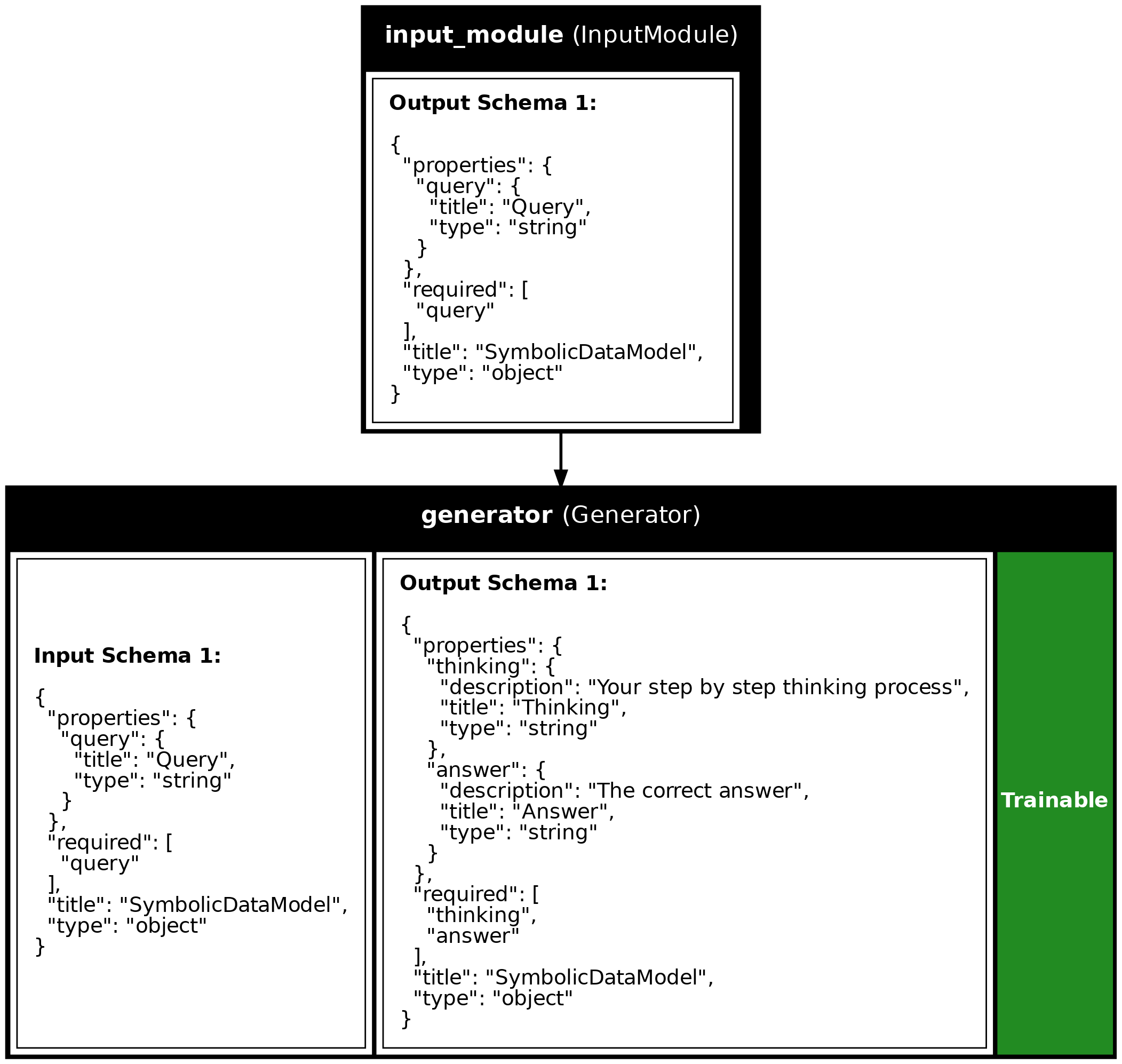
Or a plot (Useful to document your system):
synalinks.utils.plot_program(
    program,
    show_module_names=True,
    show_trainable=True,
    show_schemas=True,
)
Running your program
To run your program use the following:
await only works inside an async function (or a notebook cell). In a script, call it
from your async def main() and launch it with asyncio.run(main()), exactly like the
Functional API example above.
Training your program
async def main():

    # ... your program definition

    (x_train, y_train), (x_test, y_test) = synalinks.datasets.gsm8k.load_data()

    program.compile(
        reward=synalinks.rewards.ExactMatch(in_mask=["answer"]),
        optimizer=synalinks.optimizers.RandomFewShot(),
    )

    batch_size = 32
    epochs = 10

    history = await program.fit(
        x_train,
        y_train,
        validation_data=(x_test, y_test),
        batch_size=batch_size,
        epochs=epochs,
    )

    synalinks.utils.plot_history(history)


if __name__ == "__main__":
    asyncio.run(main())