Interactive Agent

Interactive Agents
Interactive agents represent a significant advancement in AI system design, enabling dynamic interactions with users through iterative processing and validation of inputs. This tutorial will guide you through building an interactive agent using Synalinks, capable of processing mathematical queries and returning numerical answers through a series of interactions.
Understanding the Foundation
Interactive agents address the need for dynamic and iterative processing of user inputs, allowing for more flexible and responsive AI systems. Unlike autonomous agents, interactive agents require user validation at each step, ensuring accuracy and relevance in their responses.
The architecture of an interactive agent follows several core stages:
- The input stage captures the user's query or command.
- The processing stage uses predefined tools and logic to process the input and generate a response.
- The validation stage requires user input to validate the tool calls and their arguments.
- The output stage returns the result to the user.
sequenceDiagram
    participant User
    participant Agent
    participant Tool

    User->>Agent: Query
    Agent->>User: Propose tool call
    User->>Agent: Validate/Edit args
    Agent->>Tool: Execute
    Tool-->>Agent: Result
    Agent->>User: Response
    Note over User,Agent: Repeat until done
Interactive agents are transforming the landscape of AI by facilitating dynamic and iterative interactions with users.
Exploring Interactive Agent Architecture
Synalinks offers a streamlined approach to building interactive agents, thanks to its modular and flexible architecture. Each user interaction initiates a new cycle in the Directed Acyclic Graph (DAG), and tool calls are executed only after receiving user validation.
In non-autonomous mode (also called human in the loop or interactive mode), the
user needs to validate/edit the tool arguments and send it back to the agent. In
this mode, the agent requires a ChatMessages data model as input and outputs
ChatMessages back to the user (containing both tool results and assistant
response). The agent ignores the max_iterations argument, as it will only
perform one step at a time.
Creating an Interactive Agent
Define tools as async functions with complete docstrings. Important Tool Constraints:
-
No Optional Parameters: All parameters must be required. LLM providers require all tool parameters in their JSON schemas.
-
Complete Docstring Required: Every parameter must be documented in the
Args:section. The Tool extracts descriptions to build the JSON schema.
Use ChatMessages as input and set autonomous=False:
inputs = synalinks.Input(data_model=synalinks.ChatMessages)
outputs = await synalinks.FunctionCallingAgent(
    tools=tools,
    language_model=language_model,
    return_inputs_with_trajectory=True,
    autonomous=False,  # Human-in-the-loop mode
)(inputs)
Running the Conversation Loop
Process messages iteratively, validating tool calls at each step:
input_messages = synalinks.ChatMessages(
    messages=[synalinks.ChatMessage(role="user", content="Calculate 2 + 2")]
)

for iteration in range(MAX_ITERATIONS):
    response = await agent(input_messages)
    assistant_message = response.get("messages")[-1]

    tool_calls = assistant_message.get("tool_calls")
    if not tool_calls:
        print(assistant_message.get("content"))  # Final response
        break

    # Display tool calls for user validation
    for tool_call in tool_calls:
        print(f"Tool: {tool_call.get('name')}({tool_call.get('arguments')})")

    # In a real app: let user approve/modify/reject here
    # After validation, append and continue
    input_messages.messages.append(assistant_message)
Key Takeaways
- Dynamic Interaction: Interactive agents facilitate dynamic and iterative processing of user inputs.
- Modular Design: Synalinks modular architecture simplifies the development of interactive agents.
- Structured Data Models: The use of structured ChatMessages models ensures consistency and predictability.
- Tool Integration and Validation: Integration of tools and validation of their arguments provide a robust foundation.
- User-Driven Processing: Interactive agents dynamically process information and execute tasks based on user interactions.
Program Visualization
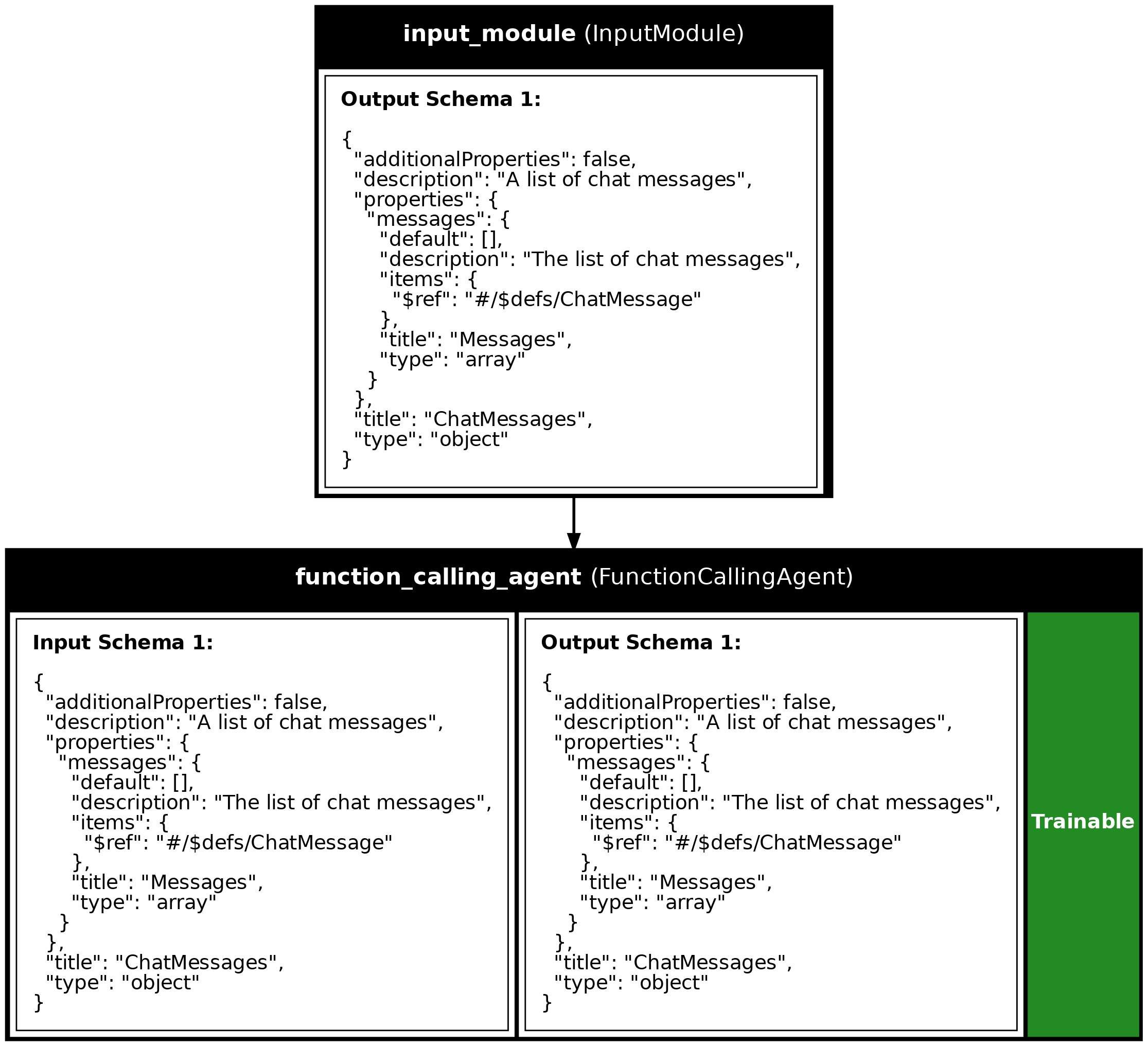
API References
calculate(expression)
async
Perform calculations based on a mathematical expression.
Parameters:
| Name | Type | Description | Default |
|---|---|---|---|
expression
|
str
|
The mathematical expression to calculate, such as '2 + 2'. The expression can contain numbers, operators (+, -, *, /), parentheses, and spaces. |
required |
Source code in examples/11_interactive_agent.py
Source
import asyncio
from dotenv import load_dotenv
import synalinks
# Activate logging for monitoring interactions
synalinks.enable_logging()
MAX_ITERATIONS = 5
# Define the calculation tool
@synalinks.utils.register_synalinks_serializable()
async def calculate(expression: str):
    """Perform calculations based on a mathematical expression.

    Args:
        expression (str): The mathematical expression to calculate, such as
            '2 + 2'. The expression can contain numbers, operators (+, -, *, /),
            parentheses, and spaces.
    """
    # Check for valid characters in the expression
    if not all(char in "0123456789+-*/(). " for char in expression):
        return {
            "result": None,
            "log": (
                "Invalid characters detected in the expression. "
                "Only numbers, operators (+, -, *, /), parentheses, and spaces "
                "are allowed."
            ),
        }
    try:
        # Safely evaluate the mathematical expression
        result = round(float(eval(expression, {"__builtins__": None}, {})), 2)
        return {
            "result": result,
            "log": "Calculation successful",
        }
    except Exception as e:
        return {
            "result": None,
            "log": f"Calculation error: {e}",
        }
async def main():
load_dotenv()
# Enable observability for tracing
# synalinks.enable_observability(
# tracking_uri="http://localhost:5000",
# experiment_name="interactive_math_agent",
# )
# Initialize the language model
language_model = synalinks.LanguageModel(
model="ollama/qwen3:8b",
)
# Define the tools available to the agent
tools = [
synalinks.Tool(calculate),
]
# ==========================================================================
# Create the interactive agent
# ==========================================================================
print("Creating the interactive agent...")
# Set up the input structure using ChatMessages
inputs = synalinks.Input(data_model=synalinks.ChatMessages)
# Create the interactive agent
# In non-autonomous mode, the agent returns ChatMessages containing both
# tool results and assistant response
outputs = await synalinks.FunctionCallingAgent(
tools=tools,
language_model=language_model,
return_inputs_with_trajectory=True,
autonomous=False,
)(inputs)
# Define the agent program
agent = synalinks.Program(
inputs=inputs,
outputs=outputs,
name="interactive_math_agent",
description="An agent designed to handle mathematical queries interactively",
)
synalinks.utils.plot_program(
agent,
to_folder="examples",
show_module_names=True,
show_trainable=True,
show_schemas=True,
)
# ==========================================================================
# Run the interactive conversation
# ==========================================================================
print("Running the interactive agent...")
# Initialize the conversation with a user query
input_messages = synalinks.ChatMessages(
messages=[
synalinks.ChatMessage(
role="user",
content="Calculate the sum of 152648 and 485.",
)
]
)
# Process the conversation through multiple iterations
for iteration in range(MAX_ITERATIONS):
print(f"\n--- Iteration {iteration + 1} ---")
response = await agent(input_messages)
# The response contains all messages including tool results
# The last message is the assistant response
assistant_message = response.get("messages")[-1]
# Check if the agent wants to call tools
tool_calls = assistant_message.get("tool_calls")
if not tool_calls:
# No tool calls - the agent is done and has a final response
print("\nAgent final response:")
print(f" {assistant_message.get('content')}")
print("\nConversation complete.")
break
# =======================================================================
# Human-in-the-loop validation step
# In a real application, you would present these tool calls to the user
# via a UI or CLI and let them approve, modify, or reject them.
# =======================================================================
print("\nAgent wants to call the following tools:")
for i, tool_call in enumerate(tool_calls):
# name/arguments nest under "function" (chat-completion shape)
fn = tool_call.get("function", tool_call)
tool_name = fn.get("name")
tool_args = fn.get("arguments")
print(f" [{i + 1}] {tool_name}({tool_args})")
# Simulate user validation (in a real app, this would be interactive)
print("\n[Simulated] User validates the tool calls...")
print("[Simulated] Proceeding with execution...")
# After validation, append the assistant message with tool_calls
# The agent will execute the tools and continue in the next iteration
input_messages.messages.append(assistant_message)
if __name__ == "__main__":
asyncio.run(main())
Run log
The log below is the unedited combined output of running the example above with local models (ollama).
Full run log: examples/11_interactive_agent.log
(DEBUG) [Synalinks]
Call ID: 9f02b221-55cc-4d2e-b53a-87b8e5c296bb
Parent call ID: None
Module: FunctionCallingAgent
Module Name: function_calling_agent
Module Description: A trainable parallel function calling agent.
Data Model JSON Schema:
[
{
"$defs": {
"ChatMessage": {
"additionalProperties": false,
"description": "A chat message",
"properties": {
"role": {
"$ref": "#/$defs/ChatRole",
"description": "The chat message role"
},
"reasoning_content": {
"anyOf": [
{
"type": "string"
},
{
"type": "null"
}
],
"default": null,
"description": "The reasoning/thinking content of the message. Keyed to match the litellm/DeepSeek `reasoning_content` chat-completion field (a provider extension, not part of the base OpenAI spec), so the message API stays a subset of the litellm-extended chat-completion message.",
"title": "Reasoning Content"
},
"thinking_blocks": {
"anyOf": [
{
"items": {
"additionalProperties": true,
"type": "object"
},
"type": "array"
},
{
"type": "null"
}
],
"default": null,
"description": "Opaque provider-native thinking blocks (e.g. Anthropic's signed `thinking_blocks`; a litellm extension, not part of the base OpenAI spec). Carried through verbatim on assistant-message re-injection so multi-turn tool-use round-trips preserve signatures. None for providers that emit reasoning only as text.",
"title": "Thinking Blocks"
},
"content": {
"anyOf": [
{
"type": "string"
},
{
"items": {
"additionalProperties": true,
"type": "object"
},
"type": "array"
},
{
"additionalProperties": true,
"type": "object"
},
{
"type": "null"
}
],
"default": null,
"description": "The content of the message",
"title": "Content"
},
"tool_call_id": {
"anyOf": [
{
"type": "string"
},
{
"type": "null"
}
],
"default": null,
"description": "The id of the tool call if role is `tool`",
"title": "Tool Call Id"
},
"tool_calls": {
"anyOf": [
{
"items": {
"$ref": "#/$defs/ToolCall"
},
"type": "array"
},
{
"type": "null"
}
],
"default": null,
"description": "The tool calls of the agent",
"title": "Tool Calls"
}
},
"required": [
"role"
],
"title": "ChatMessage",
"type": "object"
},
"ChatRole": {
"description": "The chat message roles",
"enum": [
"system",
"developer",
"user",
"assistant",
"tool",
"function"
],
"title": "ChatRole",
"type": "string"
},
"ToolCall": {
"additionalProperties": false,
"description": "A tool call, shaped like an OpenAI Chat Completions tool call.\n\nMirrors the wire envelope (`{id, type, function: {name, arguments}}`)\nexcept that `arguments` stays a parsed dict rather than a JSON-encoded\nstring, so modules and agents can read it directly. The string encoding\nis applied only at the wire edge (see `backend.pydantic.chat_completions`).",
"properties": {
"id": {
"description": "The id of the tool call",
"title": "Id",
"type": "string"
},
"type": {
"const": "function",
"default": "function",
"description": "The tool call type (always `function` today)",
"title": "Type",
"type": "string"
},
"function": {
"$ref": "#/$defs/ToolCallFunction",
"description": "The function invocation (name + arguments)"
}
},
"required": [
"id",
"function"
],
"title": "ToolCall",
"type": "object"
},
"ToolCallFunction": {
"additionalProperties": false,
"description": "The `function` payload of a tool call (name + parsed arguments).",
"properties": {
"name": {
"description": "The name of the function called",
"title": "Name",
"type": "string"
},
"arguments": {
"additionalProperties": true,
"description": "The arguments of the tool call",
"title": "Arguments",
"type": "object"
}
},
"required": [
"name",
"arguments"
],
"title": "ToolCallFunction",
"type": "object"
}
},
"additionalProperties": false,
"description": "A list of chat messages",
"properties": {
"messages": {
"default": [],
"description": "The list of chat messages",
"items": {
"$ref": "#/$defs/ChatMessage"
},
"title": "Messages",
"type": "array"
}
},
"title": "ChatMessages",
"type": "object"
}
]
(DEBUG) [Synalinks]
Call ID: 9521c246-a123-4a9f-9be8-651b2b88c2f5
Parent call ID: 9f02b221-55cc-4d2e-b53a-87b8e5c296bb
Module: Generator
Module Name: tool_calls_generator_function_calling_agent
Module Description: Use a `LanguageModel` to generate a data model from an arbitrary input data model.
Data Model JSON Schema:
[
{
"$defs": {
"ChatMessage": {
"additionalProperties": false,
"description": "A chat message",
"properties": {
"role": {
"$ref": "#/$defs/ChatRole",
"description": "The chat message role"
},
"reasoning_content": {
"anyOf": [
{
"type": "string"
},
{
"type": "null"
}
],
"default": null,
"description": "The reasoning/thinking content of the message. Keyed to match the litellm/DeepSeek `reasoning_content` chat-completion field (a provider extension, not part of the base OpenAI spec), so the message API stays a subset of the litellm-extended chat-completion message.",
"title": "Reasoning Content"
},
"thinking_blocks": {
"anyOf": [
{
"items": {
"additionalProperties": true,
"type": "object"
},
"type": "array"
},
{
"type": "null"
}
],
"default": null,
"description": "Opaque provider-native thinking blocks (e.g. Anthropic's signed `thinking_blocks`; a litellm extension, not part of the base OpenAI spec). Carried through verbatim on assistant-message re-injection so multi-turn tool-use round-trips preserve signatures. None for providers that emit reasoning only as text.",
"title": "Thinking Blocks"
},
"content": {
"anyOf": [
{
"type": "string"
},
{
"items": {
"additionalProperties": true,
"type": "object"
},
"type": "array"
},
{
"additionalProperties": true,
"type": "object"
},
{
"type": "null"
}
],
"default": null,
"description": "The content of the message",
"title": "Content"
},
"tool_call_id": {
"anyOf": [
{
"type": "string"
},
{
"type": "null"
}
],
"default": null,
"description": "The id of the tool call if role is `tool`",
"title": "Tool Call Id"
},
"tool_calls": {
"anyOf": [
{
"items": {
"$ref": "#/$defs/ToolCall"
},
"type": "array"
},
{
"type": "null"
}
],
"default": null,
"description": "The tool calls of the agent",
"title": "Tool Calls"
}
},
"required": [
"role"
],
"title": "ChatMessage",
"type": "object"
},
"ChatRole": {
"description": "The chat message roles",
"enum": [
"system",
"developer",
"user",
"assistant",
"tool",
"function"
],
"title": "ChatRole",
"type": "string"
},
"ToolCall": {
"additionalProperties": false,
"description": "A tool call, shaped like an OpenAI Chat Completions tool call.\n\nMirrors the wire envelope (`{id, type, function: {name, arguments}}`)\nexcept that `arguments` stays a parsed dict rather than a JSON-encoded\nstring, so modules and agents can read it directly. The string encoding\nis applied only at the wire edge (see `backend.pydantic.chat_completions`).",
"properties": {
"id": {
"description": "The id of the tool call",
"title": "Id",
"type": "string"
},
"type": {
"const": "function",
"default": "function",
"description": "The tool call type (always `function` today)",
"title": "Type",
"type": "string"
},
"function": {
"$ref": "#/$defs/ToolCallFunction",
"description": "The function invocation (name + arguments)"
}
},
"required": [
"id",
"function"
],
"title": "ToolCall",
"type": "object"
},
"ToolCallFunction": {
"additionalProperties": false,
"description": "The `function` payload of a tool call (name + parsed arguments).",
"properties": {
"name": {
"description": "The name of the function called",
"title": "Name",
"type": "string"
},
"arguments": {
"additionalProperties": true,
"description": "The arguments of the tool call",
"title": "Arguments",
"type": "object"
}
},
"required": [
"name",
"arguments"
],
"title": "ToolCallFunction",
"type": "object"
}
},
"additionalProperties": false,
"description": "A list of chat messages",
"properties": {
"messages": {
"default": [],
"description": "The list of chat messages",
"items": {
"$ref": "#/$defs/ChatMessage"
},
"title": "Messages",
"type": "array"
}
},
"title": "ChatMessages",
"type": "object"
}
]
(DEBUG) [Synalinks]
Call ID: 9521c246-a123-4a9f-9be8-651b2b88c2f5
Parent call ID: 9f02b221-55cc-4d2e-b53a-87b8e5c296bb
Module: Generator
Module Name: tool_calls_generator_function_calling_agent
Module Description: Use a `LanguageModel` to generate a data model from an arbitrary input data model.
Data Model JSON Schema:
[
{
"$defs": {
"ChatRole": {
"description": "The chat message roles",
"enum": [
"system",
"developer",
"user",
"assistant",
"tool",
"function"
],
"title": "ChatRole",
"type": "string"
},
"ToolCall": {
"additionalProperties": false,
"description": "A tool call, shaped like an OpenAI Chat Completions tool call.\n\nMirrors the wire envelope (`{id, type, function: {name, arguments}}`)\nexcept that `arguments` stays a parsed dict rather than a JSON-encoded\nstring, so modules and agents can read it directly. The string encoding\nis applied only at the wire edge (see `backend.pydantic.chat_completions`).",
"properties": {
"id": {
"description": "The id of the tool call",
"title": "Id",
"type": "string"
},
"type": {
"const": "function",
"default": "function",
"description": "The tool call type (always `function` today)",
"title": "Type",
"type": "string"
},
"function": {
"$ref": "#/$defs/ToolCallFunction",
"description": "The function invocation (name + arguments)"
}
},
"required": [
"id",
"function"
],
"title": "ToolCall",
"type": "object"
},
"ToolCallFunction": {
"additionalProperties": false,
"description": "The `function` payload of a tool call (name + parsed arguments).",
"properties": {
"name": {
"description": "The name of the function called",
"title": "Name",
"type": "string"
},
"arguments": {
"additionalProperties": true,
"description": "The arguments of the tool call",
"title": "Arguments",
"type": "object"
}
},
"required": [
"name",
"arguments"
],
"title": "ToolCallFunction",
"type": "object"
}
},
"additionalProperties": false,
"description": "A chat message",
"properties": {
"role": {
"$ref": "#/$defs/ChatRole",
"description": "The chat message role"
},
"reasoning_content": {
"anyOf": [
{
"type": "string"
},
{
"type": "null"
}
],
"default": null,
"description": "The reasoning/thinking content of the message. Keyed to match the litellm/DeepSeek `reasoning_content` chat-completion field (a provider extension, not part of the base OpenAI spec), so the message API stays a subset of the litellm-extended chat-completion message.",
"title": "Reasoning Content"
},
"thinking_blocks": {
"anyOf": [
{
"items": {
"additionalProperties": true,
"type": "object"
},
"type": "array"
},
{
"type": "null"
}
],
"default": null,
"description": "Opaque provider-native thinking blocks (e.g. Anthropic's signed `thinking_blocks`; a litellm extension, not part of the base OpenAI spec). Carried through verbatim on assistant-message re-injection so multi-turn tool-use round-trips preserve signatures. None for providers that emit reasoning only as text.",
"title": "Thinking Blocks"
},
"content": {
"anyOf": [
{
"type": "string"
},
{
"items": {
"additionalProperties": true,
"type": "object"
},
"type": "array"
},
{
"additionalProperties": true,
"type": "object"
},
{
"type": "null"
}
],
"default": null,
"description": "The content of the message",
"title": "Content"
},
"tool_call_id": {
"anyOf": [
{
"type": "string"
},
{
"type": "null"
}
],
"default": null,
"description": "The id of the tool call if role is `tool`",
"title": "Tool Call Id"
},
"tool_calls": {
"anyOf": [
{
"items": {
"$ref": "#/$defs/ToolCall"
},
"type": "array"
},
{
"type": "null"
}
],
"default": null,
"description": "The tool calls of the agent",
"title": "Tool Calls"
}
},
"required": [
"role"
],
"title": "ChatMessage",
"type": "object"
}
]
(DEBUG) [Synalinks]
Call ID: 64cfa1dd-aa08-4698-8c7e-44ef9ccc2c19
Parent call ID: 9521c246-a123-4a9f-9be8-651b2b88c2f5
Module: Generator
Module Name: tool_calls_generator_function_calling_agent
Module Description: Use a `LanguageModel` to generate a data model from an arbitrary input data model.
Data Model JSON Schema:
[
{
"$defs": {
"ChatMessage": {
"additionalProperties": false,
"description": "A chat message",
"properties": {
"role": {
"$ref": "#/$defs/ChatRole",
"description": "The chat message role"
},
"reasoning_content": {
"anyOf": [
{
"type": "string"
},
{
"type": "null"
}
],
"default": null,
"description": "The reasoning/thinking content of the message. Keyed to match the litellm/DeepSeek `reasoning_content` chat-completion field (a provider extension, not part of the base OpenAI spec), so the message API stays a subset of the litellm-extended chat-completion message.",
"title": "Reasoning Content"
},
"thinking_blocks": {
"anyOf": [
{
"items": {
"additionalProperties": true,
"type": "object"
},
"type": "array"
},
{
"type": "null"
}
],
"default": null,
"description": "Opaque provider-native thinking blocks (e.g. Anthropic's signed `thinking_blocks`; a litellm extension, not part of the base OpenAI spec). Carried through verbatim on assistant-message re-injection so multi-turn tool-use round-trips preserve signatures. None for providers that emit reasoning only as text.",
"title": "Thinking Blocks"
},
"content": {
"anyOf": [
{
"type": "string"
},
{
"items": {
"additionalProperties": true,
"type": "object"
},
"type": "array"
},
{
"additionalProperties": true,
"type": "object"
},
{
"type": "null"
}
],
"default": null,
"description": "The content of the message",
"title": "Content"
},
"tool_call_id": {
"anyOf": [
{
"type": "string"
},
{
"type": "null"
}
],
"default": null,
"description": "The id of the tool call if role is `tool`",
"title": "Tool Call Id"
},
"tool_calls": {
"anyOf": [
{
"items": {
"$ref": "#/$defs/ToolCall"
},
"type": "array"
},
{
"type": "null"
}
],
"default": null,
"description": "The tool calls of the agent",
"title": "Tool Calls"
}
},
"required": [
"role"
],
"title": "ChatMessage",
"type": "object"
},
"ChatRole": {
"description": "The chat message roles",
"enum": [
"system",
"developer",
"user",
"assistant",
"tool",
"function"
],
"title": "ChatRole",
"type": "string"
},
"ToolCall": {
"additionalProperties": false,
"description": "A tool call, shaped like an OpenAI Chat Completions tool call.\n\nMirrors the wire envelope (`{id, type, function: {name, arguments}}`)\nexcept that `arguments` stays a parsed dict rather than a JSON-encoded\nstring, so modules and agents can read it directly. The string encoding\nis applied only at the wire edge (see `backend.pydantic.chat_completions`).",
"properties": {
"id": {
"description": "The id of the tool call",
"title": "Id",
"type": "string"
},
"type": {
"const": "function",
"default": "function",
"description": "The tool call type (always `function` today)",
"title": "Type",
"type": "string"
},
"function": {
"$ref": "#/$defs/ToolCallFunction",
"description": "The function invocation (name + arguments)"
}
},
"required": [
"id",
"function"
],
"title": "ToolCall",
"type": "object"
},
"ToolCallFunction": {
"additionalProperties": false,
"description": "The `function` payload of a tool call (name + parsed arguments).",
"properties": {
"name": {
"description": "The name of the function called",
"title": "Name",
"type": "string"
},
"arguments": {
"additionalProperties": true,
"description": "The arguments of the tool call",
"title": "Arguments",
"type": "object"
}
},
"required": [
"name",
"arguments"
],
"title": "ToolCallFunction",
"type": "object"
}
},
"additionalProperties": false,
"description": "A list of chat messages",
"properties": {
"messages": {
"default": [],
"description": "The list of chat messages",
"items": {
"$ref": "#/$defs/ChatMessage"
},
"title": "Messages",
"type": "array"
}
},
"title": "ChatMessages",
"type": "object"
}
]
(DEBUG) [Synalinks]
Call ID: 64cfa1dd-aa08-4698-8c7e-44ef9ccc2c19
Parent call ID: 9521c246-a123-4a9f-9be8-651b2b88c2f5
Module: Generator
Module Name: tool_calls_generator_function_calling_agent
Module Description: Use a `LanguageModel` to generate a data model from an arbitrary input data model.
Data Model JSON Schema:
[
{
"$defs": {
"ChatRole": {
"description": "The chat message roles",
"enum": [
"system",
"developer",
"user",
"assistant",
"tool",
"function"
],
"title": "ChatRole",
"type": "string"
},
"ToolCall": {
"additionalProperties": false,
"description": "A tool call, shaped like an OpenAI Chat Completions tool call.\n\nMirrors the wire envelope (`{id, type, function: {name, arguments}}`)\nexcept that `arguments` stays a parsed dict rather than a JSON-encoded\nstring, so modules and agents can read it directly. The string encoding\nis applied only at the wire edge (see `backend.pydantic.chat_completions`).",
"properties": {
"id": {
"description": "The id of the tool call",
"title": "Id",
"type": "string"
},
"type": {
"const": "function",
"default": "function",
"description": "The tool call type (always `function` today)",
"title": "Type",
"type": "string"
},
"function": {
"$ref": "#/$defs/ToolCallFunction",
"description": "The function invocation (name + arguments)"
}
},
"required": [
"id",
"function"
],
"title": "ToolCall",
"type": "object"
},
"ToolCallFunction": {
"additionalProperties": false,
"description": "The `function` payload of a tool call (name + parsed arguments).",
"properties": {
"name": {
"description": "The name of the function called",
"title": "Name",
"type": "string"
},
"arguments": {
"additionalProperties": true,
"description": "The arguments of the tool call",
"title": "Arguments",
"type": "object"
}
},
"required": [
"name",
"arguments"
],
"title": "ToolCallFunction",
"type": "object"
}
},
"additionalProperties": false,
"description": "A chat message",
"properties": {
"role": {
"$ref": "#/$defs/ChatRole",
"description": "The chat message role"
},
"reasoning_content": {
"anyOf": [
{
"type": "string"
},
{
"type": "null"
}
],
"default": null,
"description": "The reasoning/thinking content of the message. Keyed to match the litellm/DeepSeek `reasoning_content` chat-completion field (a provider extension, not part of the base OpenAI spec), so the message API stays a subset of the litellm-extended chat-completion message.",
"title": "Reasoning Content"
},
"thinking_blocks": {
"anyOf": [
{
"items": {
"additionalProperties": true,
"type": "object"
},
"type": "array"
},
{
"type": "null"
}
],
"default": null,
"description": "Opaque provider-native thinking blocks (e.g. Anthropic's signed `thinking_blocks`; a litellm extension, not part of the base OpenAI spec). Carried through verbatim on assistant-message re-injection so multi-turn tool-use round-trips preserve signatures. None for providers that emit reasoning only as text.",
"title": "Thinking Blocks"
},
"content": {
"anyOf": [
{
"type": "string"
},
{
"items": {
"additionalProperties": true,
"type": "object"
},
"type": "array"
},
{
"additionalProperties": true,
"type": "object"
},
{
"type": "null"
}
],
"default": null,
"description": "The content of the message",
"title": "Content"
},
"tool_call_id": {
"anyOf": [
{
"type": "string"
},
{
"type": "null"
}
],
"default": null,
"description": "The id of the tool call if role is `tool`",
"title": "Tool Call Id"
},
"tool_calls": {
"anyOf": [
{
"items": {
"$ref": "#/$defs/ToolCall"
},
"type": "array"
},
{
"type": "null"
}
],
"default": null,
"description": "The tool calls of the agent",
"title": "Tool Calls"
}
},
"required": [
"role"
],
"title": "ChatMessage",
"type": "object"
}
]
(DEBUG) [Synalinks]
Call ID: 9f02b221-55cc-4d2e-b53a-87b8e5c296bb
Parent call ID: None
Module: FunctionCallingAgent
Module Name: function_calling_agent
Module Description: A trainable parallel function calling agent.
Data Model JSON Schema:
[
{
"$defs": {
"ChatMessage": {
"additionalProperties": false,
"description": "A chat message",
"properties": {
"role": {
"$ref": "#/$defs/ChatRole",
"description": "The chat message role"
},
"reasoning_content": {
"anyOf": [
{
"type": "string"
},
{
"type": "null"
}
],
"default": null,
"description": "The reasoning/thinking content of the message. Keyed to match the litellm/DeepSeek `reasoning_content` chat-completion field (a provider extension, not part of the base OpenAI spec), so the message API stays a subset of the litellm-extended chat-completion message.",
"title": "Reasoning Content"
},
"thinking_blocks": {
"anyOf": [
{
"items": {
"additionalProperties": true,
"type": "object"
},
"type": "array"
},
{
"type": "null"
}
],
"default": null,
"description": "Opaque provider-native thinking blocks (e.g. Anthropic's signed `thinking_blocks`; a litellm extension, not part of the base OpenAI spec). Carried through verbatim on assistant-message re-injection so multi-turn tool-use round-trips preserve signatures. None for providers that emit reasoning only as text.",
"title": "Thinking Blocks"
},
"content": {
"anyOf": [
{
"type": "string"
},
{
"items": {
"additionalProperties": true,
"type": "object"
},
"type": "array"
},
{
"additionalProperties": true,
"type": "object"
},
{
"type": "null"
}
],
"default": null,
"description": "The content of the message",
"title": "Content"
},
"tool_call_id": {
"anyOf": [
{
"type": "string"
},
{
"type": "null"
}
],
"default": null,
"description": "The id of the tool call if role is `tool`",
"title": "Tool Call Id"
},
"tool_calls": {
"anyOf": [
{
"items": {
"$ref": "#/$defs/ToolCall"
},
"type": "array"
},
{
"type": "null"
}
],
"default": null,
"description": "The tool calls of the agent",
"title": "Tool Calls"
}
},
"required": [
"role"
],
"title": "ChatMessage",
"type": "object"
},
"ChatRole": {
"description": "The chat message roles",
"enum": [
"system",
"developer",
"user",
"assistant",
"tool",
"function"
],
"title": "ChatRole",
"type": "string"
},
"ToolCall": {
"additionalProperties": false,
"description": "A tool call, shaped like an OpenAI Chat Completions tool call.\n\nMirrors the wire envelope (`{id, type, function: {name, arguments}}`)\nexcept that `arguments` stays a parsed dict rather than a JSON-encoded\nstring, so modules and agents can read it directly. The string encoding\nis applied only at the wire edge (see `backend.pydantic.chat_completions`).",
"properties": {
"id": {
"description": "The id of the tool call",
"title": "Id",
"type": "string"
},
"type": {
"const": "function",
"default": "function",
"description": "The tool call type (always `function` today)",
"title": "Type",
"type": "string"
},
"function": {
"$ref": "#/$defs/ToolCallFunction",
"description": "The function invocation (name + arguments)"
}
},
"required": [
"id",
"function"
],
"title": "ToolCall",
"type": "object"
},
"ToolCallFunction": {
"additionalProperties": false,
"description": "The `function` payload of a tool call (name + parsed arguments).",
"properties": {
"name": {
"description": "The name of the function called",
"title": "Name",
"type": "string"
},
"arguments": {
"additionalProperties": true,
"description": "The arguments of the tool call",
"title": "Arguments",
"type": "object"
}
},
"required": [
"name",
"arguments"
],
"title": "ToolCallFunction",
"type": "object"
}
},
"additionalProperties": false,
"description": "A list of chat messages",
"properties": {
"messages": {
"default": [],
"description": "The list of chat messages",
"items": {
"$ref": "#/$defs/ChatMessage"
},
"title": "Messages",
"type": "array"
}
},
"title": "ChatMessages",
"type": "object"
}
]
[Synalinks]
Call ID: b6e9b01f-be77-44d5-a9f2-40293e4668e6
Parent call ID: None
Module: Functional
Module Name: interactive_math_agent
Module Description: An agent designed to handle mathematical queries interactively
Data Model JSON:
[
{
"messages": [
{
"role": "user",
"content": "Calculate the sum of 152648 and 485."
}
]
}
]
[Synalinks]
Call ID: 28e1839d-e1d6-4b32-8126-66db37d050ef
Parent call ID: b6e9b01f-be77-44d5-a9f2-40293e4668e6
Module: FunctionCallingAgent
Module Name: function_calling_agent
Module Description: A trainable parallel function calling agent.
Data Model JSON:
[
{
"messages": [
{
"role": "user",
"content": "Calculate the sum of 152648 and 485."
}
]
}
]
[Synalinks]
Call ID: ccefba86-105c-4ca9-a3d8-32bd0d93a703
Parent call ID: 28e1839d-e1d6-4b32-8126-66db37d050ef
Module: Generator
Module Name: tool_calls_generator_function_calling_agent
Module Description: Use a `LanguageModel` to generate a data model from an arbitrary input data model.
Data Model JSON:
[
{
"messages": [
{
"role": "user",
"content": "Calculate the sum of 152648 and 485."
}
]
}
]
[Synalinks]
Call ID: 7f77a00e-b58b-43e3-9c9b-54c70b74adc6
Parent call ID: ccefba86-105c-4ca9-a3d8-32bd0d93a703
Module: LanguageModel
Module Name: language_model
Module Description: A language model API wrapper.
Data Model JSON:
[
{
"messages": [
{
"role": "system",
"content": "<instructions>\nThink step by step: Use the thinking field to elaborate what you observe and\nwhat do you need to accomplish next.\nReflect on prior steps: Review your previous actions and their outcomes to\navoid unnecessary repetition.\nAvoid unnecessary actions: If you already have enough information to complete\nthe user task, return an empty tool calls array.\n</instructions>\n"
},
{
"role": "user",
"content": "Calculate the sum of 152648 and 485."
}
]
}
]
[Synalinks]
Call ID: 7f77a00e-b58b-43e3-9c9b-54c70b74adc6
Parent call ID: ccefba86-105c-4ca9-a3d8-32bd0d93a703
Module: LanguageModel
Module Name: language_model
Module Description: A language model API wrapper.
Data Model JSON:
[
{
"role": "assistant",
"content": "",
"reasoning_content": "Okay, the user wants to calculate the sum of 152648 and 485. Let me check the tools available. There's a function called calculate that takes a mathematical expression. The expression here would be adding those two numbers. I need to make sure to format the tool call correctly. The parameters should be a JSON object with the expression key. So the expression is \"152648 + 485\". I don't see any other steps needed here. Just call the calculate function with that expression.\n",
"tool_calls": [
{
"id": "call_xgusghqk",
"type": "function",
"function": {
"name": "calculate",
"arguments": {
"expression": "152648 + 485"
}
}
}
]
}
]
[Synalinks]
Call ID: ccefba86-105c-4ca9-a3d8-32bd0d93a703
Parent call ID: 28e1839d-e1d6-4b32-8126-66db37d050ef
Module: Generator
Module Name: tool_calls_generator_function_calling_agent
Module Description: Use a `LanguageModel` to generate a data model from an arbitrary input data model.
Data Model JSON:
[
{
"role": "assistant",
"content": "",
"reasoning_content": "Okay, the user wants to calculate the sum of 152648 and 485. Let me check the tools available. There's a function called calculate that takes a mathematical expression. The expression here would be adding those two numbers. I need to make sure to format the tool call correctly. The parameters should be a JSON object with the expression key. So the expression is \"152648 + 485\". I don't see any other steps needed here. Just call the calculate function with that expression.\n",
"tool_calls": [
{
"id": "call_xgusghqk",
"type": "function",
"function": {
"name": "calculate",
"arguments": {
"expression": "152648 + 485"
}
}
}
]
}
]
[Synalinks]
Call ID: 28e1839d-e1d6-4b32-8126-66db37d050ef
Parent call ID: b6e9b01f-be77-44d5-a9f2-40293e4668e6
Module: FunctionCallingAgent
Module Name: function_calling_agent
Module Description: A trainable parallel function calling agent.
Data Model JSON:
[
{
"messages": [
{
"role": "user",
"content": "Calculate the sum of 152648 and 485."
},
{
"role": "assistant",
"reasoning_content": "Okay, the user wants to calculate the sum of 152648 and 485. Let me check the tools available. There's a function called calculate that takes a mathematical expression. The expression here would be adding those two numbers. I need to make sure to format the tool call correctly. The parameters should be a JSON object with the expression key. So the expression is \"152648 + 485\". I don't see any other steps needed here. Just call the calculate function with that expression.\n",
"content": "",
"tool_calls": [
{
"id": "call_xgusghqk",
"type": "function",
"function": {
"name": "calculate",
"arguments": {
"expression": "152648 + 485"
}
}
}
]
}
]
}
]
[Synalinks]
Call ID: b6e9b01f-be77-44d5-a9f2-40293e4668e6
Parent call ID: None
Module: Functional
Module Name: interactive_math_agent
Module Description: An agent designed to handle mathematical queries interactively
Data Model JSON:
[
{
"messages": [
{
"role": "user",
"content": "Calculate the sum of 152648 and 485."
},
{
"role": "assistant",
"reasoning_content": "Okay, the user wants to calculate the sum of 152648 and 485. Let me check the tools available. There's a function called calculate that takes a mathematical expression. The expression here would be adding those two numbers. I need to make sure to format the tool call correctly. The parameters should be a JSON object with the expression key. So the expression is \"152648 + 485\". I don't see any other steps needed here. Just call the calculate function with that expression.\n",
"content": "",
"tool_calls": [
{
"id": "call_xgusghqk",
"type": "function",
"function": {
"name": "calculate",
"arguments": {
"expression": "152648 + 485"
}
}
}
]
}
]
}
]
/home/yoan/SynalinksWorkspace/synalinks/.venv/lib/python3.12/site-packages/pydantic/main.py:464: UserWarning: Pydantic serializer warnings:
PydanticSerializationUnexpectedValue(Expected `ChatMessage` - serialized value may not be as expected [field_name='messages', input_value={'role': 'assistant', 're...on': '152648 + 485'}}}]}, input_type=dict])
return self.__pydantic_serializer__.to_python(
[Synalinks]
Call ID: 0a41dc13-cbea-48f0-9d18-0fde50f9829e
Parent call ID: None
Module: Functional
Module Name: interactive_math_agent
Module Description: An agent designed to handle mathematical queries interactively
Data Model JSON:
[
{
"messages": [
{
"role": "user",
"content": "Calculate the sum of 152648 and 485."
},
{
"role": "assistant",
"reasoning_content": "Okay, the user wants to calculate the sum of 152648 and 485. Let me check the tools available. There's a function called calculate that takes a mathematical expression. The expression here would be adding those two numbers. I need to make sure to format the tool call correctly. The parameters should be a JSON object with the expression key. So the expression is \"152648 + 485\". I don't see any other steps needed here. Just call the calculate function with that expression.\n",
"content": "",
"tool_calls": [
{
"id": "call_xgusghqk",
"type": "function",
"function": {
"name": "calculate",
"arguments": {
"expression": "152648 + 485"
}
}
}
]
}
]
}
]
[Synalinks]
Call ID: 7a675908-9433-4efc-9b48-3e989ac10850
Parent call ID: 0a41dc13-cbea-48f0-9d18-0fde50f9829e
Module: FunctionCallingAgent
Module Name: function_calling_agent
Module Description: A trainable parallel function calling agent.
Data Model JSON:
[
{
"messages": [
{
"role": "user",
"content": "Calculate the sum of 152648 and 485."
},
{
"role": "assistant",
"reasoning_content": "Okay, the user wants to calculate the sum of 152648 and 485. Let me check the tools available. There's a function called calculate that takes a mathematical expression. The expression here would be adding those two numbers. I need to make sure to format the tool call correctly. The parameters should be a JSON object with the expression key. So the expression is \"152648 + 485\". I don't see any other steps needed here. Just call the calculate function with that expression.\n",
"content": "",
"tool_calls": [
{
"id": "call_xgusghqk",
"type": "function",
"function": {
"name": "calculate",
"arguments": {
"expression": "152648 + 485"
}
}
}
]
}
]
}
]
[Synalinks]
Call ID: 8531bb25-cdcf-4643-b4d6-b220da775819
Parent call ID: 7a675908-9433-4efc-9b48-3e989ac10850
Module: Tool
Module Name: calculate
Module Description: Perform calculations based on a mathematical expression.
Keyword Arguments:
{
"expression": "152648 + 485"
}
[Synalinks]
Call ID: 8531bb25-cdcf-4643-b4d6-b220da775819
Parent call ID: 7a675908-9433-4efc-9b48-3e989ac10850
Module: Tool
Module Name: calculate
Module Description: Perform calculations based on a mathematical expression.
Data Model JSON:
[
{
"result": 153133.0,
"log": "Calculation successful"
}
]
[Synalinks]
Call ID: 06122ce8-5046-4224-9345-919ac400565e
Parent call ID: 8531bb25-cdcf-4643-b4d6-b220da775819
Module: Generator
Module Name: tool_calls_generator_function_calling_agent
Module Description: Use a `LanguageModel` to generate a data model from an arbitrary input data model.
Data Model JSON:
[
{
"messages": [
{
"role": "user",
"content": "Calculate the sum of 152648 and 485."
},
{
"role": "assistant",
"reasoning_content": "Okay, the user wants to calculate the sum of 152648 and 485. Let me check the tools available. There's a function called calculate that takes a mathematical expression. The expression here would be adding those two numbers. I need to make sure to format the tool call correctly. The parameters should be a JSON object with the expression key. So the expression is \"152648 + 485\". I don't see any other steps needed here. Just call the calculate function with that expression.\n",
"content": "",
"tool_calls": [
{
"id": "call_xgusghqk",
"type": "function",
"function": {
"name": "calculate",
"arguments": {
"expression": "152648 + 485"
}
}
}
]
},
{
"role": "tool",
"content": {
"result": 153133.0,
"log": "Calculation successful"
},
"tool_call_id": "call_xgusghqk"
}
]
}
]
[Synalinks]
Call ID: 8c3d5872-0dc0-49ea-a920-9bae8a35863a
Parent call ID: 06122ce8-5046-4224-9345-919ac400565e
Module: LanguageModel
Module Name: language_model
Module Description: A language model API wrapper.
Data Model JSON:
[
{
"messages": [
{
"role": "system",
"content": "<instructions>\nThink step by step: Use the thinking field to elaborate what you observe and\nwhat do you need to accomplish next.\nReflect on prior steps: Review your previous actions and their outcomes to\navoid unnecessary repetition.\nAvoid unnecessary actions: If you already have enough information to complete\nthe user task, return an empty tool calls array.\n</instructions>\n"
},
{
"role": "user",
"content": "Calculate the sum of 152648 and 485."
},
{
"role": "assistant",
"reasoning_content": "Okay, the user wants to calculate the sum of 152648 and 485. Let me check the tools available. There's a function called calculate that takes a mathematical expression. The expression here would be adding those two numbers. I need to make sure to format the tool call correctly. The parameters should be a JSON object with the expression key. So the expression is \"152648 + 485\". I don't see any other steps needed here. Just call the calculate function with that expression.\n",
"content": "",
"tool_calls": [
{
"id": "call_xgusghqk",
"type": "function",
"function": {
"name": "calculate",
"arguments": {
"expression": "152648 + 485"
}
}
}
]
},
{
"role": "tool",
"content": {
"result": 153133.0,
"log": "Calculation successful"
},
"tool_call_id": "call_xgusghqk"
}
]
}
]
[Synalinks]
Call ID: 8c3d5872-0dc0-49ea-a920-9bae8a35863a
Parent call ID: 06122ce8-5046-4224-9345-919ac400565e
Module: LanguageModel
Module Name: language_model
Module Description: A language model API wrapper.
Data Model JSON:
[
{
"role": "assistant",
"content": "The sum of 152,648 and 485 is **153,133**. The calculation was performed successfully.",
"reasoning_content": "Okay, let me see. The user asked for the sum of 152648 and 485. I used the calculate function with the expression \"152648 + 485\". The tool response came back with a result of 153133.0. That looks correct because 152648 plus 485 is indeed 153133. The log says the calculation was successful, so there's no error to worry about. I should just present the answer clearly to the user. Maybe mention the result and confirm that the addition was done correctly. Let me make sure the numbers are formatted properly and there are no typos. Alright, time to put it all together in a simple response.\n"
}
]
[Synalinks]
Call ID: 06122ce8-5046-4224-9345-919ac400565e
Parent call ID: 8531bb25-cdcf-4643-b4d6-b220da775819
Module: Generator
Module Name: tool_calls_generator_function_calling_agent
Module Description: Use a `LanguageModel` to generate a data model from an arbitrary input data model.
Data Model JSON:
[
{
"role": "assistant",
"content": "The sum of 152,648 and 485 is **153,133**. The calculation was performed successfully.",
"reasoning_content": "Okay, let me see. The user asked for the sum of 152648 and 485. I used the calculate function with the expression \"152648 + 485\". The tool response came back with a result of 153133.0. That looks correct because 152648 plus 485 is indeed 153133. The log says the calculation was successful, so there's no error to worry about. I should just present the answer clearly to the user. Maybe mention the result and confirm that the addition was done correctly. Let me make sure the numbers are formatted properly and there are no typos. Alright, time to put it all together in a simple response.\n"
}
]
[Synalinks]
Call ID: 68a9c967-10d0-4b56-98e3-b9a80868ece6
Parent call ID: 8c3d5872-0dc0-49ea-a920-9bae8a35863a
Module: Generator
Module Name: final_generator_function_calling_agent
Module Description: Use a `LanguageModel` to generate a data model from an arbitrary input data model.
Data Model JSON:
[
{
"messages": [
{
"role": "user",
"content": "Calculate the sum of 152648 and 485."
},
{
"role": "assistant",
"reasoning_content": "Okay, the user wants to calculate the sum of 152648 and 485. Let me check the tools available. There's a function called calculate that takes a mathematical expression. The expression here would be adding those two numbers. I need to make sure to format the tool call correctly. The parameters should be a JSON object with the expression key. So the expression is \"152648 + 485\". I don't see any other steps needed here. Just call the calculate function with that expression.\n",
"content": "",
"tool_calls": [
{
"id": "call_xgusghqk",
"type": "function",
"function": {
"name": "calculate",
"arguments": {
"expression": "152648 + 485"
}
}
}
]
},
{
"role": "tool",
"content": {
"result": 153133.0,
"log": "Calculation successful"
},
"tool_call_id": "call_xgusghqk"
}
]
}
]
[Synalinks]
Call ID: 13f3abe6-85f4-46a5-aa7d-44f4a7e1a345
Parent call ID: 68a9c967-10d0-4b56-98e3-b9a80868ece6
Module: LanguageModel
Module Name: language_model
Module Description: A language model API wrapper.
Data Model JSON:
[
{
"messages": [
{
"role": "system",
"content": "<instructions>\nThink step by step: Use the thinking field to elaborate what you observe and\nwhat do you need to accomplish next.\nReflect on prior steps: Review your previous actions and their outcomes to\navoid unnecessary repetition.\nAvoid unnecessary actions: If you already have enough information to complete\nthe user task, return an empty tool calls array.\n</instructions>\n"
},
{
"role": "user",
"content": "Calculate the sum of 152648 and 485."
},
{
"role": "assistant",
"reasoning_content": "Okay, the user wants to calculate the sum of 152648 and 485. Let me check the tools available. There's a function called calculate that takes a mathematical expression. The expression here would be adding those two numbers. I need to make sure to format the tool call correctly. The parameters should be a JSON object with the expression key. So the expression is \"152648 + 485\". I don't see any other steps needed here. Just call the calculate function with that expression.\n",
"content": "",
"tool_calls": [
{
"id": "call_xgusghqk",
"type": "function",
"function": {
"name": "calculate",
"arguments": {
"expression": "152648 + 485"
}
}
}
]
},
{
"role": "tool",
"content": {
"result": 153133.0,
"log": "Calculation successful"
},
"tool_call_id": "call_xgusghqk"
}
]
}
]
[Synalinks]
Call ID: 13f3abe6-85f4-46a5-aa7d-44f4a7e1a345
Parent call ID: 68a9c967-10d0-4b56-98e3-b9a80868ece6
Module: LanguageModel
Module Name: language_model
Module Description: A language model API wrapper.
Data Model JSON:
[
{
"role": "assistant",
"content": "The sum of 152648 and 485 is $\\boxed{153133}$.",
"reasoning_content": "Okay, the user asked to calculate the sum of 152648 and 485. I used the calculate tool with the expression \"152648 + 485\". The tool returned a result of 153133.0. Now I need to present this answer clearly. Let me check if the numbers add up correctly. 152648 plus 485: 152648 + 400 is 153048, then +85 is 153133. Yep, that's right. The log says the calculation was successful, so I can just state the result in a box.\n"
}
]
[Synalinks]
Call ID: 68a9c967-10d0-4b56-98e3-b9a80868ece6
Parent call ID: 8c3d5872-0dc0-49ea-a920-9bae8a35863a
Module: Generator
Module Name: final_generator_function_calling_agent
Module Description: Use a `LanguageModel` to generate a data model from an arbitrary input data model.
Data Model JSON:
[
{
"role": "assistant",
"content": "The sum of 152648 and 485 is $\\boxed{153133}$.",
"reasoning_content": "Okay, the user asked to calculate the sum of 152648 and 485. I used the calculate tool with the expression \"152648 + 485\". The tool returned a result of 153133.0. Now I need to present this answer clearly. Let me check if the numbers add up correctly. 152648 plus 485: 152648 + 400 is 153048, then +85 is 153133. Yep, that's right. The log says the calculation was successful, so I can just state the result in a box.\n"
}
]
[Synalinks]
Call ID: 7a675908-9433-4efc-9b48-3e989ac10850
Parent call ID: 0a41dc13-cbea-48f0-9d18-0fde50f9829e
Module: FunctionCallingAgent
Module Name: function_calling_agent
Module Description: A trainable parallel function calling agent.
Data Model JSON:
[
{
"messages": [
{
"role": "user",
"content": "Calculate the sum of 152648 and 485."
},
{
"role": "assistant",
"reasoning_content": "Okay, the user wants to calculate the sum of 152648 and 485. Let me check the tools available. There's a function called calculate that takes a mathematical expression. The expression here would be adding those two numbers. I need to make sure to format the tool call correctly. The parameters should be a JSON object with the expression key. So the expression is \"152648 + 485\". I don't see any other steps needed here. Just call the calculate function with that expression.\n",
"content": "",
"tool_calls": [
{
"id": "call_xgusghqk",
"type": "function",
"function": {
"name": "calculate",
"arguments": {
"expression": "152648 + 485"
}
}
}
]
},
{
"role": "tool",
"content": {
"result": 153133.0,
"log": "Calculation successful"
},
"tool_call_id": "call_xgusghqk"
},
{
"role": "assistant",
"reasoning_content": "Okay, the user asked to calculate the sum of 152648 and 485. I used the calculate tool with the expression \"152648 + 485\". The tool returned a result of 153133.0. Now I need to present this answer clearly. Let me check if the numbers add up correctly. 152648 plus 485: 152648 + 400 is 153048, then +85 is 153133. Yep, that's right. The log says the calculation was successful, so I can just state the result in a box.\n",
"content": "The sum of 152648 and 485 is $\\boxed{153133}$."
}
]
}
]
[Synalinks]
Call ID: 0a41dc13-cbea-48f0-9d18-0fde50f9829e
Parent call ID: None
Module: Functional
Module Name: interactive_math_agent
Module Description: An agent designed to handle mathematical queries interactively
Data Model JSON:
[
{
"messages": [
{
"role": "user",
"content": "Calculate the sum of 152648 and 485."
},
{
"role": "assistant",
"reasoning_content": "Okay, the user wants to calculate the sum of 152648 and 485. Let me check the tools available. There's a function called calculate that takes a mathematical expression. The expression here would be adding those two numbers. I need to make sure to format the tool call correctly. The parameters should be a JSON object with the expression key. So the expression is \"152648 + 485\". I don't see any other steps needed here. Just call the calculate function with that expression.\n",
"content": "",
"tool_calls": [
{
"id": "call_xgusghqk",
"type": "function",
"function": {
"name": "calculate",
"arguments": {
"expression": "152648 + 485"
}
}
}
]
},
{
"role": "tool",
"content": {
"result": 153133.0,
"log": "Calculation successful"
},
"tool_call_id": "call_xgusghqk"
},
{
"role": "assistant",
"reasoning_content": "Okay, the user asked to calculate the sum of 152648 and 485. I used the calculate tool with the expression \"152648 + 485\". The tool returned a result of 153133.0. Now I need to present this answer clearly. Let me check if the numbers add up correctly. 152648 plus 485: 152648 + 400 is 153048, then +85 is 153133. Yep, that's right. The log says the calculation was successful, so I can just state the result in a box.\n",
"content": "The sum of 152648 and 485 is $\\boxed{153133}$."
}
]
}
]
Creating the interactive agent...
Running the interactive agent...
--- Iteration 1 ---
Agent wants to call the following tools:
[1] calculate({'expression': '152648 + 485'})
[Simulated] User validates the tool calls...
[Simulated] Proceeding with execution...
--- Iteration 2 ---
Agent final response:
The sum of 152648 and 485 is $\boxed{153133}$.
Conversation complete.