Functional API

The Functional API
Welcome to your first Synalinks lesson! In this tutorial, you will learn how to build AI applications using the Functional API - the most intuitive and recommended approach for creating programs.
What is Synalinks?
Synalinks is a framework for building AI applications powered by Large Language Models (LLMs). Think of it like building with LEGO blocks - you connect different pieces (called "modules") together to create something useful.
Core Concepts
1. Programs and Modules
A Program in Synalinks is like a recipe - it defines the steps your AI application will follow. Each step is performed by a Module, which is a reusable building block.
graph LR
    Input --> Module1[Module 1] --> Module2[Module 2] --> Output
2. Data Models
Data flows through your program in structured formats called DataModels. Think of them as blueprints that define what information looks like:
3. The Functional API
The Functional API lets you build programs by:
- Creating an Input placeholder
- Passing it through modules (like connecting pipes)
- Wrapping everything in a Program
# Step 1: Define where data enters
inputs = synalinks.Input(data_model=Query)

# Step 2: Pass through a module (Generator uses an LLM to create output)
outputs = await synalinks.Generator(
    data_model=Answer,
    language_model=language_model,
)(inputs)

# Step 3: Create the program
program = synalinks.Program(inputs=inputs, outputs=outputs)
Complete Example
Here's a complete Chain of Thought program that shows reasoning before answering:
import asyncio
from dotenv import load_dotenv
import synalinks

# Define input and output data models
class Query(synalinks.DataModel):
    query: str = synalinks.Field(description="The user query")

class AnswerWithThinking(synalinks.DataModel):
    thinking: str = synalinks.Field(description="Your step by step thinking")
    answer: str = synalinks.Field(description="The correct answer")

async def main():
    load_dotenv()

    language_model = synalinks.LanguageModel(model="ollama/qwen3:8b")

    # Build with Functional API
    inputs = synalinks.Input(data_model=Query)
    outputs = await synalinks.Generator(
        data_model=AnswerWithThinking,
        language_model=language_model,
    )(inputs)

    program = synalinks.Program(
        inputs=inputs,
        outputs=outputs,
        name="chain_of_thought",
        description="Useful to answer in a step by step manner.",
    )

    # Run the program
    result = await program(Query(query="What are the key aspects of human cognition?"))
    print(f"Thinking: {result['thinking']}")
    print(f"Answer: {result['answer']}")

asyncio.run(main())
Key Takeaways
- Functional API: Build programs by connecting modules like pipes - data
flows from
Inputthrough modules to create outputs. - Three Steps: (1) Create an Input, (2) Pass through modules, (3) Wrap in a Program.
- Generator Module: The core module that uses an LLM to transform input data into structured output matching your data model.
- Reusable Programs: Once built, programs can be called like functions with your input data model.
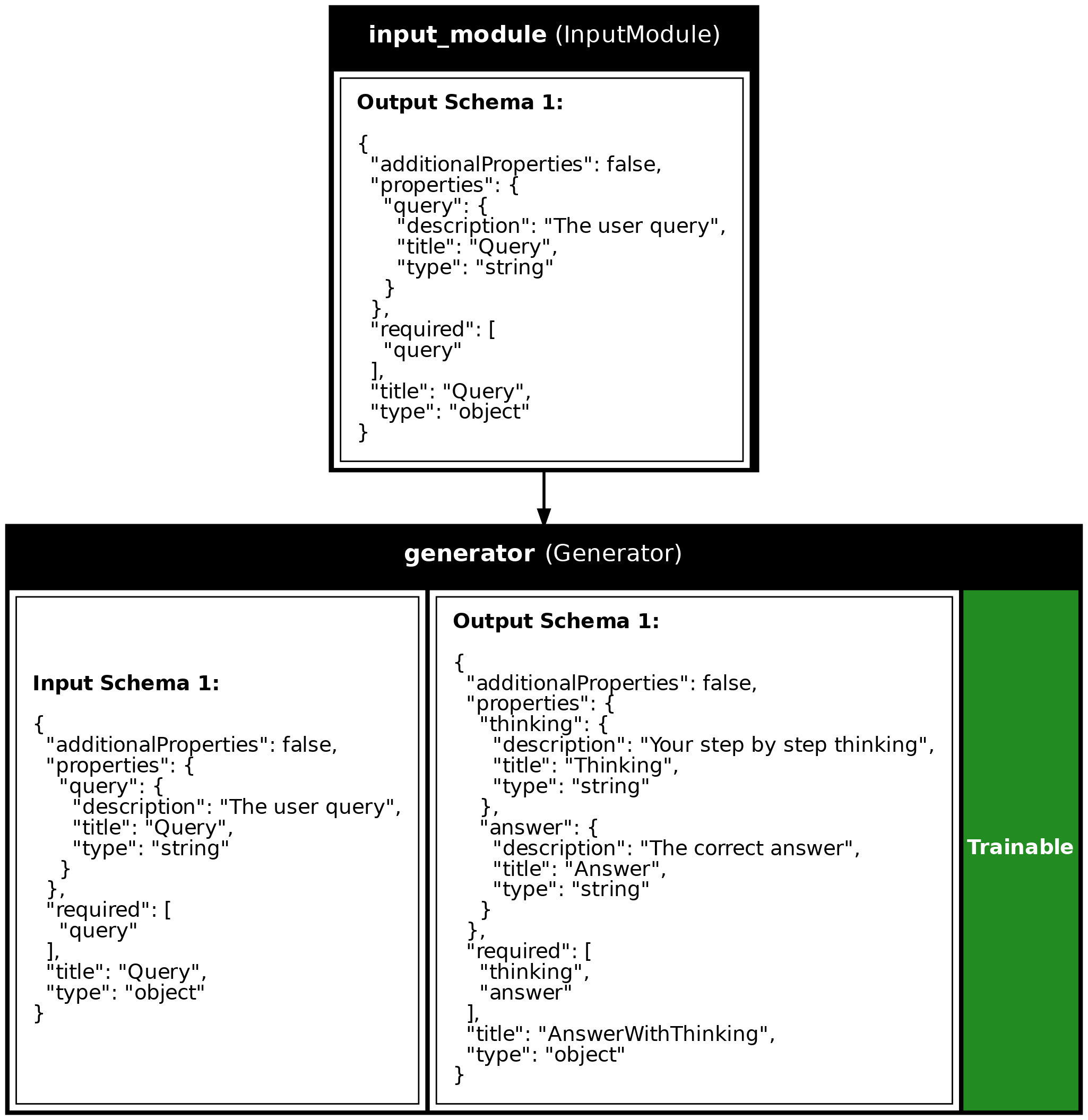
Program Visualization
API References
AnswerWithThinking
Bases: DataModel
The output from our program - reasoning + final answer.
By asking the LLM to show its thinking, we get better answers. This is called "Chain of Thought" prompting.
Source code in examples/1a_functional_api.py
Source
import asyncio
from dotenv import load_dotenv
import synalinks
# =============================================================================
# STEP 1: Define Your Data Models
# =============================================================================
# Data Models are like forms that define what information your program
# expects as input and what it will produce as output.
#
# Each field has:
# - A name (e.g., "query")
# - A type (e.g., str for text)
# - A description (helps the LLM understand what to fill in)
class Query(synalinks.DataModel):
"""The input to our program - a user's question."""
query: str = synalinks.Field(
description="The user query",
)
class AnswerWithThinking(synalinks.DataModel):
    """The output from our program - reasoning + final answer.

    By asking the LLM to show its thinking, we get better answers.
    This is called "Chain of Thought" prompting.
    """

    thinking: str = synalinks.Field(
        description="Your step by step thinking",
    )
    answer: str = synalinks.Field(
        description="The correct answer",
    )
# =============================================================================
# STEP 2: Build and Run the Program
# =============================================================================
async def main():
# Load environment variables (like your API key) from .env file
load_dotenv()
# Enable observability for tracing (view traces at http://localhost:5000)
# synalinks.enable_observability(
# tracking_uri="http://localhost:5000",
# experiment_name="lesson_1a_functional_api",
# )
# -------------------------------------------------------------------------
# 2.1: Configure the Language Model
# -------------------------------------------------------------------------
# The LanguageModel is the AI brain that will process our requests.
# We're using Google's Gemini model here.
language_model = synalinks.LanguageModel(
model="ollama/qwen3:8b",
)
# -------------------------------------------------------------------------
# 2.2: Build the Program with the Functional API
# -------------------------------------------------------------------------
print("=" * 60)
print("Building a Chain-of-Thought Program")
print("=" * 60)
# Create the input placeholder
# This tells Synalinks what kind of data will enter the program
inputs = synalinks.Input(data_model=Query)
# Create a Generator module and connect it to the input
# The Generator uses the LLM to transform input into output
outputs = await synalinks.Generator(
data_model=AnswerWithThinking, # What to produce
language_model=language_model, # Which AI to use
)(inputs) # <-- This connects the module to our input
# Wrap everything into a Program
# Now we have a reusable AI application!
program = synalinks.Program(
inputs=inputs,
outputs=outputs,
name="chain_of_thought",
description="Useful to answer in a step by step manner.",
)
# Generate a visualization of our program (optional but helpful!)
synalinks.utils.plot_program(
program,
to_folder="examples",
show_module_names=True,
show_trainable=True,
show_schemas=True,
)
# -------------------------------------------------------------------------
# 2.3: Run the Program
# -------------------------------------------------------------------------
print("\nRunning the program...")
print("-" * 60)
# Call the program like a function, passing in our query
result = await program(
Query(query="What are the key aspects of human cognition?"),
)
# Display the result in a nicely formatted way
print("\nResult:")
print(result.prettify_json())
# -------------------------------------------------------------------------
# 2.4: Understanding the Output
# -------------------------------------------------------------------------
# The result is a JsonDataModel containing:
# - thinking: The LLM's step-by-step reasoning
# - answer: The final answer
#
# JsonDataModel supports direct field access - no need for get_json()!
print("\n" + "=" * 60)
print("Accessing individual fields:")
print("=" * 60)
print(f"\nThinking: {result['thinking'][:100]}...")
print(f"\nAnswer: {result['answer'][:100]}...")
if __name__ == "__main__":
asyncio.run(main())
Run log
The log below is the unedited combined output of running the example above with local models (ollama).
Full run log: examples/1a_functional_api.log
============================================================
Building a Chain-of-Thought Program
============================================================

Running the program...
------------------------------------------------------------

Result:
{
  "thinking": "Okay, the user is asking about the key aspects of human cognition. Let me start by recalling what I know about cognitive science. Human cognition involves various processes like perception, memory, attention, problem-solving, language, and decision-making. I should make sure to cover the main areas without getting too detailed.\n\nFirst, perception is how we interpret sensory information. Then there's attention, which is about focusing on specific stimuli. Memory is crucial too, including different types like short-term, long-term, and working memory. Problem-solving and decision-making are higher-order processes that involve reasoning and judgment. Language is another key aspect, as it's central to communication and thought. \n\nWait, maybe I should also mention cognitive biases and heuristics, as they play a role in how we process information. Emotional cognition is important too, linking emotions to thought processes. Executive functions like planning and self-control are part of cognitive processes as well. \n\nI need to structure these points clearly. Let me check if there's anything I'm missing. Oh, maybe cognitive development stages, but the question is about aspects rather than development. Focus on the core components. Also, include things like learning and creativity. \n\nPutting it all together, the answer should list these aspects in a structured way. Make sure each key aspect is explained briefly but clearly. Avoid jargon so it's accessible. Alright, time to organize this into the JSON format as specified.\n",
  "answer": "The key aspects of human cognition include: 1) Perception (interpreting sensory information), 2) Attention (focusing on relevant stimuli), 3) Memory (storing and retrieving information), 4) Language (processing and generating communication), 5) Problem-solving and Decision-making (reasoning and judgment), 6) Executive Functions (planning, self-control), 7) Emotional Cognition (linking emotions to thought), and 8) Cognitive Biases/Heuristics (mental shortcuts influencing judgment). These processes collectively enable learning, adaptation, and interaction with the environment."
}

============================================================
Accessing individual fields:
============================================================

Thinking: Okay, the user is asking about the key aspects of human cognition. Let me start by recalling what I ...

Answer: The key aspects of human cognition include: 1) Perception (interpreting sensory information), 2) Att...