Parallel Branches

Parallel Branches
In Lesson 1, you learned to build simple linear programs. But what if you need to do multiple things at once? This lesson introduces parallel branches - running multiple modules simultaneously for better performance.
Why Parallel Execution?
Imagine you're writing an essay and need to:
- Research the topic
- Find relevant quotes
- Check for similar existing essays
You could do these sequentially (one after another), but it's much faster to do them all at the same time - that's parallel execution!
How Parallel Branches Work
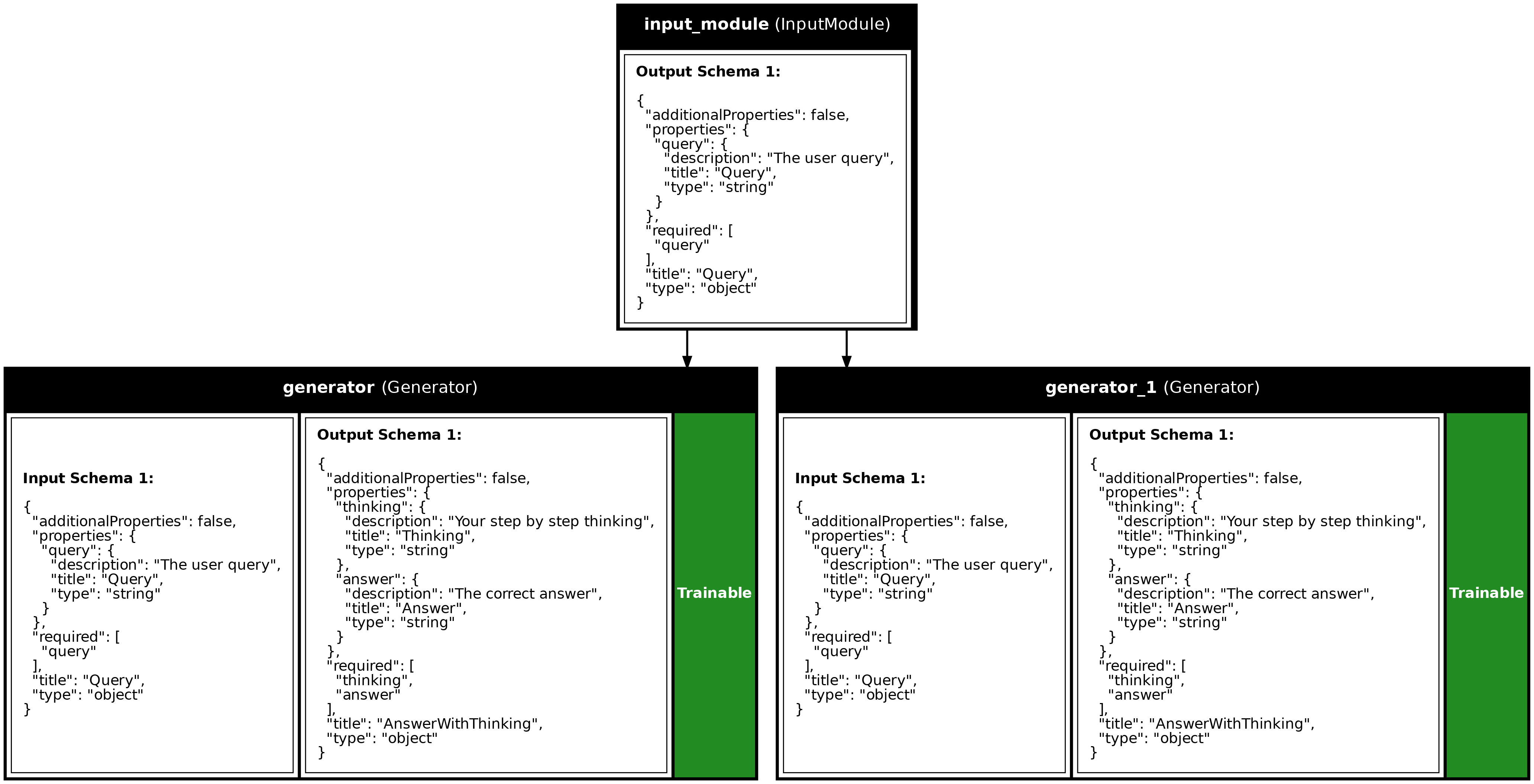
In Synalinks, creating parallel branches is automatic. When multiple modules use the same input, they run in parallel:
graph LR
    Input --> Fork
    Fork --> A[Module A]
    Fork --> B[Module B]
    Fork --> C[Module C]
    A --> Merge
    B --> Merge
    C --> Merge
    Merge --> Outputs
The syntax is simple - just connect multiple modules to the same input:
inputs = synalinks.Input(data_model=Query)

# Both generators share the same input -> they run in parallel!
answer1 = await synalinks.Generator(data_model=Answer1, ...)(inputs)
answer2 = await synalinks.Generator(data_model=Answer2, ...)(inputs)

# Pass multiple outputs as a list
program = synalinks.Program(inputs=inputs, outputs=[answer1, answer2])
Use Cases for Parallel Branches
- Ensemble Methods: Get multiple answers and pick the best one
- Multi-perspective Analysis: Analyze input from different angles
- Redundancy: Run the same task multiple times for reliability
- Speed: Process independent tasks concurrently
Complete Example
import asyncio
from dotenv import load_dotenv
import synalinks

class Query(synalinks.DataModel):
    query: str = synalinks.Field(description="The user query")

class AnswerWithThinking(synalinks.DataModel):
    thinking: str = synalinks.Field(description="Your step by step thinking")
    answer: str = synalinks.Field(description="The correct answer")

async def main():
    load_dotenv()
    language_model = synalinks.LanguageModel(model="ollama/mistral:latest")

    inputs = synalinks.Input(data_model=Query)

    # Two generators sharing the same input -> parallel execution!
    branch_1 = await synalinks.Generator(
        data_model=AnswerWithThinking,
        language_model=language_model,
        name="branch_1",
    )(inputs)

    branch_2 = await synalinks.Generator(
        data_model=AnswerWithThinking,
        language_model=language_model,
        name="branch_2",
    )(inputs)

    # Program with multiple outputs (as a list)
    program = synalinks.Program(
        inputs=inputs,
        outputs=[branch_1, branch_2],
        name="parallel_branches",
    )

    # Result is a LIST of outputs
    results = await program(Query(query="What is the meaning of life?"))
    for i, result in enumerate(results, 1):
        print(f"Branch {i}: {result['answer'][:50]}...")

asyncio.run(main())
Key Takeaways
- Automatic Parallelism: When multiple modules share the same input, Synalinks automatically runs them in parallel.
- Multiple Outputs: Pass a list of outputs to
Programto get multiple results from parallel branches. - Performance: Parallel execution significantly speeds up programs that need multiple independent operations.
- Ensemble Methods: Use parallel branches to get multiple perspectives or answers and combine them.
Program Visualization
API References
AnswerWithThinking
Bases: DataModel
An answer with step-by-step reasoning.
Source code in examples/2_parallel_branches.py
Source
import asyncio
from dotenv import load_dotenv
import synalinks
# =============================================================================
# STEP 1: Define Data Models
# =============================================================================
class Query(synalinks.DataModel):
"""The input query to analyze."""
query: str = synalinks.Field(
description="The user query",
)
class AnswerWithThinking(synalinks.DataModel):
    """An answer with step-by-step reasoning."""

    thinking: str = synalinks.Field(
        description="Your step by step thinking",
    )
    answer: str = synalinks.Field(
        description="The correct answer",
    )
# =============================================================================
# STEP 2: Build and Run the Program
# =============================================================================
async def main():
load_dotenv()
# Enable observability for tracing (view traces at http://localhost:5000)
# synalinks.enable_observability(
# tracking_uri="http://localhost:5000",
# experiment_name="lesson_2_parallel_branches",
# )
language_model = synalinks.LanguageModel(
model="ollama/mistral:latest",
)
# -------------------------------------------------------------------------
# 2.1: Create Parallel Branches
# -------------------------------------------------------------------------
print("=" * 60)
print("Building a Program with Parallel Branches")
print("=" * 60)
# Create the input
inputs = synalinks.Input(data_model=Query)
# Create TWO generators that both use the SAME input
# This automatically creates parallel branches!
# Both will run concurrently using asyncio
branch_1 = await synalinks.Generator(
data_model=AnswerWithThinking,
language_model=language_model,
name="branch_1",
)(inputs)
branch_2 = await synalinks.Generator(
data_model=AnswerWithThinking,
language_model=language_model,
name="branch_2",
)(inputs)
# Create program with MULTIPLE outputs (as a list)
program = synalinks.Program(
inputs=inputs,
outputs=[branch_1, branch_2], # <-- List of outputs
name="parallel_branches",
description="Demonstrates parallel execution of modules",
)
# Generate visualization
synalinks.utils.plot_program(
program,
to_folder="examples",
show_module_names=True,
show_schemas=True,
show_trainable=True,
)
# -------------------------------------------------------------------------
# 2.2: Run the Program
# -------------------------------------------------------------------------
print("\nRunning the program (both branches execute in parallel)...")
print("-" * 60)
result = await program(
Query(query="What is the meaning of life?"),
)
# Result is a LIST because we have multiple outputs
print(f"\nGot {len(result)} results from parallel branches:\n")
for i, branch_result in enumerate(result, 1):
print(f"Branch {i} Answer:")
print(f" {branch_result['answer'][:80]}...")
print()
if __name__ == "__main__":
asyncio.run(main())
Run log
The log below is the unedited combined output of running the example above with local models (ollama).
Full run log: examples/2_parallel_branches.log
============================================================
Building a Program with Parallel Branches
============================================================

Running the program (both branches execute in parallel)...
------------------------------------------------------------

Got 2 results from parallel branches:

Branch 1 Answer:
  The meaning of life is a philosophical question that doesn't have one definitive...

Branch 2 Answer:
  The meaning of life is a philosophical question that doesn't have one definitive...